KubeStellar Console Features
This guide covers the main features of the KubeStellar Console.
Dashboard
The main dashboard provides a customizable view of your multi-cluster environment.
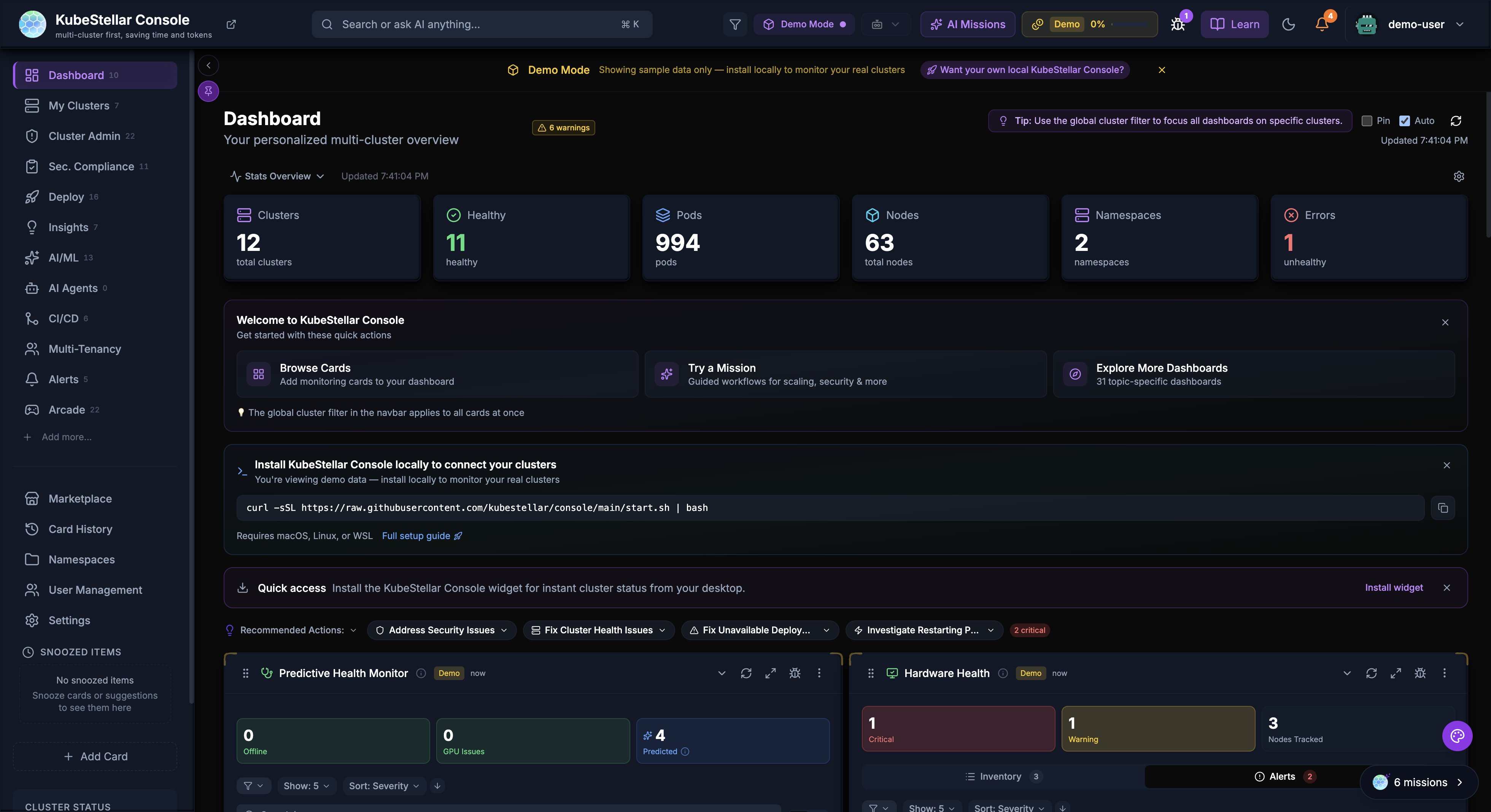
Stats Overview
The stats bar at the top of the dashboard displays key metrics with auto-scaling number formatting:
- Clusters: Total cluster count and health status
- Healthy: Number of healthy clusters
- Pods: Total pod count (auto-scales to
3.5Kfor large counts) - Nodes: Total nodes across all clusters
- Namespaces: Total namespace count
- Errors: Count of unhealthy resources with drill-down links
Dashboard Cards
Cards are the building blocks of the dashboard. Each card displays specific information about your clusters:
- Drag cards to reorder them
- Resize cards by adjusting their width
- Collapse cards to save space
- Use the AI button to get insights about card data
Dashboard Templates
Pre-configured dashboard layouts for common use cases:
- Operations: Cluster health, deployments, events
- GPU Monitoring: GPU utilization, workloads, trends
- Security: OPA policies, alerts, vulnerabilities
- GitOps: Helm releases, drift detection, sync status
Settings
The settings page allows you to configure all aspects of the console.
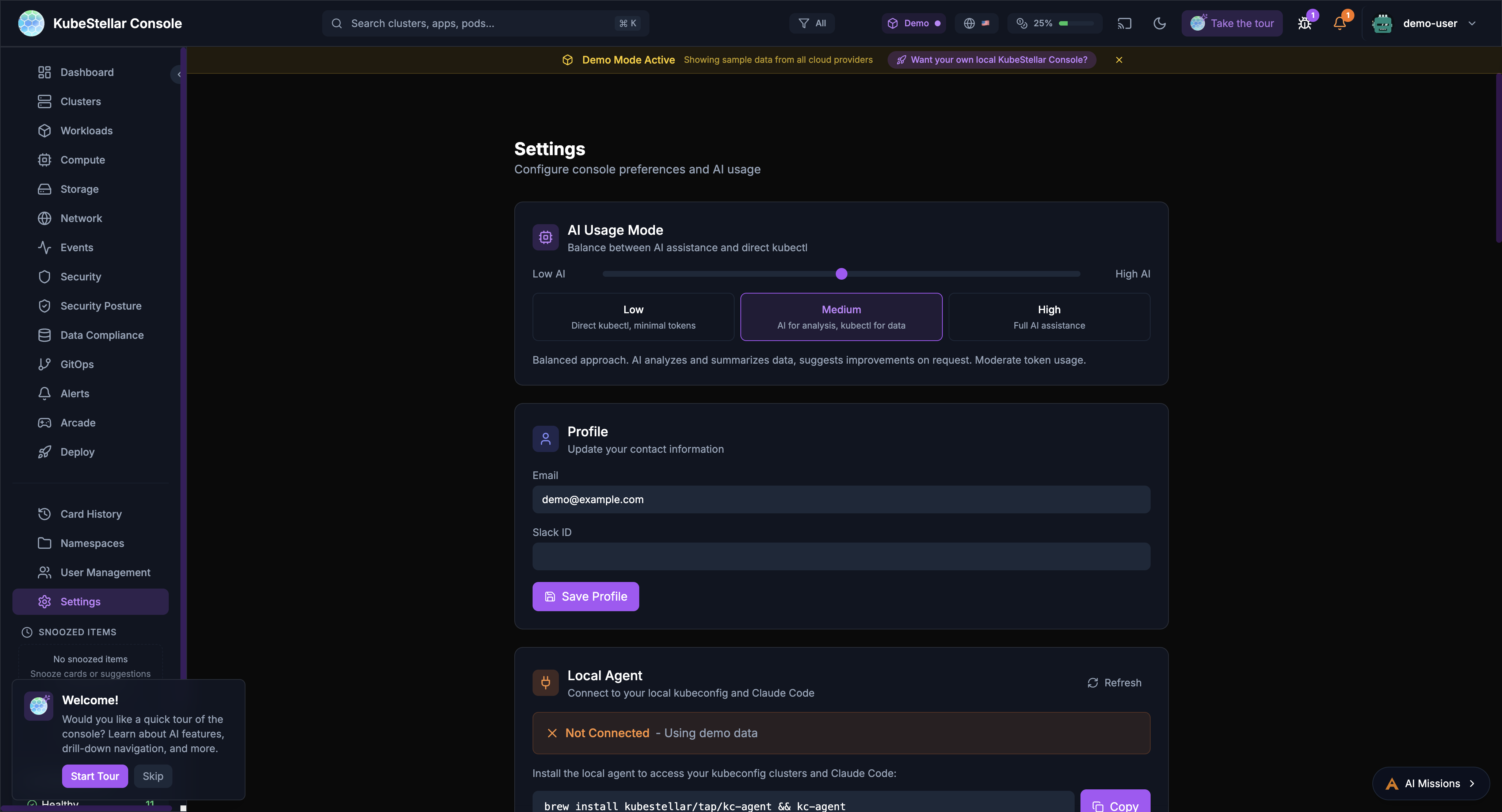
AI Usage Mode
Control how much AI assistance you receive:
- Low: Direct kubectl commands, minimal token usage
- Medium: AI for analysis and suggestions
- High: Full AI assistance for all operations
Local Agent
Connect to your local kubeconfig and Claude Code:
- View agent version and connection status
- See connected clusters
- Monitor token usage (session, daily, monthly)
Update Channels
Choose your release channel:
- Stable (Weekly): Tested releases every week
- Nightly: Latest features, updated daily
Appearance
Customize the look and feel:
- Multiple themes: KubeStellar, Batman, Dracula, Nord, Tokyo Night, Cyberpunk, Matrix
- Visual effects: star field, glow effects, gradients
- Accessibility: color blind mode, reduce motion, high contrast
Token Usage
Monitor and limit AI token consumption:
- Set monthly token limits
- Configure warning and critical thresholds
- Reset usage counters
Navigation
The sidebar provides access to all major sections:
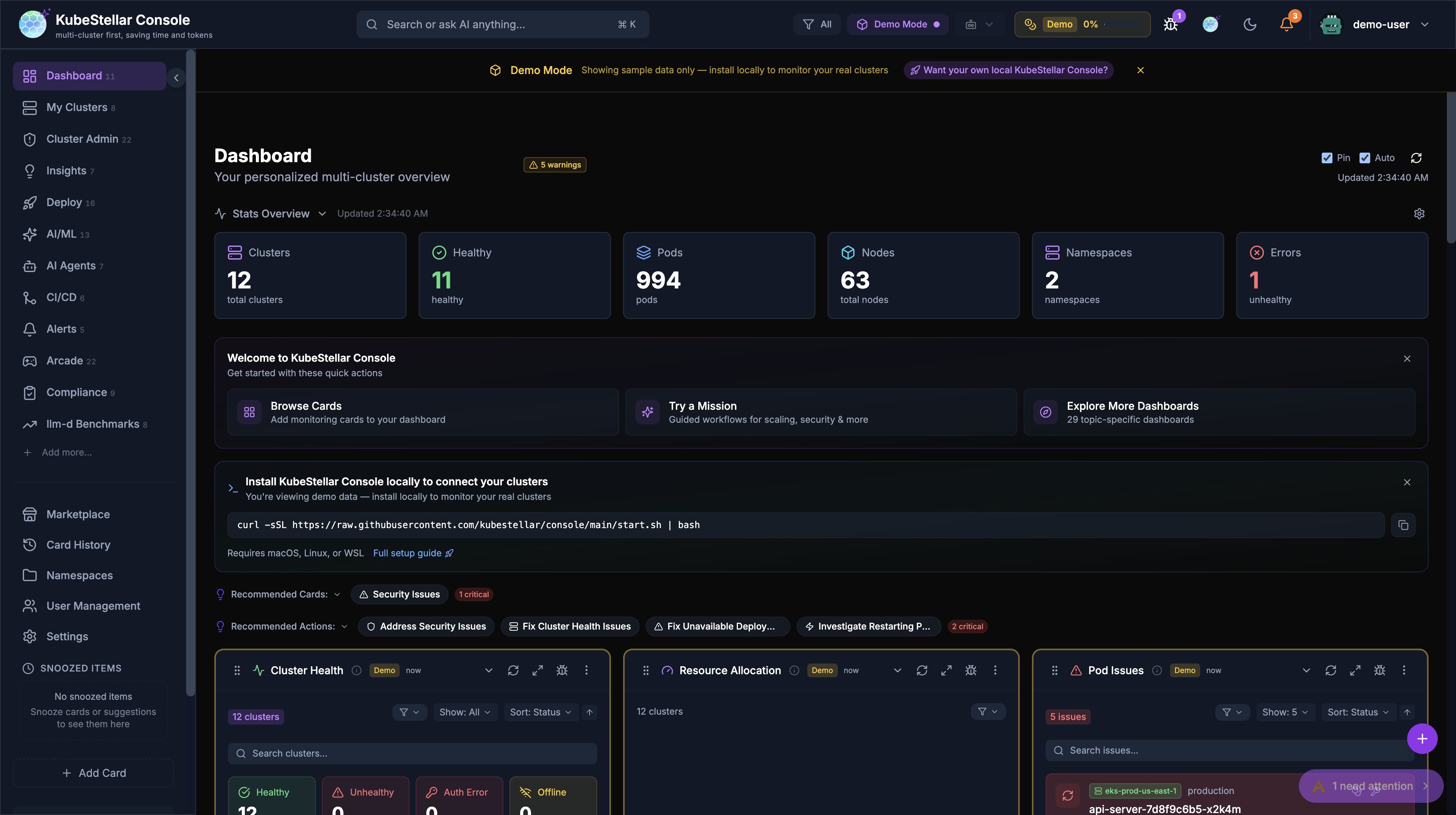
Sidebar Card Counts
Each sidebar item displays a live count badge showing the number of cards available on that dashboard. For example, “Workloads (12)” means 12 cards are registered for the Workloads dashboard. This helps you understand the depth of monitoring available for each area at a glance.
- Counts update dynamically based on registered cards
- Badges use muted styling to avoid visual clutter
- Collapsed sidebar hides counts but shows them on hover
Primary Navigation
- Dashboard: Main multi-cluster overview
- Clusters: Detailed cluster management
- Workloads: Deployments, pods, and jobs
- Compute: CPU, memory, and GPU resources
- Storage: Persistent volumes and claims
- Network: Services, ingresses, and network policies
- Events: Kubernetes event stream
- Security: Security posture and alerts
- GitOps: Helm, Kustomize, and ArgoCD
Secondary Navigation
- Card History: Previously viewed cards
- Namespaces: Namespace-specific views
- User Management: RBAC and access control
- Settings: Console configuration
Special Sections
- Arcade: Games and entertainment
- Deploy: Multi-cluster deployment tools
Search
The global search bar (Cmd/Ctrl + K) enables quick navigation:
- Search clusters by name
- Find applications and pods
- Navigate to specific namespaces
- Filter by resource type
Alerts
The alert system keeps you informed:
- Real-time notifications for critical events
- Configurable alert rules
- Integration with external notification systems
- Alert history and acknowledgment
AI Missions
AI-powered automation for common tasks:
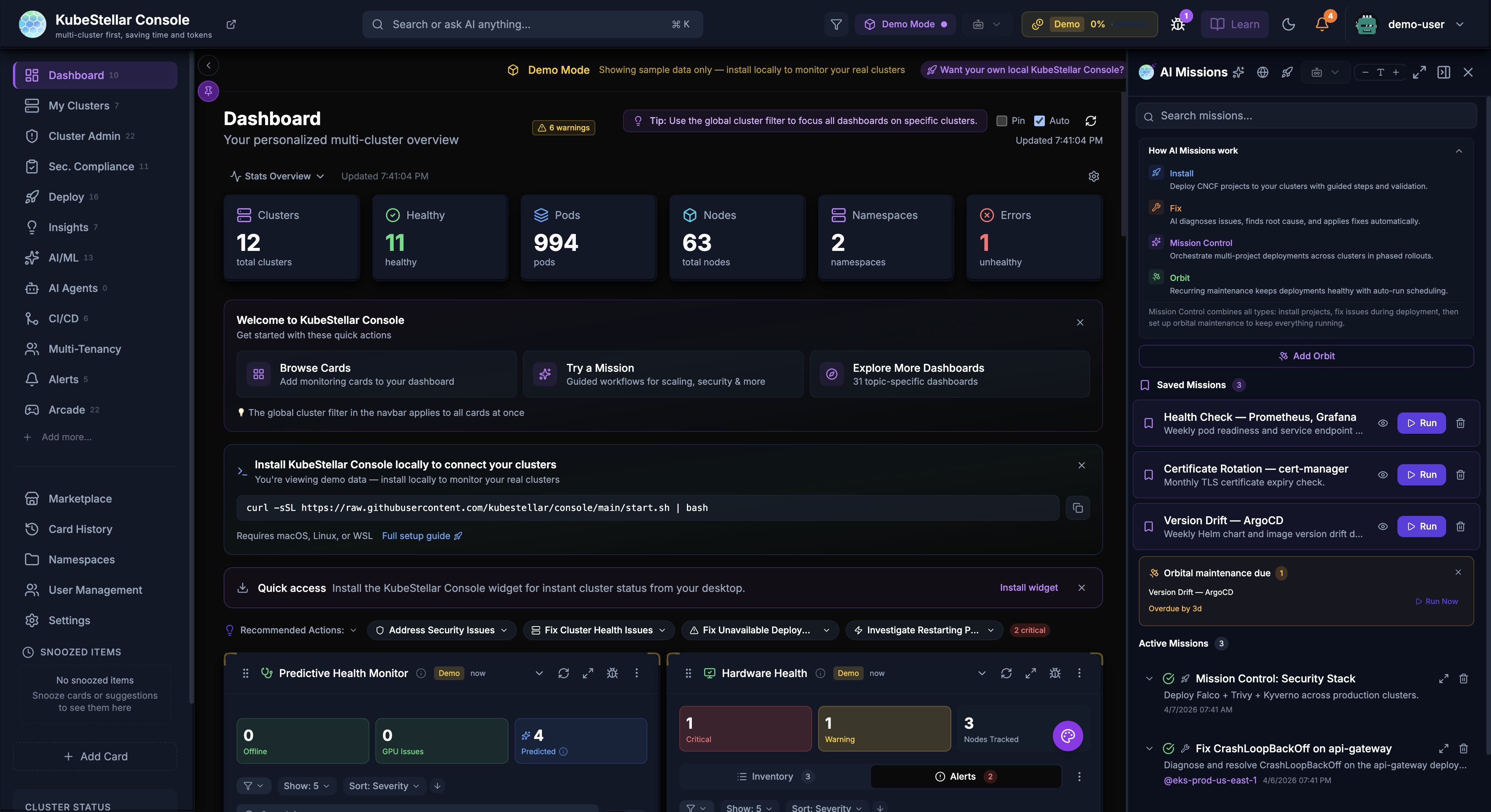
Starting a Mission
Missions can be started from:
- AI Missions navbar button: Click “AI Missions” in the top navigation bar (new in April 2026)
- Card AI buttons: Click the AI icon on any card
- Stats bar actions: Click “Address Security Issues” or similar action buttons
- Keyboard shortcut: Press
Mto open the missions panel - Mission Control: Full-screen wizard for complex multi-project missions
Mission Types
- Install: Deploy CNCF projects with guided steps
- Fix (Fixer): AI root cause analysis and auto-fix
- Mission Control: Multi-project, multi-cluster deployment orchestration with Flight Plan blueprint
- Orbit: Recurring maintenance automation (health checks, cert rotation, version drift, resource quota, backup verification)
- Security Analysis: Investigate security issues and vulnerabilities
- Performance Investigation: Analyze slow pods or resource constraints
- Troubleshooting: Debug failing deployments or pods
- Remediation: Apply fixes for common problems
AI Provider Configuration
The console supports multiple AI backends:
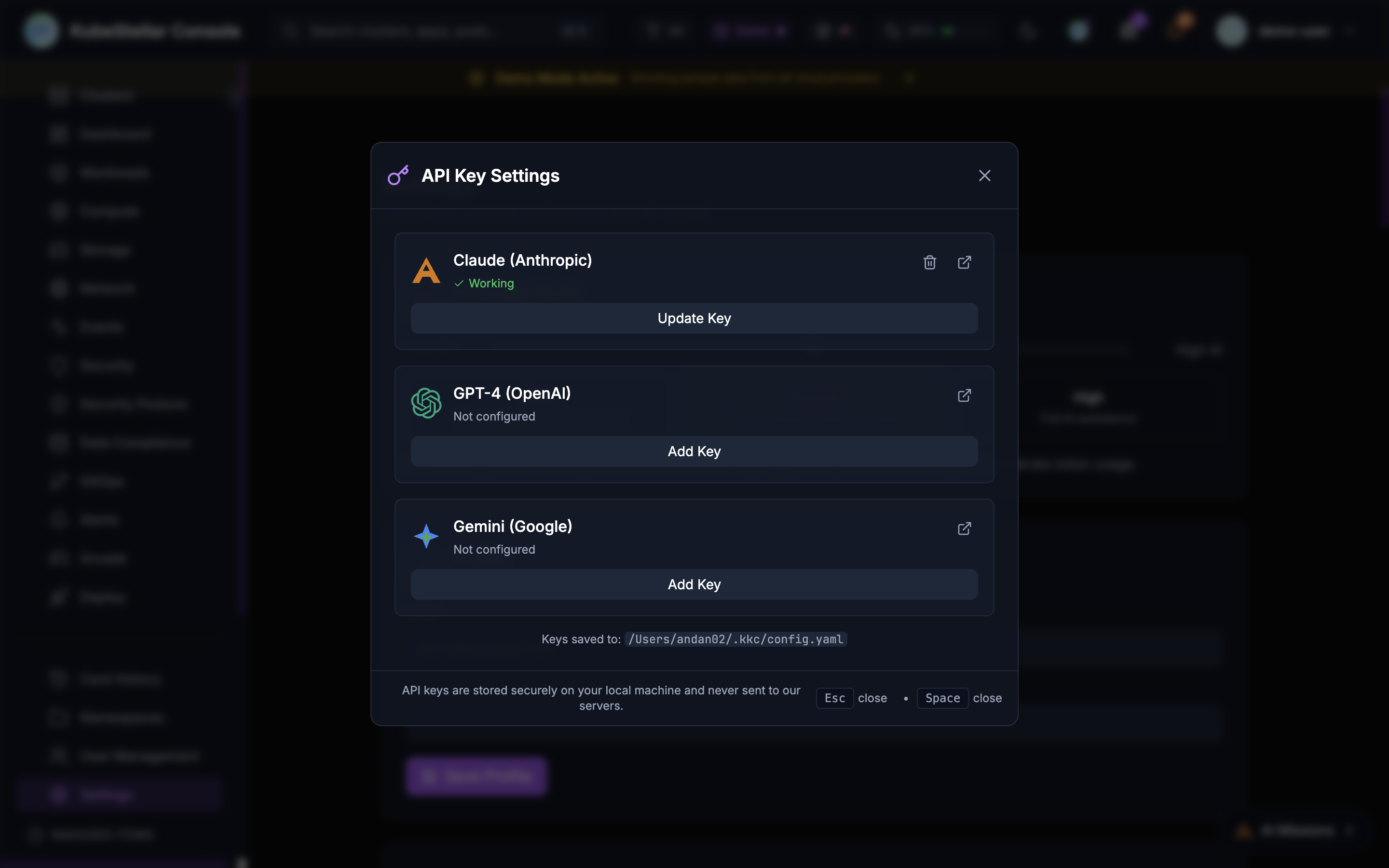
- Claude (Anthropic): Primary AI backend with API access
- Claude Code (Local): Uses your local Claude Code installation for missions
- GPT-4 (OpenAI): Alternative LLM backend
- Gemini (Google): Alternative LLM backend
Configure API keys in Settings > AI Provider Keys or click the key icon in the header.
Offline Detection & Predictive Health
The console includes both reactive offline detection and AI-powered predictive failure detection.
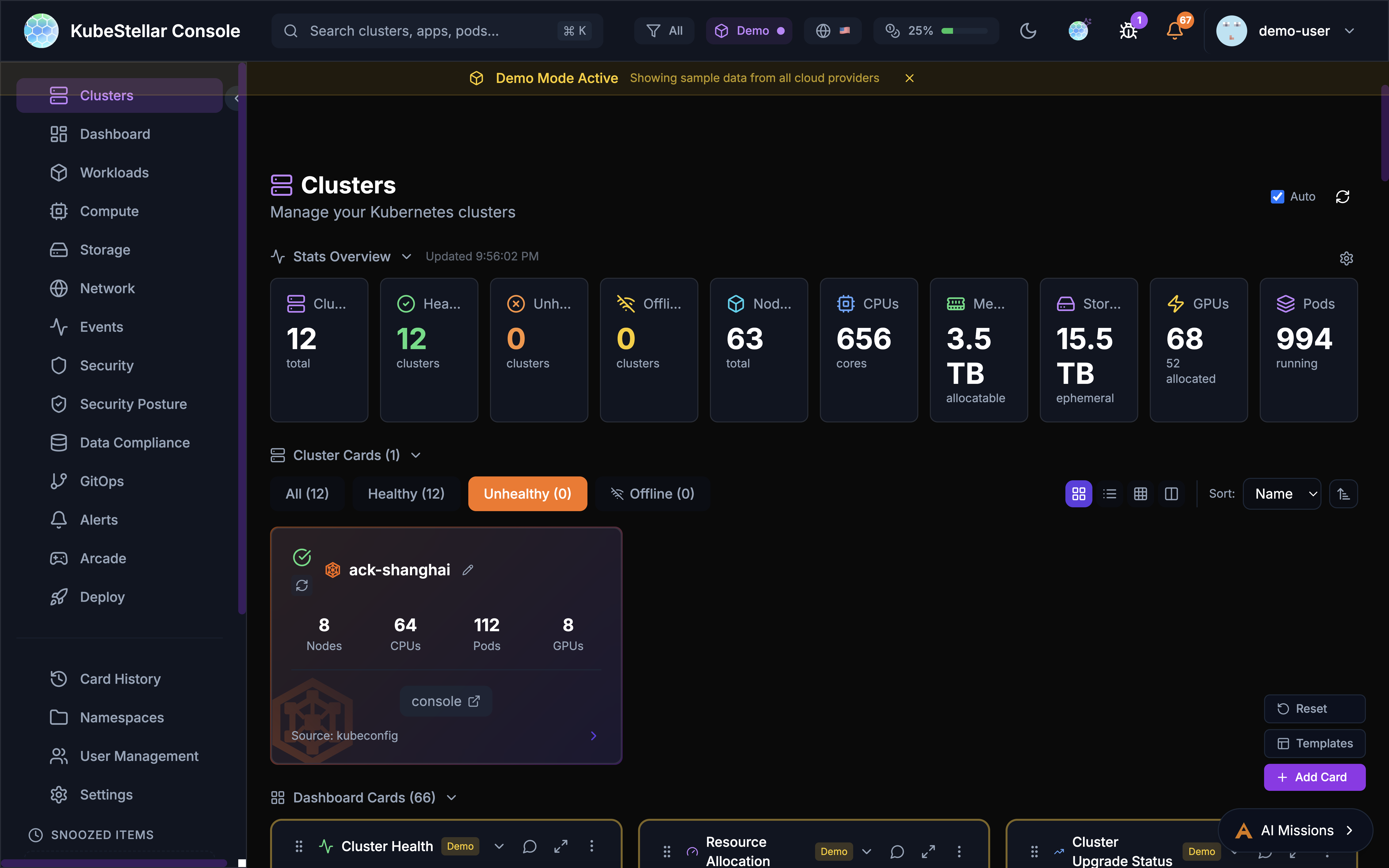
Node Offline Detection
- Node Monitoring: Detects nodes with NotReady status
- GPU Tracking: Identifies GPU nodes reporting 0 available GPUs
- Health Summary: Shows count of offline nodes and GPU issues
- AI Analysis: Click “Analyze Issues” to start an AI mission investigating problems
Predictive Failure Detection
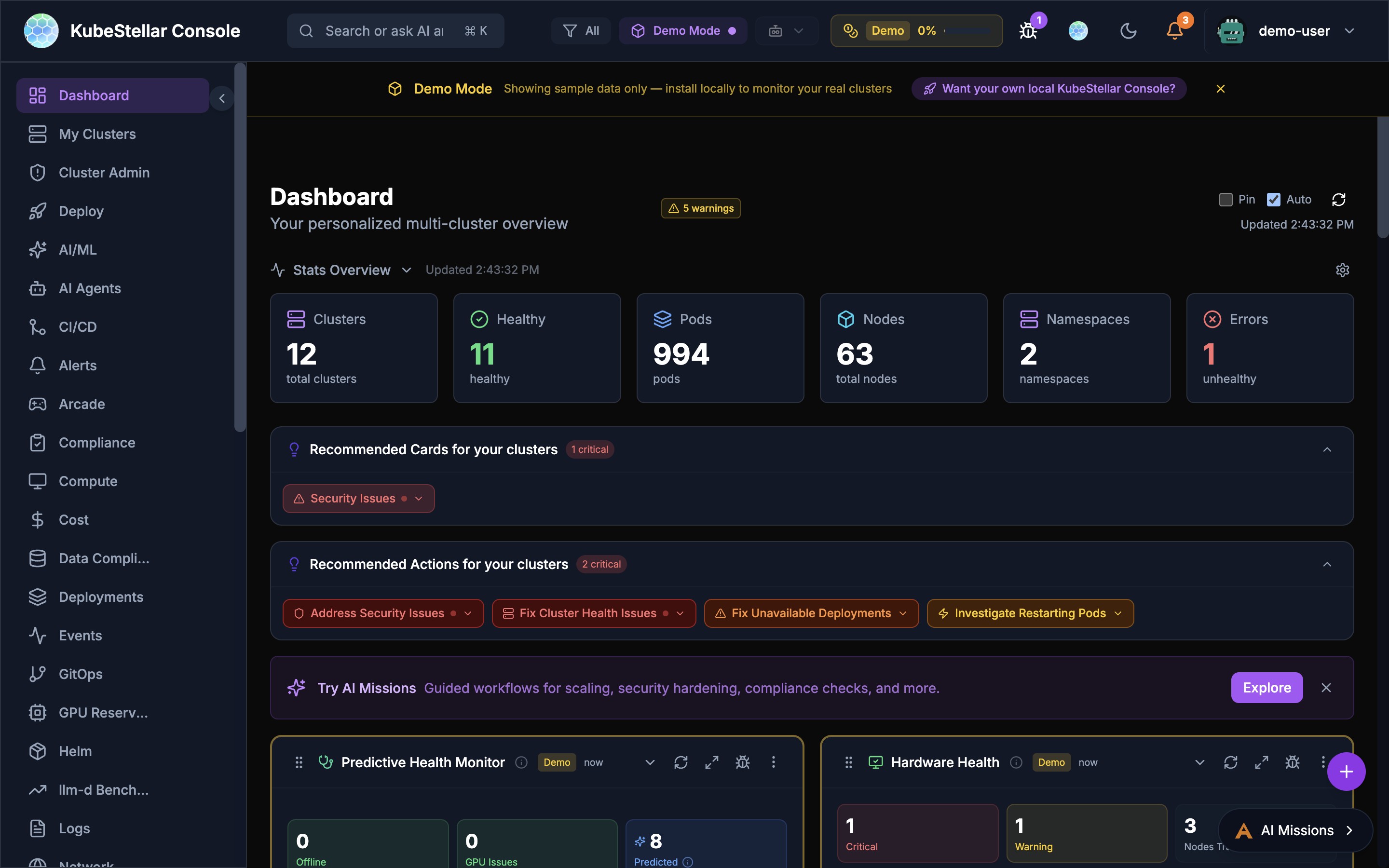
AI analyzes cluster data to predict failures before they happen:
- Pattern Recognition: Detects anomalous CPU, memory, disk, and network patterns
- Confidence Levels: Each prediction shows a confidence percentage
- Root Cause Analysis (RCA): AI explains why a failure is likely, correlating symptoms with known patterns
- Configurable Thresholds: Adjust analysis interval (15 min - 2 hours) and minimum confidence (50% - 90%)
- Multi-Provider Consensus: Optionally run predictions across multiple AI providers for higher accuracy
Configure in Settings > AI & Intelligence > Predictions.
Hardware Health
The Hardware Health card provides IPMI-style monitoring for GPU and accelerator nodes:
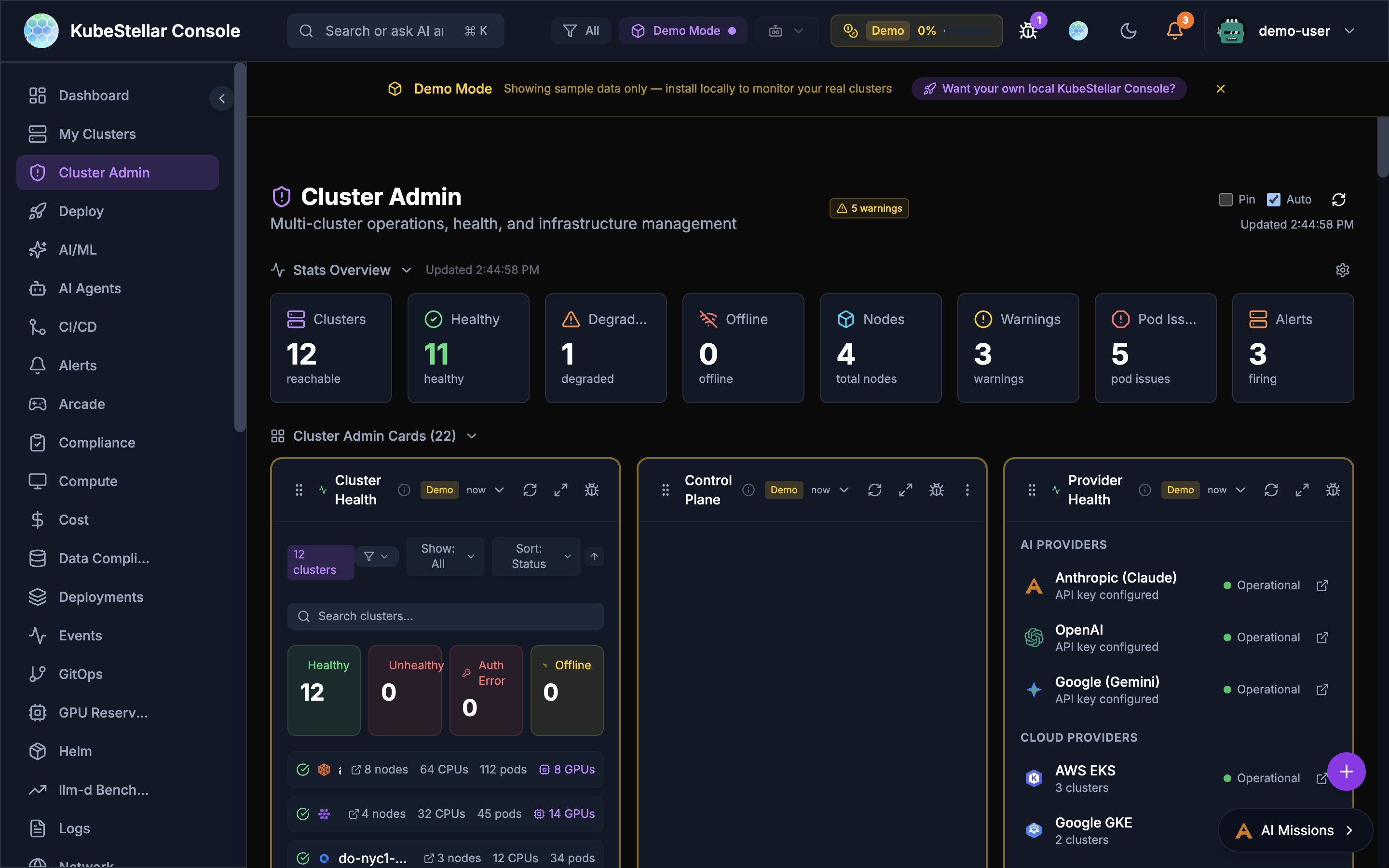
- Alert Summary: Critical and warning counts at a glance
- Device Inventory: Searchable list of all GPU/accelerator nodes
- Disappearance Tracking: Detects when devices go missing (e.g., “2 → 1 (1 disappeared)”)
- Per-Device Status: Shows environment labels (e.g., staging, production) and per-device alerts
Status Indicators
- All Healthy: Green status when no issues detected
- Issues Found: Red/orange status with counts of affected resources
- Predicted: Yellow bubble for AI-predicted future failures
- Drill-Down: Click counts to navigate to affected resources
Console Studio (New in April 2026)
Console Studio is a unified customization panel that replaces the separate card add modal, sidebar customizer, and template modal with a single coherent experience.
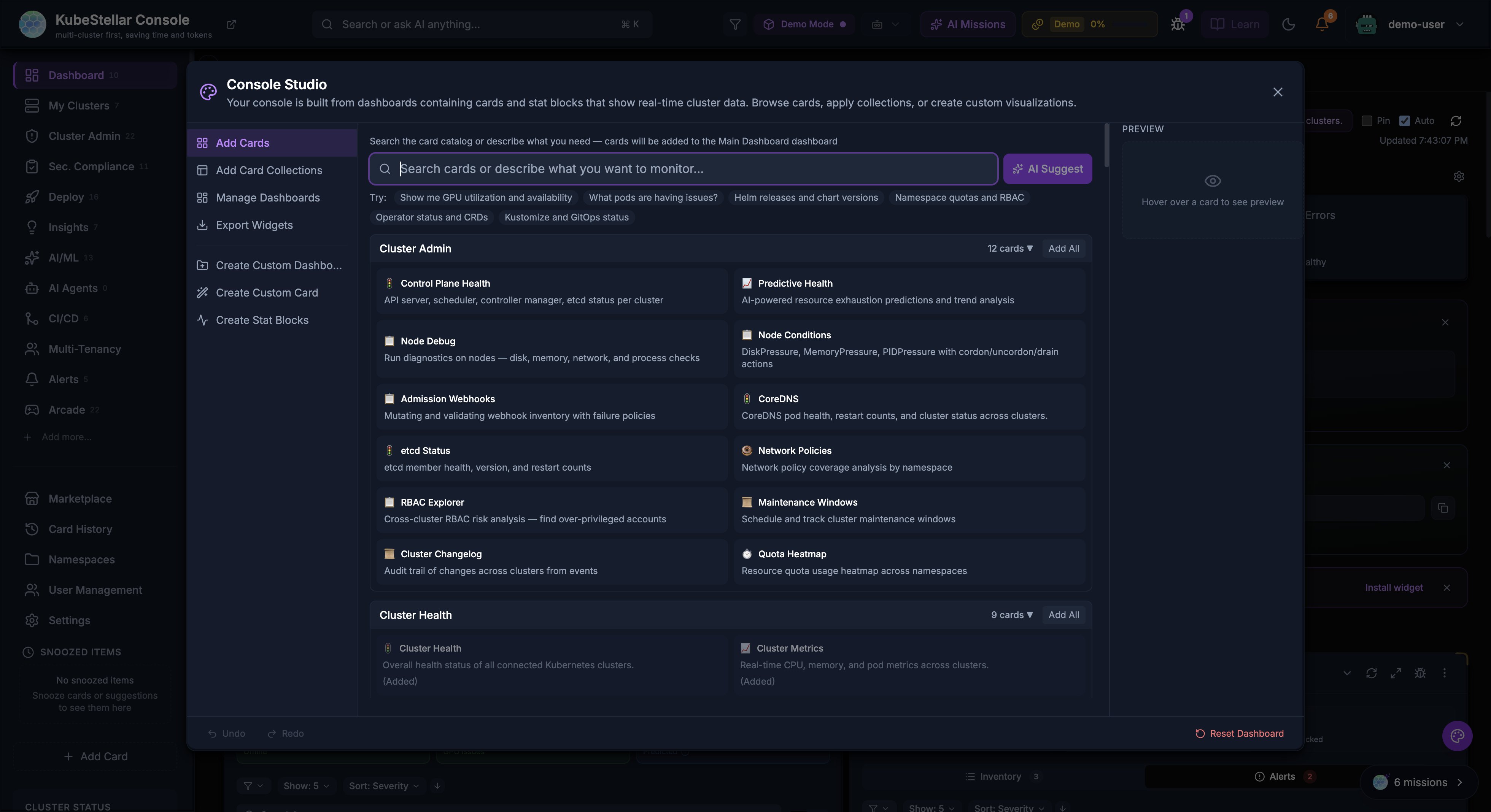
Opening Console Studio
- Press Cmd/Ctrl + K to open Console Studio
- Or click the palette icon FAB (floating action button) on the dashboard
What You Can Do
Console Studio has a flat left navigation with these sections:
| Section | Description |
|---|---|
| Add Cards | Browse the card catalog by dashboard category with an AI-powered search bar |
| Add Card Collections | Apply pre-built card collections by category |
| Manage Dashboards | Create, rename, or delete custom dashboards |
| Create Custom Dashboard | Build a new dashboard from scratch |
| Create Custom Card | Design a custom card with AI assistance |
| Create Stat Blocks | Add custom stat blocks to the dashboard header |
| Export Widgets | Export cards as embeddable widgets |
AI-Powered Card Search
The card catalog includes an AI suggestion bar at the top. Type a description of what you want to monitor (e.g., “GPU utilization and availability”) and click AI Suggest to get recommended cards. Quick suggestion chips are provided for common queries like “Helm releases and chart versions” or “Namespace quotas and RBAC”.
Live Preview
The right panel shows a live preview of the selected card or dashboard layout before you add it.
NPS Survey System (New in April 2026)
An in-product Net Promoter Score (NPS) survey helps collect user feedback:
- 4 emoji reactions: Not great, Meh, Good, Love it!
- Session-based trigger: Hidden for the first 4 sessions, appears after 30 seconds of idle time on session 5+
- Re-prompt cadence: Every 30 days after submission; retries 7 days after dismiss (max 3 dismissals)
- Authenticated users: Skips in demo mode
- Optional feedback text: Users can provide written feedback (minimum 20 characters, forwarded to the backend)
- GA4 tracking: Events
ksc_nps_survey_shown,ksc_nps_score_submitted,ksc_nps_feedback_submitted
Learn Dropdown with Medium Blog (New in April 2026)
The Learn button in the top navigation bar now includes a Blog section with the latest articles from the KubeStellar Medium publication:
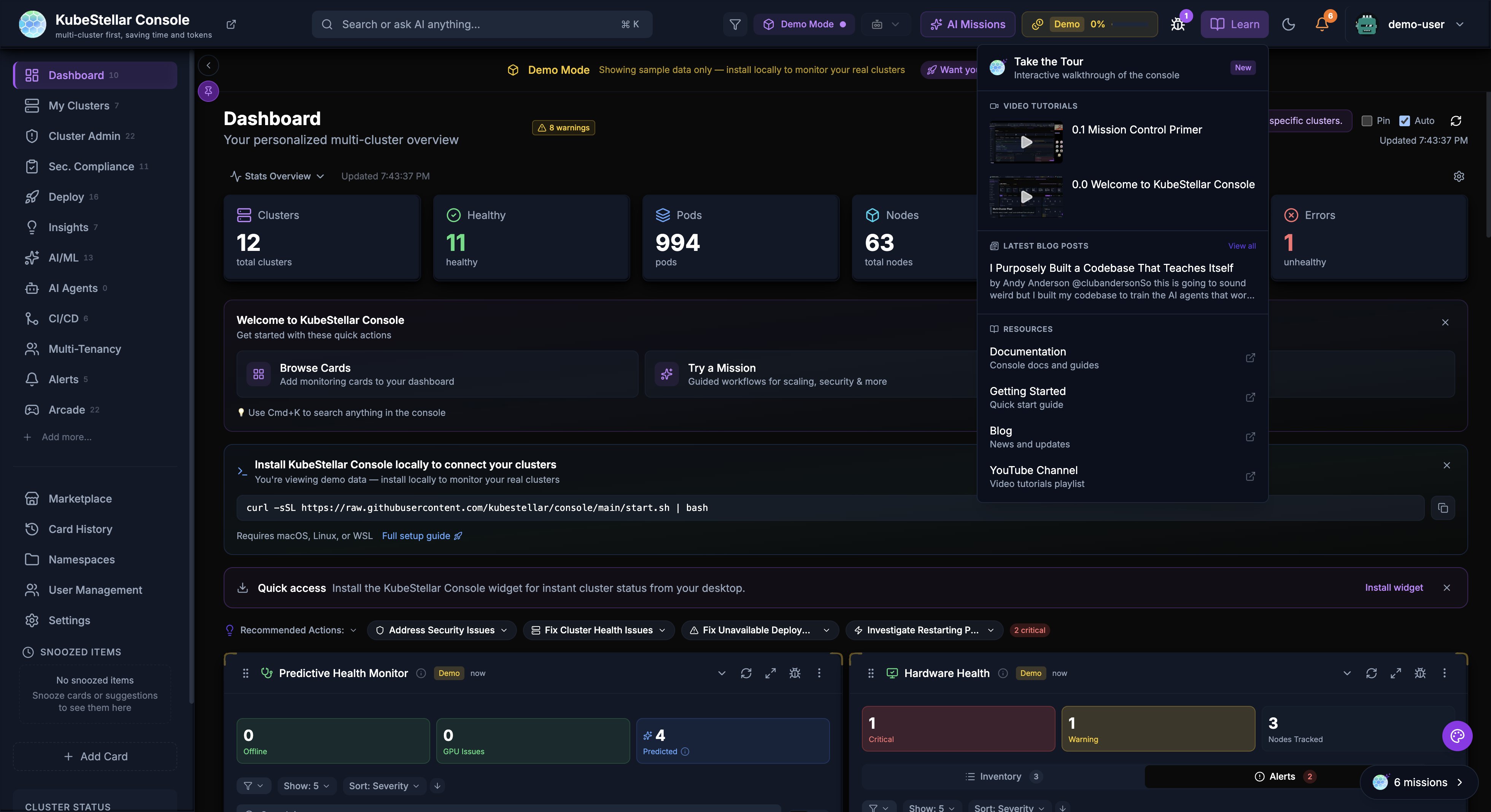
The dropdown organizes learning resources into sections:
- Take the Tour — Interactive walkthrough of the console
- Blog — Latest Medium articles with author and date
- Documentation — Links to console and cluster docs
- Getting Started — Quick setup guides
- YouTube Channel — Video tutorials and playlists
Workload Import Dialog (New in April 2026)
The Workloads dashboard and Deploy page now include an Add Workload button that opens a multi-tab import dialog:
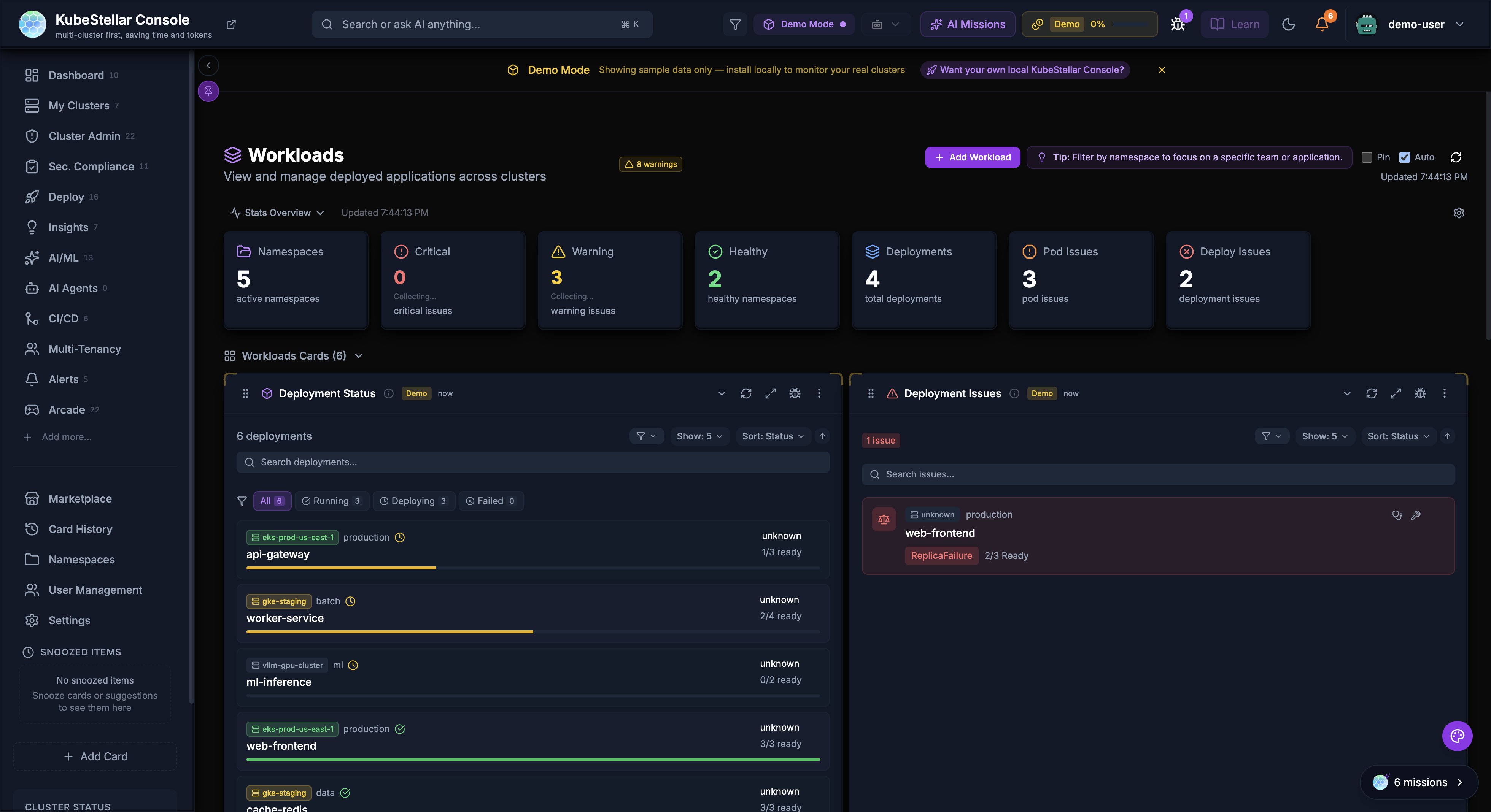
| Tab | Import Method |
|---|---|
| YAML | Paste or upload YAML manifests with client-side parsing via js-yaml and multi-document support |
| Helm | Deploy from a Helm chart repository |
| GitHub | Import directly from a GitHub repository |
| Kustomize | Apply a Kustomize overlay |
The Workloads dashboard also shows an “Add Workload” button in the header and a “Deploy a Workload” call-to-action in the empty state (both navigate to the Deploy page).
System Updates Settings Clarification (New in April 2026)
The System Updates settings page now includes a collapsible “What do these settings control?” info section that explains three distinct update scopes:
| Scope | What it does |
|---|---|
| System Updates | Updates the entire console to a new version (controlled by Update Channel and Auto-Update) |
| Auto-Reload | Browser reloads when a new build is deployed (chunk hash mismatch detection) |
| Card/Content Updates | Individual cards check for new data on their own refresh intervals |
Deploy Page
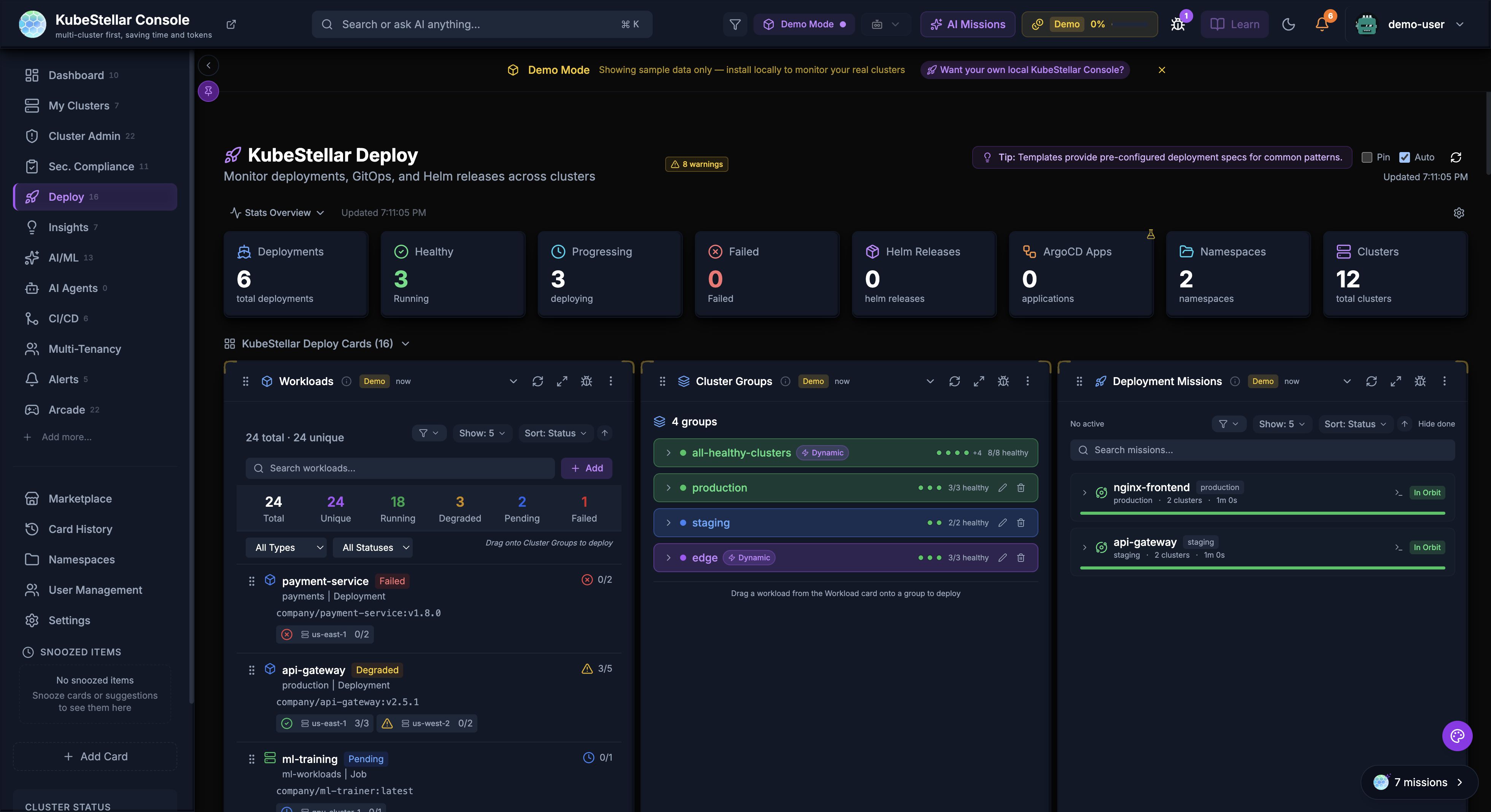
The Deploy page provides tools for managing deployments across clusters.
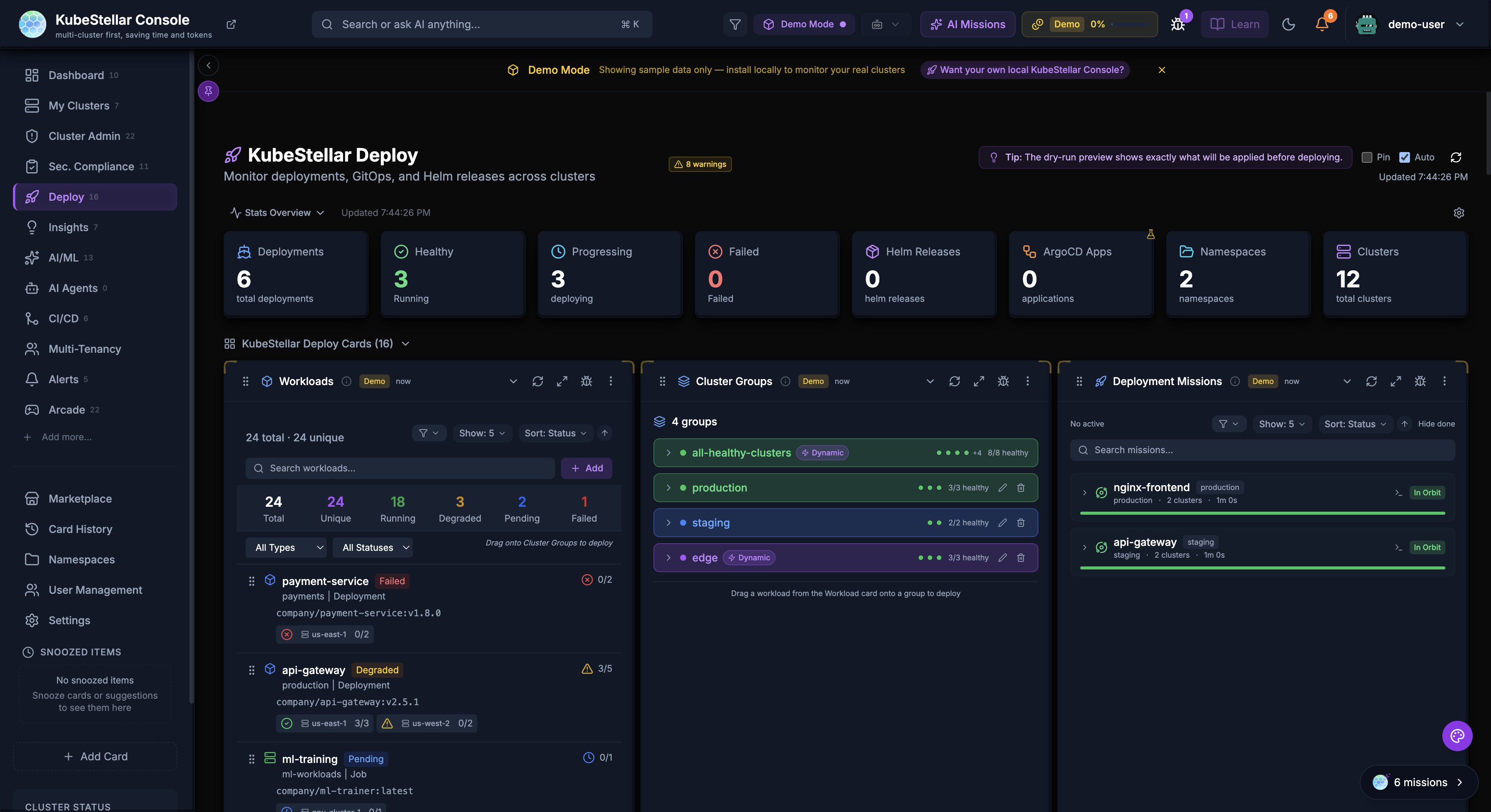
Deployment Cards
- Deployment Status: Overview of all deployments
- Deployment Progress: Track rollout progress
- Deployment Issues: View failing deployments
GitOps Integration
- GitOps Drift: Detect configuration drift from Git
- ArgoCD Applications: Manage ArgoCD apps across clusters
- ArgoCD Sync Status: Monitor sync state
- ArgoCD Health: Application health dashboard
Helm Management
- Helm Release Status: View deployed releases
- Helm History: Track release revisions
- Helm Chart Versions: Monitor chart updates
Kustomize
- Kustomization Status: Monitor Flux kustomizations
- Overlay Comparison: Compare environment overlays
Workload Deployment
Deploy workloads across clusters with drag-and-drop:
- Select a workload type (Deployment, StatefulSet, Job)
- Drag to target clusters on the world map
- Configure namespace and replicas
- Preview changes before applying
Marketplace
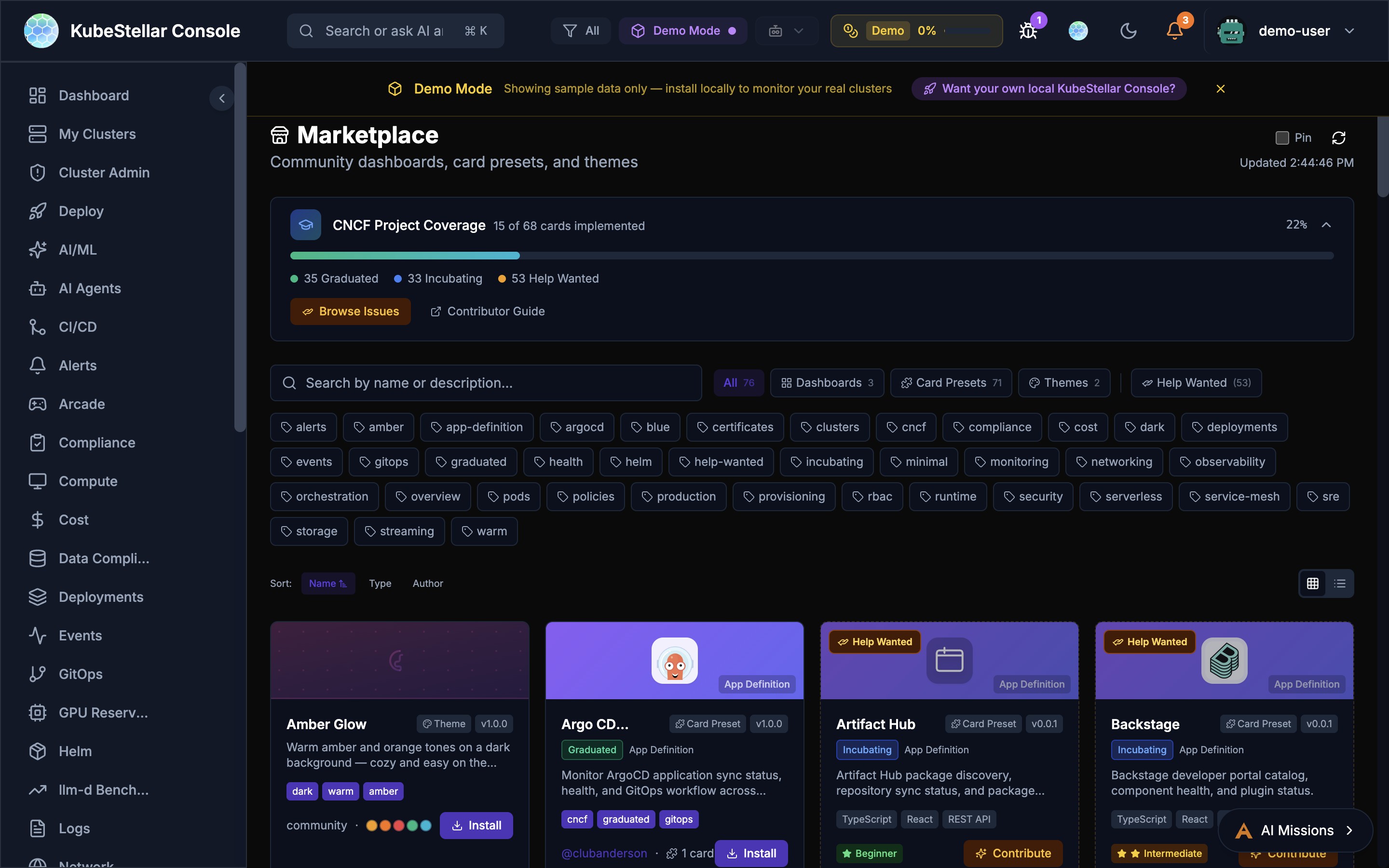
The Marketplace is a community hub for sharing dashboards, card presets, and themes.
What’s Available
- Dashboards - Pre-built dashboard layouts for specific use cases
- Card Presets - Curated sets of cards for common monitoring scenarios
- Themes - Visual themes for the console
- CNCF Projects - Cards and dashboards for 68 CNCF projects (graduated, incubating, sandbox)
CNCF Project Coverage
The Marketplace tracks coverage of CNCF projects:
- 35 Graduated projects with dashboard support
- 33 Incubating projects with monitoring cards
- 57 Help Wanted issues for community contributions
Installing from Marketplace
- Navigate to Marketplace in the sidebar
- Browse or search for what you need
- Filter by tags (graduated, helm, security, monitoring, etc.)
- Click Install to add to your console
- Installed dashboards appear in the sidebar with vanity URLs
Contributing
The Marketplace includes a Contributor Guide and links to Help Wanted issues for anyone who wants to create new dashboards or cards for the community.
Real-Time SSE Streaming
The console uses Server-Sent Events (SSE) for real-time data streaming, replacing polling-based REST calls for many resources.
Streamed Resources
The following resources are streamed in real-time via SSE:
- Pods, Deployments, Services - Core workload status
- Jobs, ConfigMaps, Secrets - Job lifecycle and configuration changes
- Operators and Subscriptions - OLM operator status and available upgrades
- Helm Releases - Release status across clusters
- Benchmark Data - Live benchmark results from Google Drive
- NVIDIA Operators - GPU operator status and health
How It Works
- The Go backend opens long-lived connections to each cluster
- Data is streamed to the frontend as JSON events
- The frontend updates cards instantly without full-page refresh
- Automatic reconnection on connection loss
- Fallback to REST polling if SSE is unavailable
Benefits
- Instant updates: No more waiting for refresh intervals
- Lower resource usage: Single connection per resource type instead of repeated polls
- Better UX: Cards update in real-time as cluster state changes
Performance Optimizations
Recent optimizations have dramatically improved console load times:
- 17x faster warm start: Card data loads near-instantly on subsequent visits
- 3.6x faster cold start: First-time page loads reduced from ~8s to ~2.2s
- Instant card rendering: Cards render immediately with cached data, then update in background
- Vite warmup: Dashboard pages are pre-warmed to eliminate navigation lag
- In-memory operator caching: Operator and subscription data is cached server-side with TTL, avoiding repeated kubectl calls
- Permanent error caching: Clusters without OLM are cached as permanent errors to skip future probes
- Demo data instant display: Cards configured with
demoWhenEmptyshow demo data immediately while real data loads - SSE response caching: Backend caches SSE responses for 15 seconds, reducing re-navigation latency from seconds to near-instant
- Per-cluster adaptive timeouts: Slow clusters are automatically tracked and given shorter timeouts (10s vs 60s) to prevent blocking
- Smart chunk prefetching: When
ENABLED_DASHBOARDSis configured, JavaScript chunks for enabled dashboards are prefetched, reducing initial network requests by ~80% - SSE deduplication: Frontend prevents duplicate concurrent SSE requests during rapid navigation
Local Cluster Creation
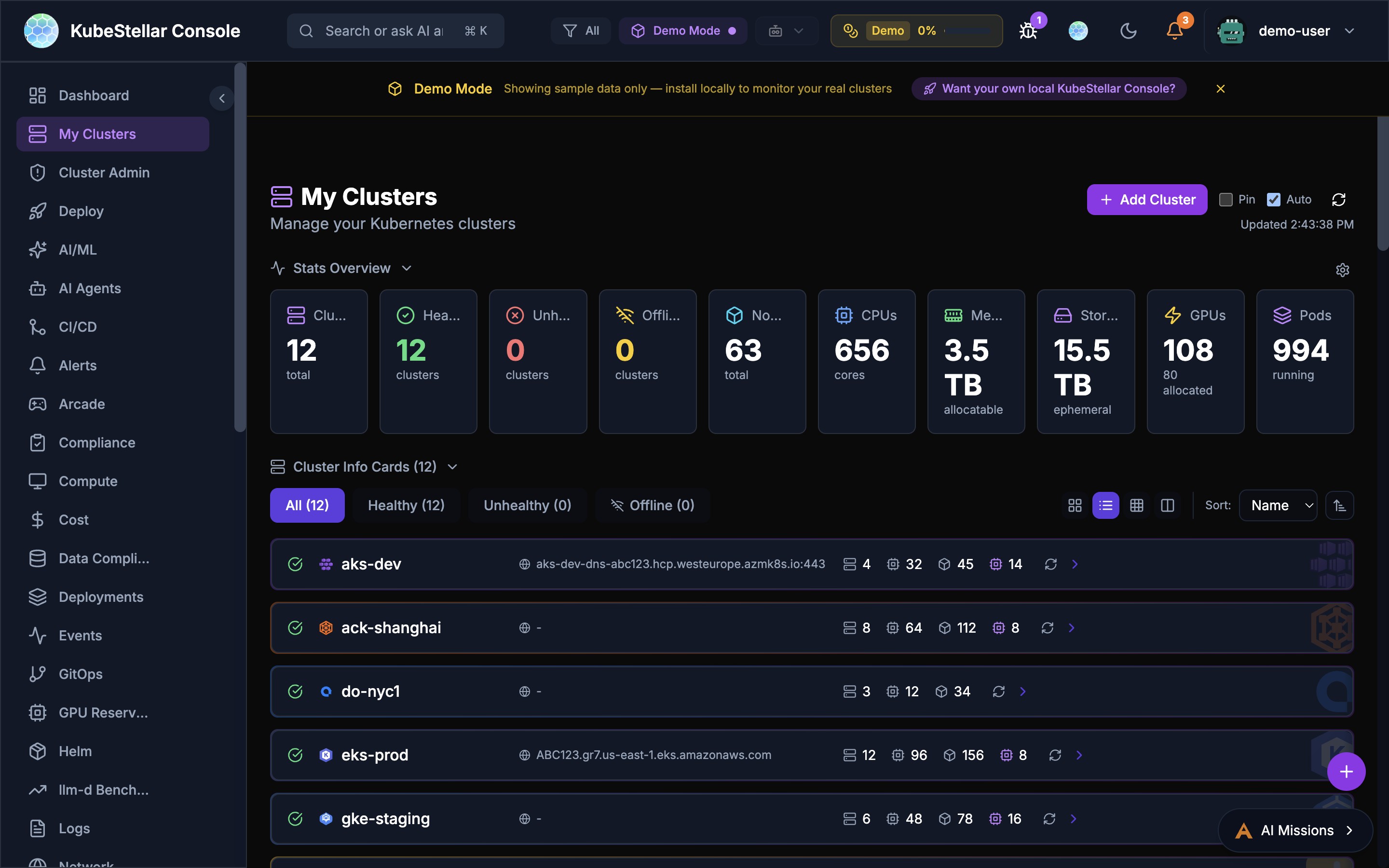
Create and manage local Kubernetes clusters directly from the console Settings page.
Supported Tools
The console auto-detects installed cluster creation tools:
- kind - Kubernetes in Docker
- k3d - Lightweight k3s in Docker
- minikube - Local Kubernetes with multiple drivers
Creating a Cluster
- Go to Settings > Utilities > Local Clusters
- Select a tool from the dropdown
- Enter a cluster name
- Click Create
- The cluster appears in your cluster list and is immediately available for monitoring
Managing Clusters
The Local Clusters page shows all local clusters with:
- Cluster name and creation tool
- Running status
- Delete button to remove clusters
llm-d Inference Monitoring
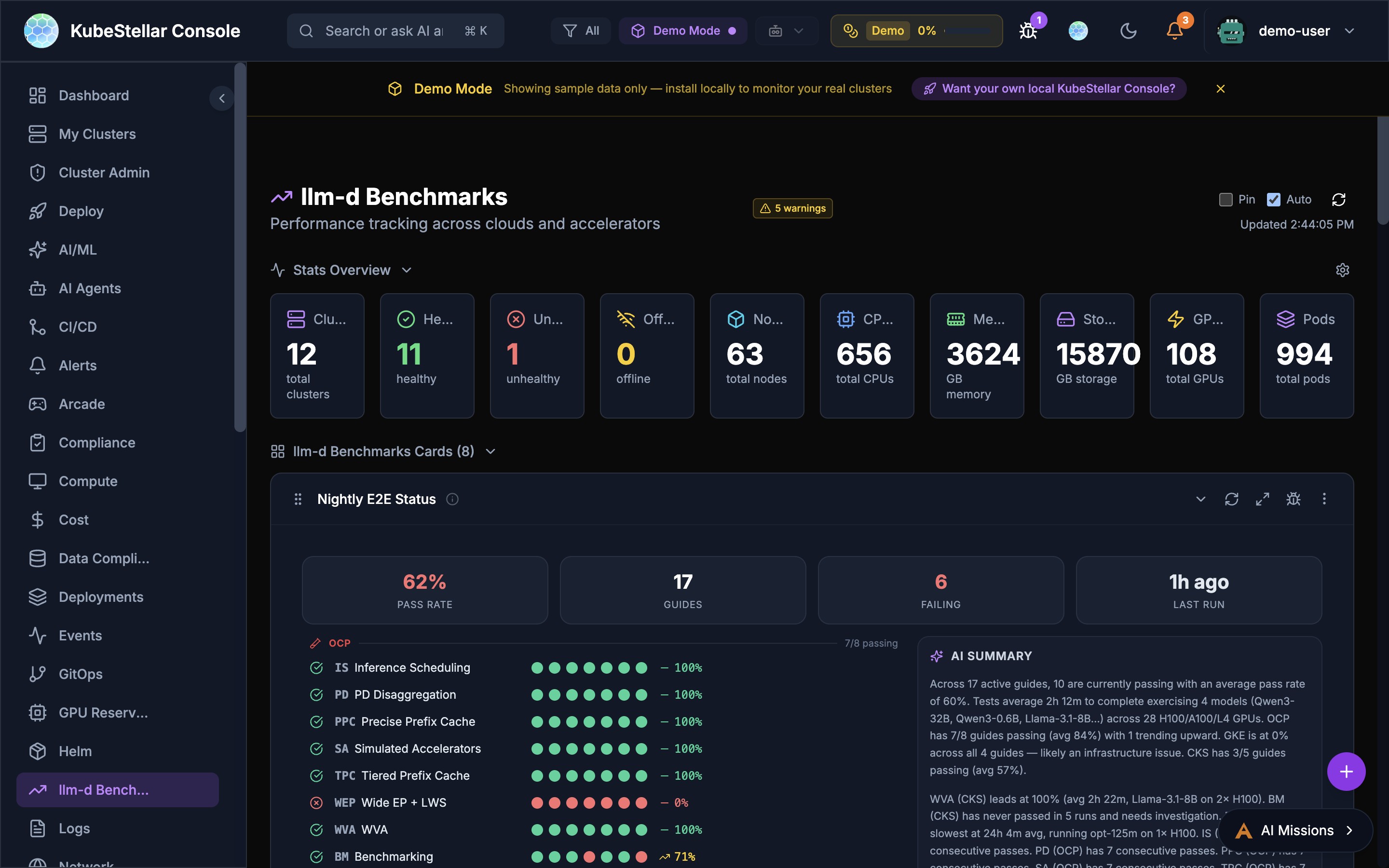
The AI/ML dashboard includes specialized cards for monitoring llm-d inference serving stacks.
Stack Discovery
The console automatically discovers llm-d stacks across your clusters:
- Scans all namespaces for llm-d deployments
- Detects vLLM, TGI, llm-d, and Triton inference servers
- Shows stack health with component status
Key Cards
- Request Flow - Animated visualization of requests flowing through the inference pipeline
- KV Cache Monitor - Real-time KV cache utilization with per-pod breakdowns
- EPP Routing - Endpoint Picker routing decisions, RPS, and distribution
- P/D Disaggregation - Separate prefill and decode server metrics including load, queue depth, throughput, TPOT, and GPU memory
- Benchmarks - Compare stacks with TTFT, throughput, and latency charts
- Configurator - Configure inference strategies (Intelligent Scheduling, P/D Disaggregation, Wide Expert Parallelism, Variant Autoscaling)
Real Prometheus Metrics
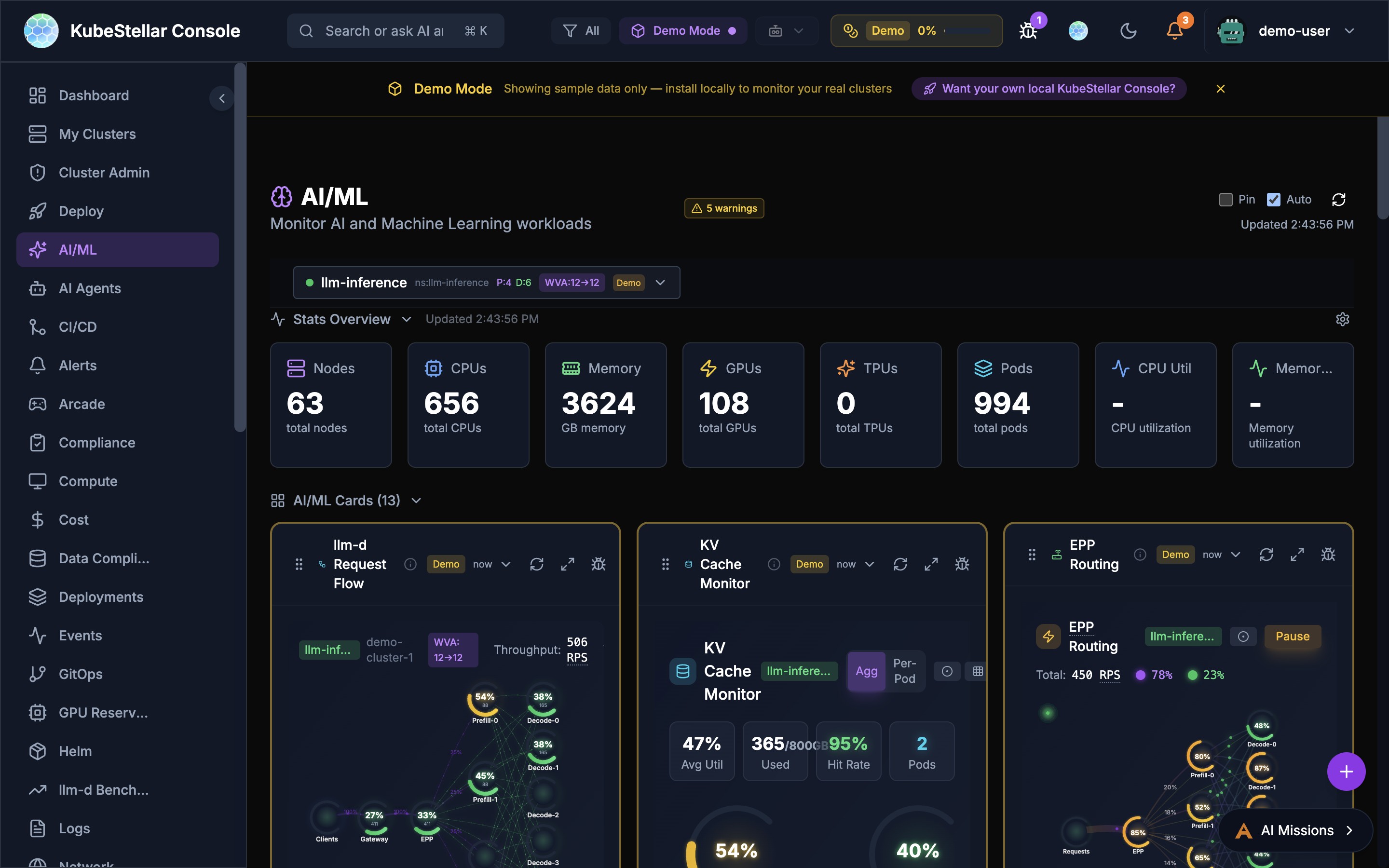
The four LLM-d visualization cards (Request Flow, KV Cache Monitor, EPP Routing, P/D Disaggregation) display real per-pod Prometheus metrics from vLLM when available:
- A Prometheus query proxy routes queries through the Kubernetes API server’s service proxy — no port-forwarding or extra configuration needed
- Six vLLM metrics are polled every 5 seconds: request throughput, KV cache utilization, time-to-first-token, inter-token latency, batch size, and queue depth
- Cards gracefully fall back to simulated data when Prometheus is unavailable
- Per-pod views show individual vLLM instance metrics with color-coded health indicators
llm-d AI Insights
The AI Insights card provides automated analysis of your inference stack configuration, identifying:
- Balanced vs imbalanced prefill-to-decode ratios
- Optimization opportunities
- Configuration recommendations
PROW CI Monitoring
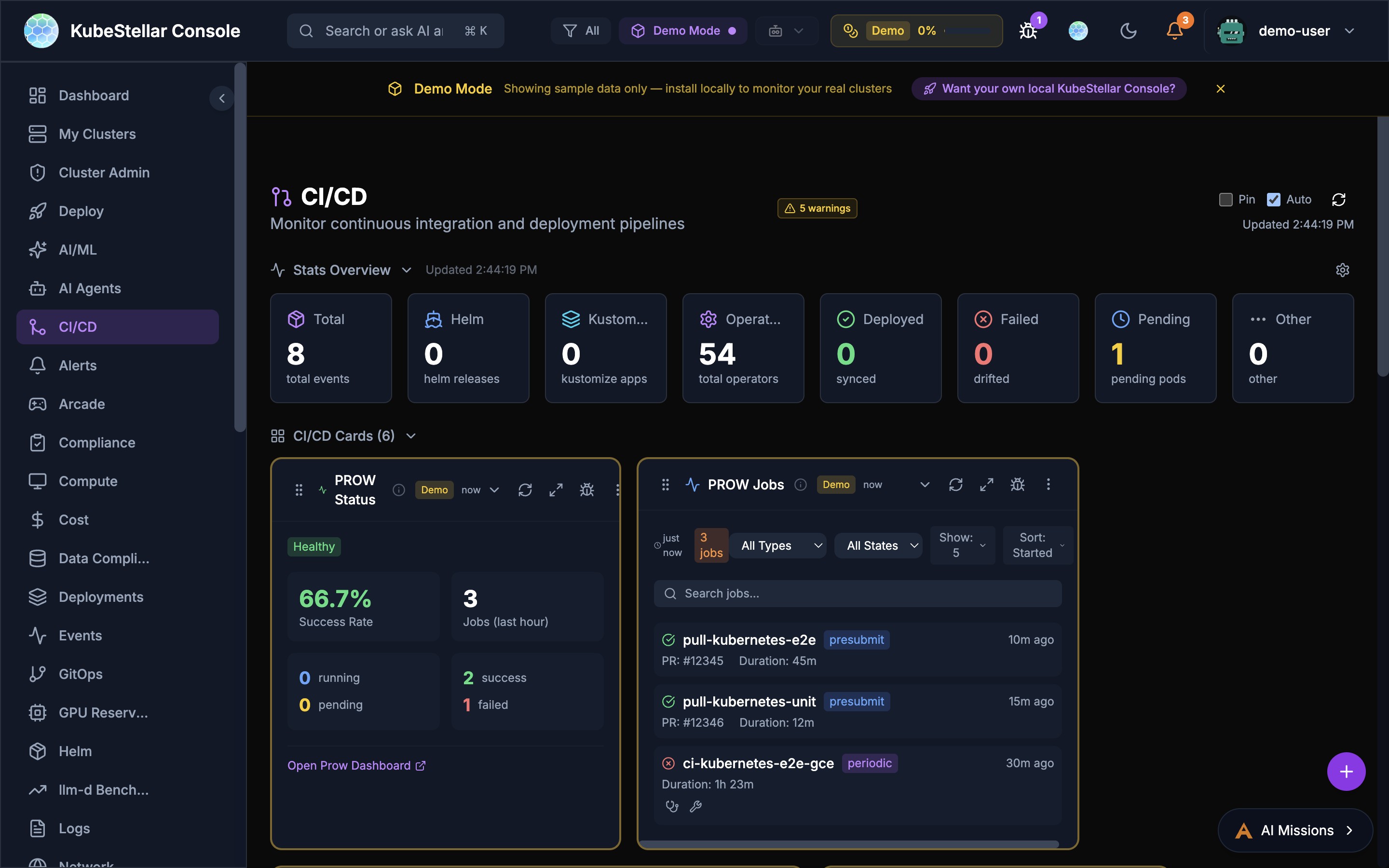
The CI/CD dashboard includes PROW CI integration for monitoring Kubernetes-style CI/CD.
PROW Status Card
Shows overall PROW health:
- Success rate percentage
- Job counts in the last hour
- Running, pending, and failed job breakdown
- Link to your PROW dashboard
PROW Jobs Card
Filterable list of PROW jobs:
- Filter by job type (presubmit, postsubmit, periodic, batch)
- Filter by state (all states, triggered, pending, running, succeeded, failed)
- Each job shows PR number, duration, and age
- Click to open the job in your PROW instance
PROW History Card
Revision history showing pass/fail trends over time.
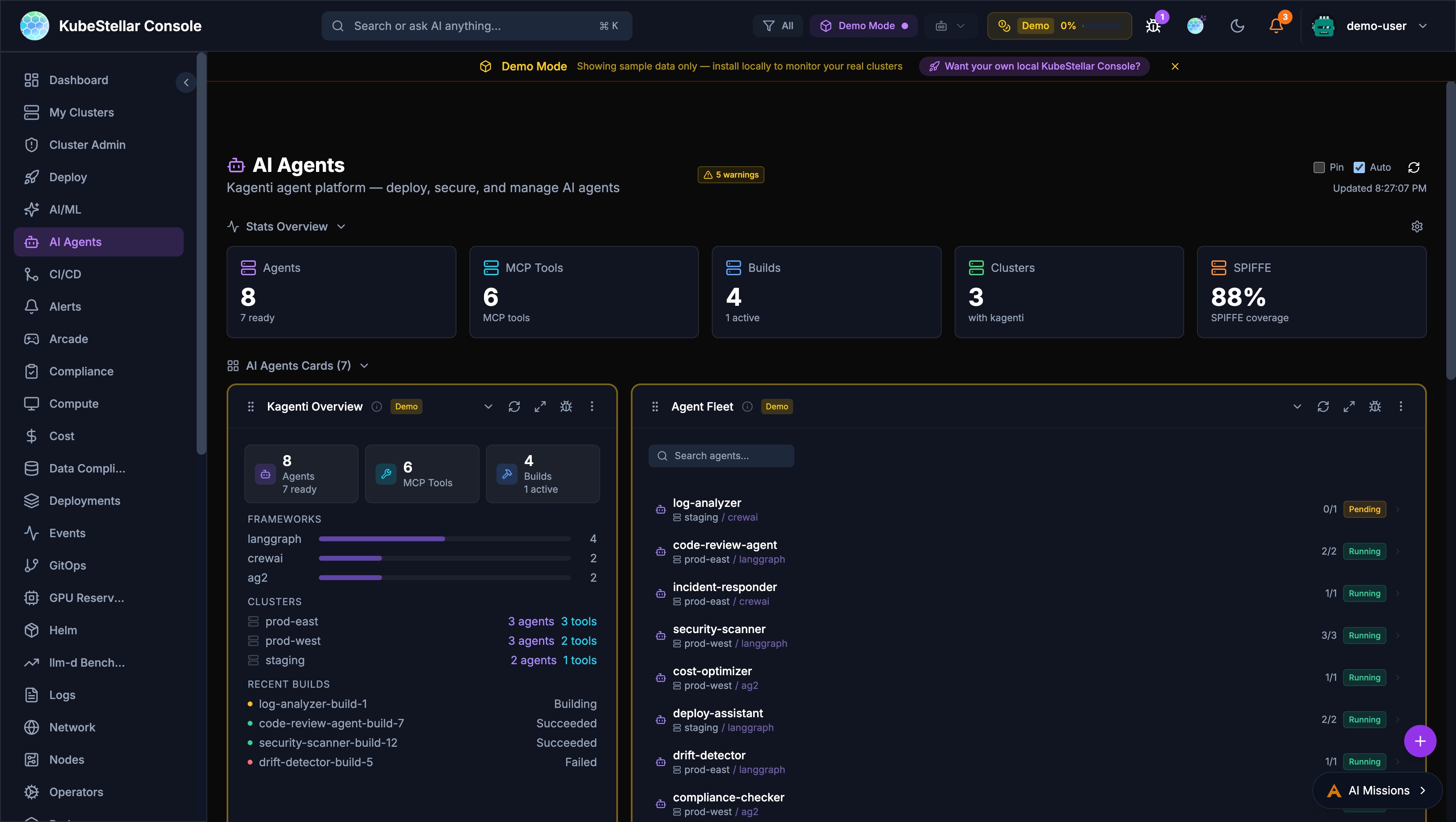
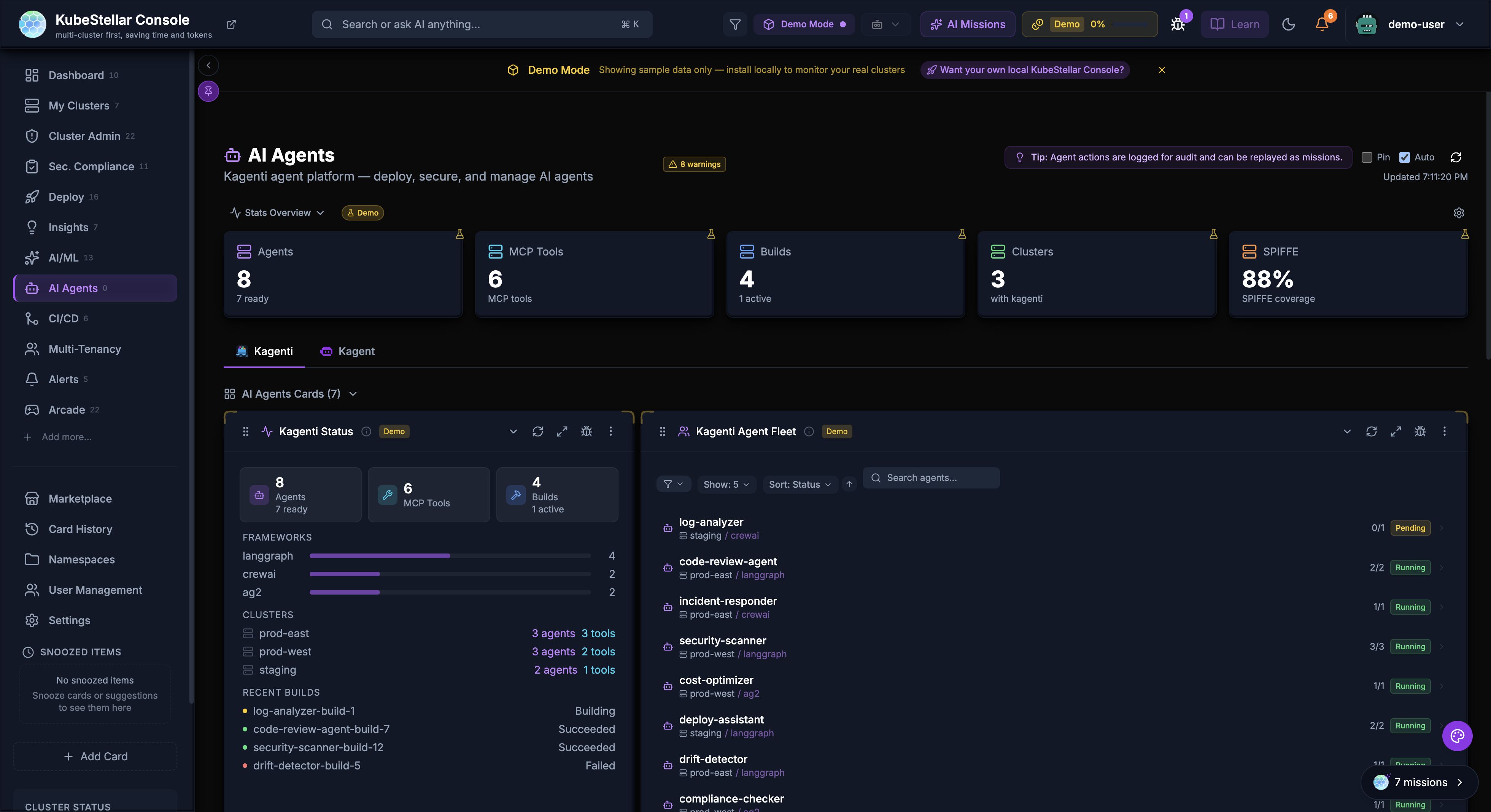
Kagenti AI Agents
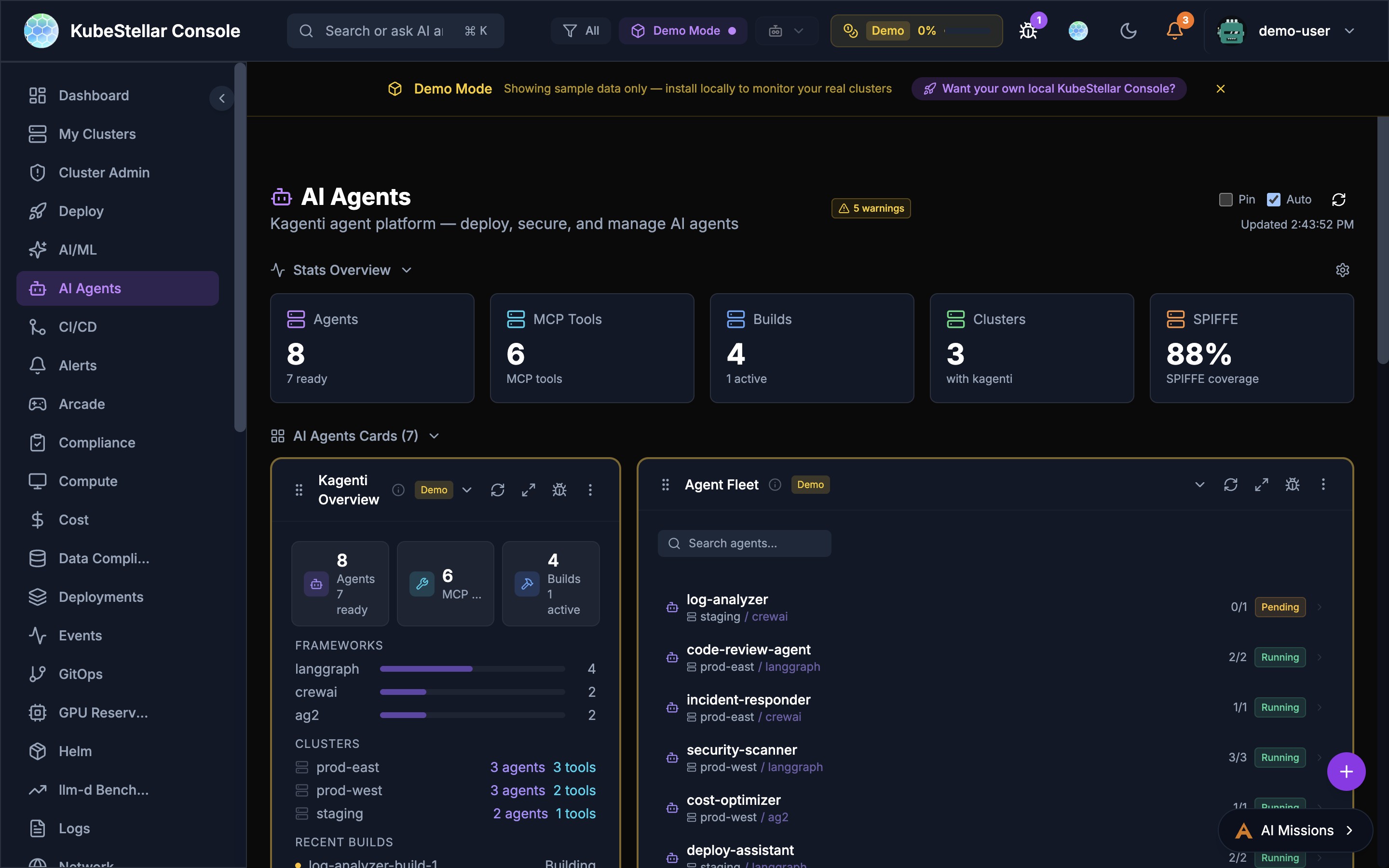
The AI Agents dashboard provides a management plane for Kagenti AI agents deployed across clusters.
Overview
- Agent Count: Total agents and their readiness state
- MCP Tools: Number of Model Context Protocol tools available
- Builds: Active and recent build status
- Clusters: Clusters with Kagenti installed
- SPIFFE Coverage: Identity and security coverage percentage
Agent Fleet
Searchable list of all deployed agents showing:
- Agent name and cluster placement
- Framework (LangGraph, CrewAI, AG2)
- Replica count and status (Running, Pending)
- Per-agent actions (diagnose, repair, logs)
Diagnose & Repair
Every card in the console has AI-powered Diagnose and Repair buttons:
- Diagnose - Opens an AI mission to analyze the card’s data
- Repair - Opens an AI mission to fix detected issues
- Available as compact icon buttons on every card’s toolbar
Provider configuration
To connect kagenti-backend to a hosted LLM provider, see Configure Kagenti LLM Providers and API Keys. That guide covers supported providers, the kagenti-llm-secrets Secret, LLM_PROVIDER, key rotation, and troubleshooting.
Nightly E2E Test Monitoring
The CI/CD dashboard includes a Nightly E2E Tests card that monitors end-to-end test results across llm-d infrastructure guides.
GPU Failure Detection
The card distinguishes between actual test failures and GPU unavailability:
- Red dots indicate genuine test failures
- Amber dots indicate GPU unavailability failures (e.g., insufficient GPU quota)
- Green dots indicate successful runs
- Flashing blue dots indicate currently running or queued jobs
The backend classifies failures by inspecting GitHub Actions job steps to determine whether a failure was caused by missing GPU resources or an actual test regression.
Per-Run Metadata
Hovering over individual run dots in the detail panel reveals infrastructure information:
- Model: Which LLM model was tested (e.g.,
granite-3.3-2b-instruct) - GPU type: GPU accelerator used (e.g.,
NVIDIA L40S) - GPU count: Number of GPUs allocated
- Duration: How long the run took
- Run number: GitHub Actions run identifier
Log and Artifact Links
Hovering over failed (red) or GPU-unavailable (amber) run dots shows a popup with:
- Clickable View Logs link to the GitHub Actions run
- Clickable Artifacts link to retained pod logs (available for 7 days)
- Failure type classification (test failure vs GPU unavailability)
CoreWeave Cluster Support
CoreWeave is recognized as a cloud provider with automatic detection:
- Clusters are identified via
.coreweave.comURL patterns orcoreweavein the cluster name - CoreWeave clusters display a branded icon with the double-wave mark
- Cluster detail modals include a direct link to the CoreWeave console
- CoreWeave-specific color scheme is applied to cluster cards
Data Freshness Indicators
Eight core cards now display real-time data freshness information:
- “Updated Xs ago” timestamp shows when data was last refreshed
- A spinning icon appears during background data refresh
- An amber warning icon appears when data is stale (older than 5 minutes)
Affected cards: EventStream, EventsTimeline, TopPods, NamespaceOverview, ProwJobs, LLMInference, LLMModels, and ResourceCapacity.
Auto-Scaling Number Formatting
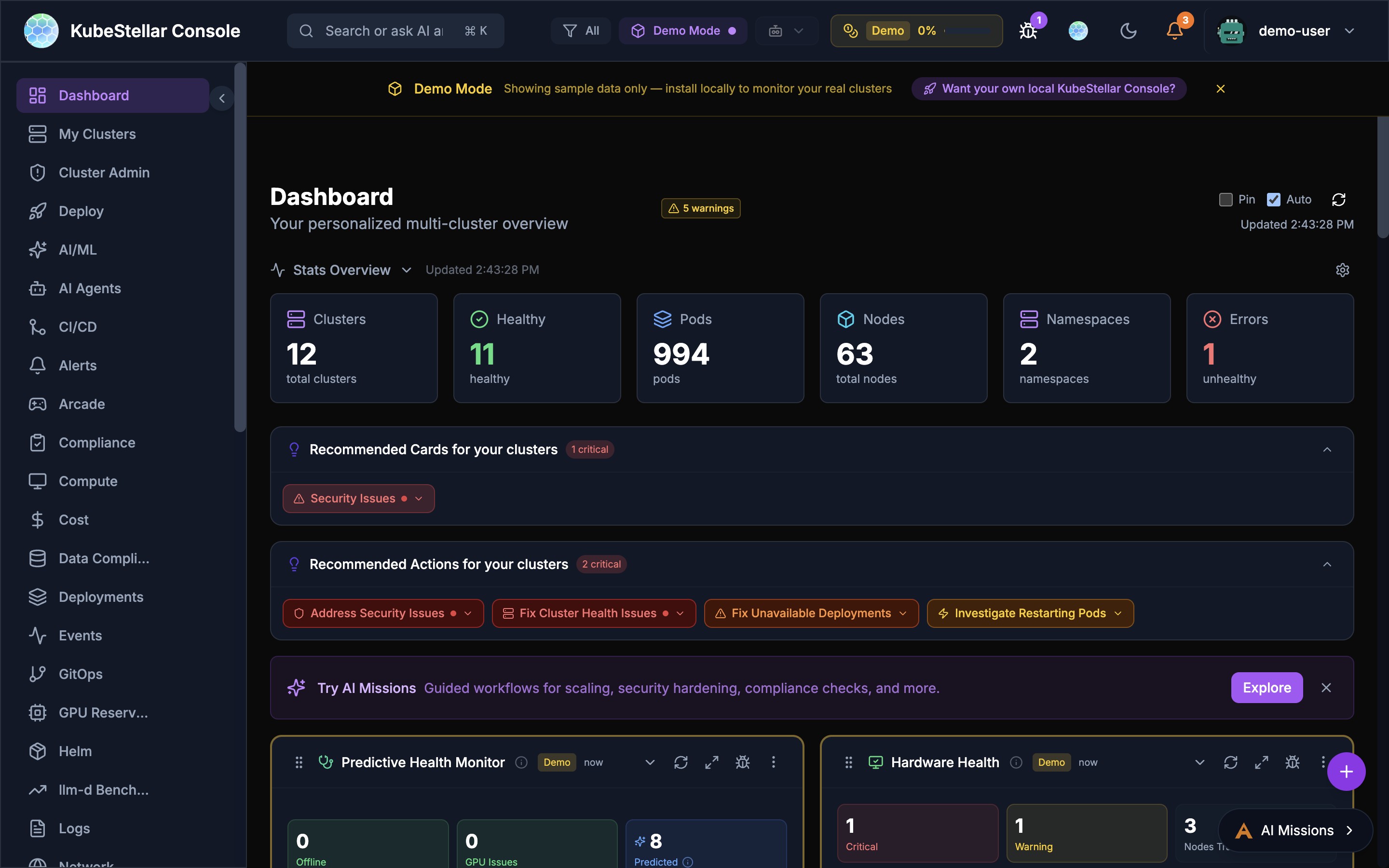
Stat blocks in the Stats Overview bar automatically format large numbers to prevent overflow:
- Values 10,000+ display as compact format (e.g.,
7.1Kinstead of7120) - Values 1,000,000+ display as millions (e.g.,
1.2M) - Values under 10,000 display as full numbers
- Memory values auto-scale through MB, GB, TB, and PB ranges
What’s New in April 2026
Updated Screenshots (April 6, 2026)
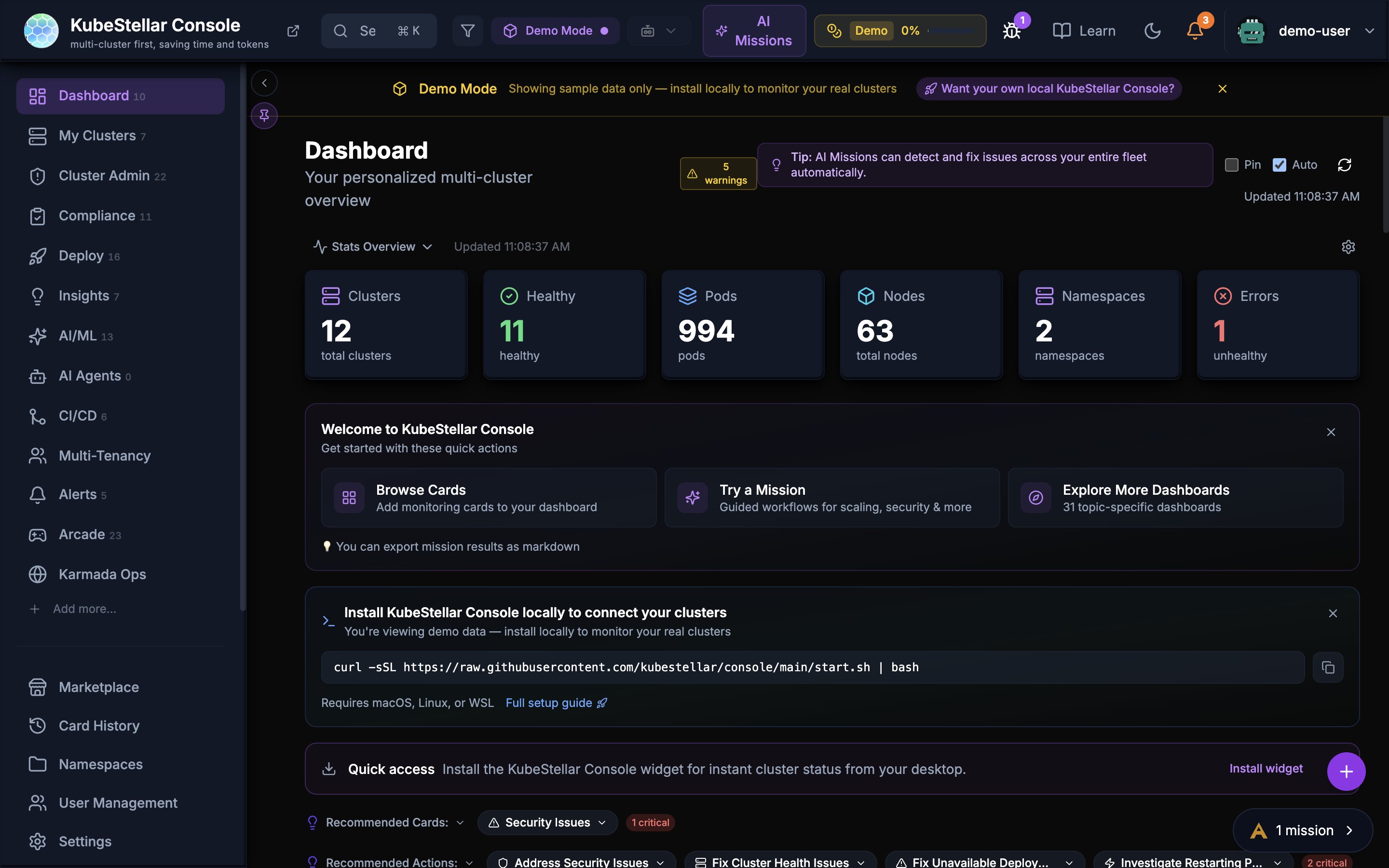
The dashboard with Stats Overview showing cluster health, pod counts, node metrics, and the Getting Started banner with quick actions.
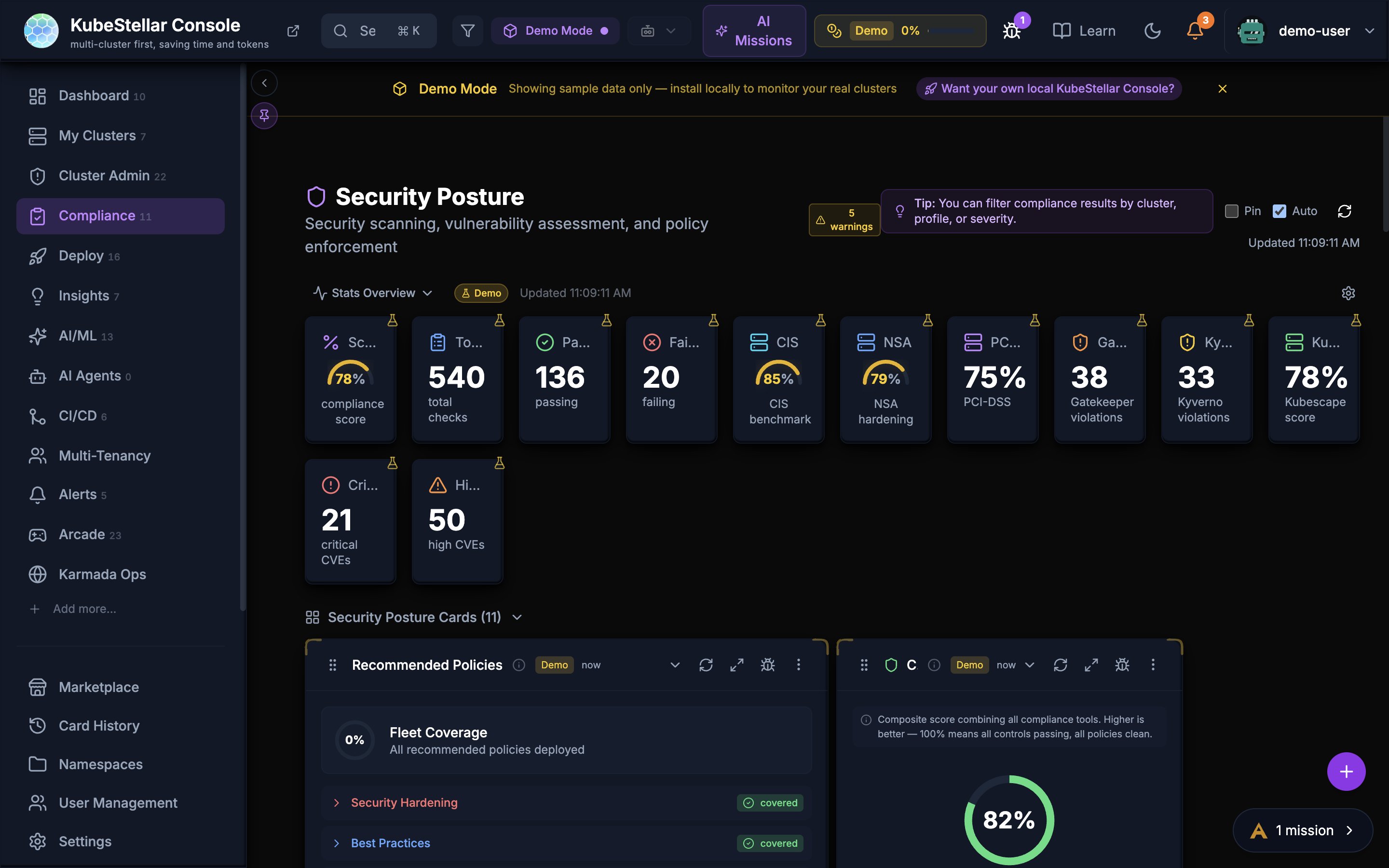
The Security Posture page with compliance scoring, policy coverage, and fleet-wide security assessment cards.
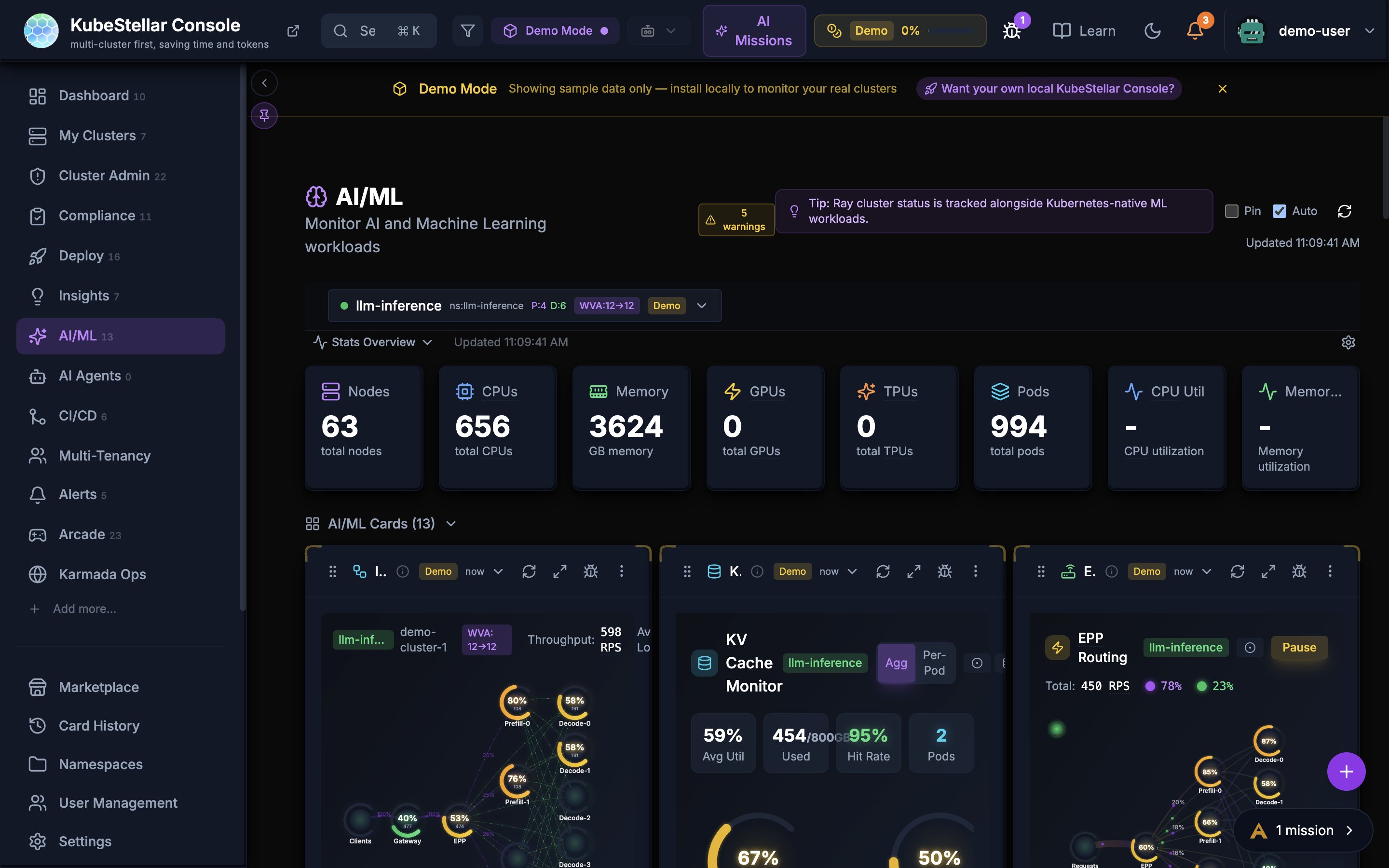
The AI/ML dashboard showing llm-d inference monitoring with KV Cache, EPP Routing, and throughput metrics.
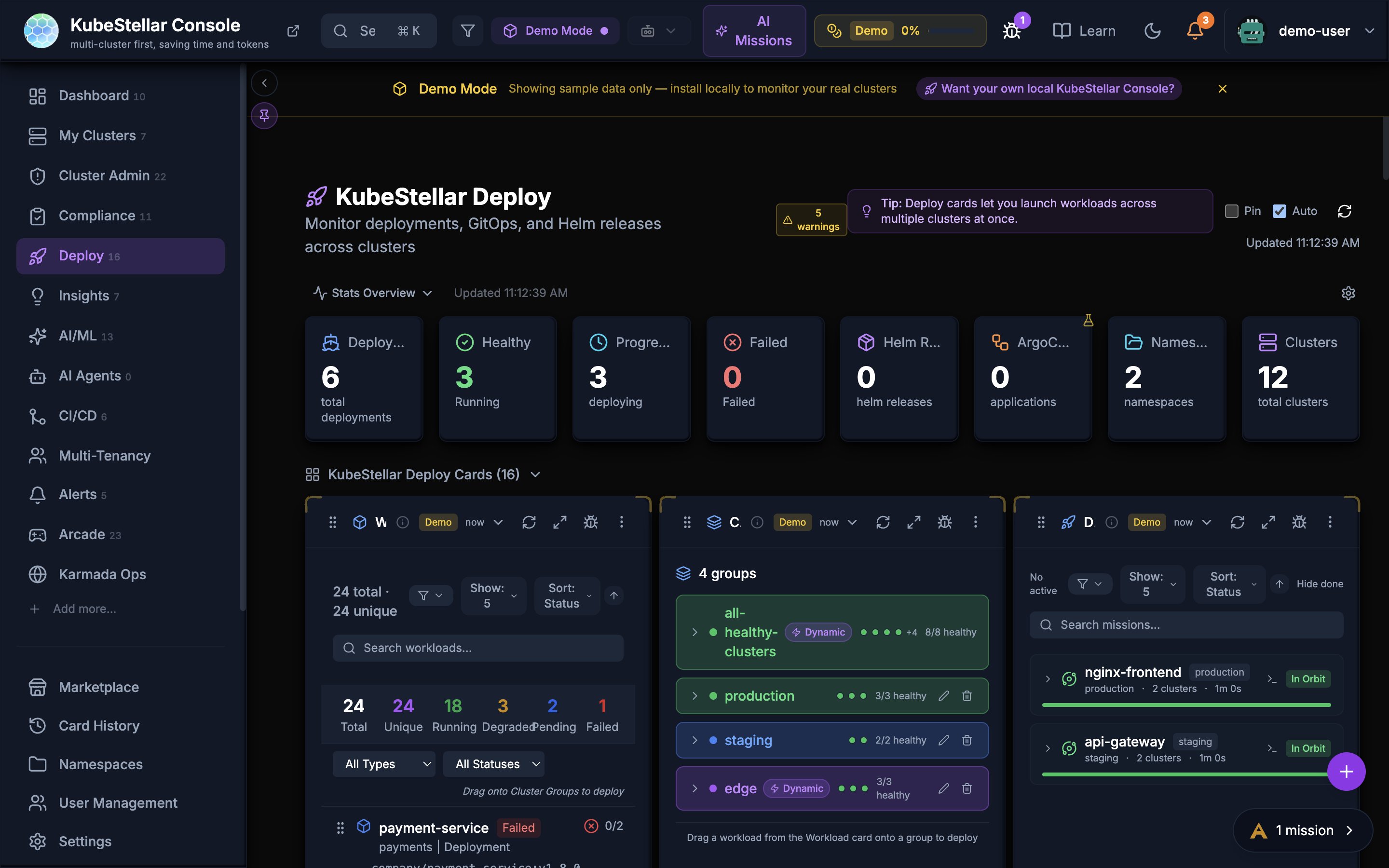
The Deploy page with workload deployment cards, cluster group targeting, and mission browser.
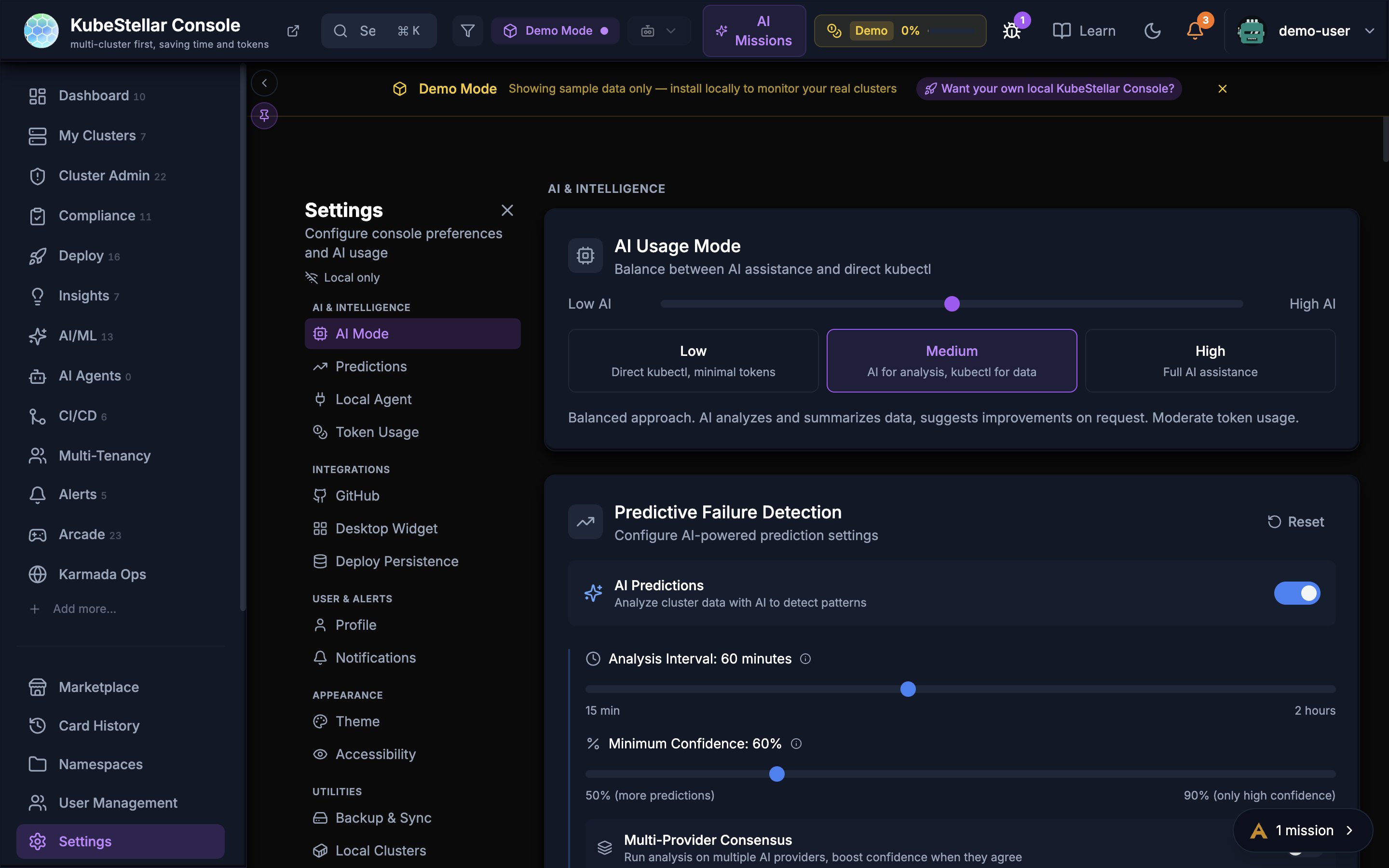
The Settings page with AI Mode configuration, Predictive Failure Detection settings, and the full settings sidebar.
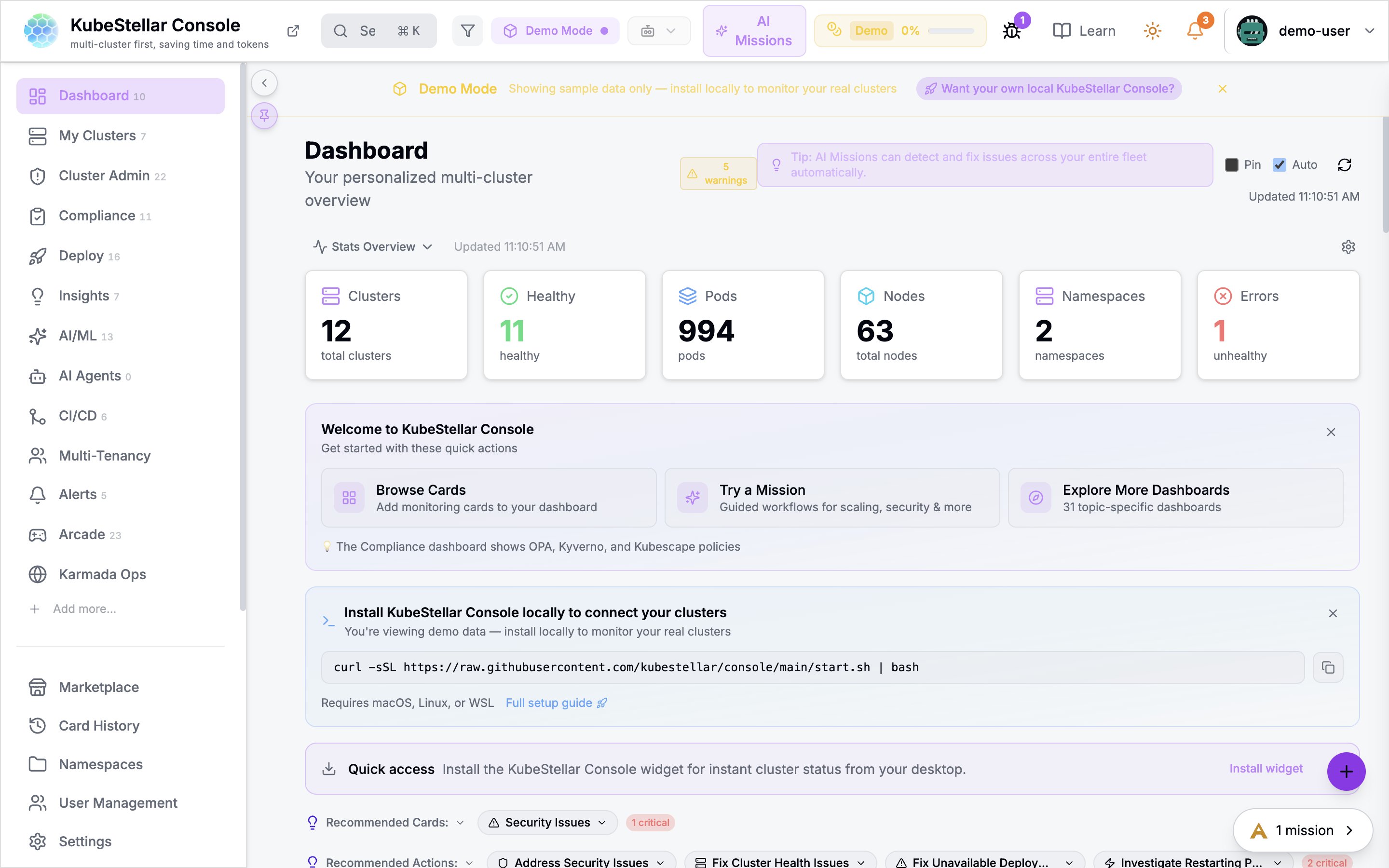
The KubeStellar Light theme providing a clean, high-contrast experience for well-lit environments.
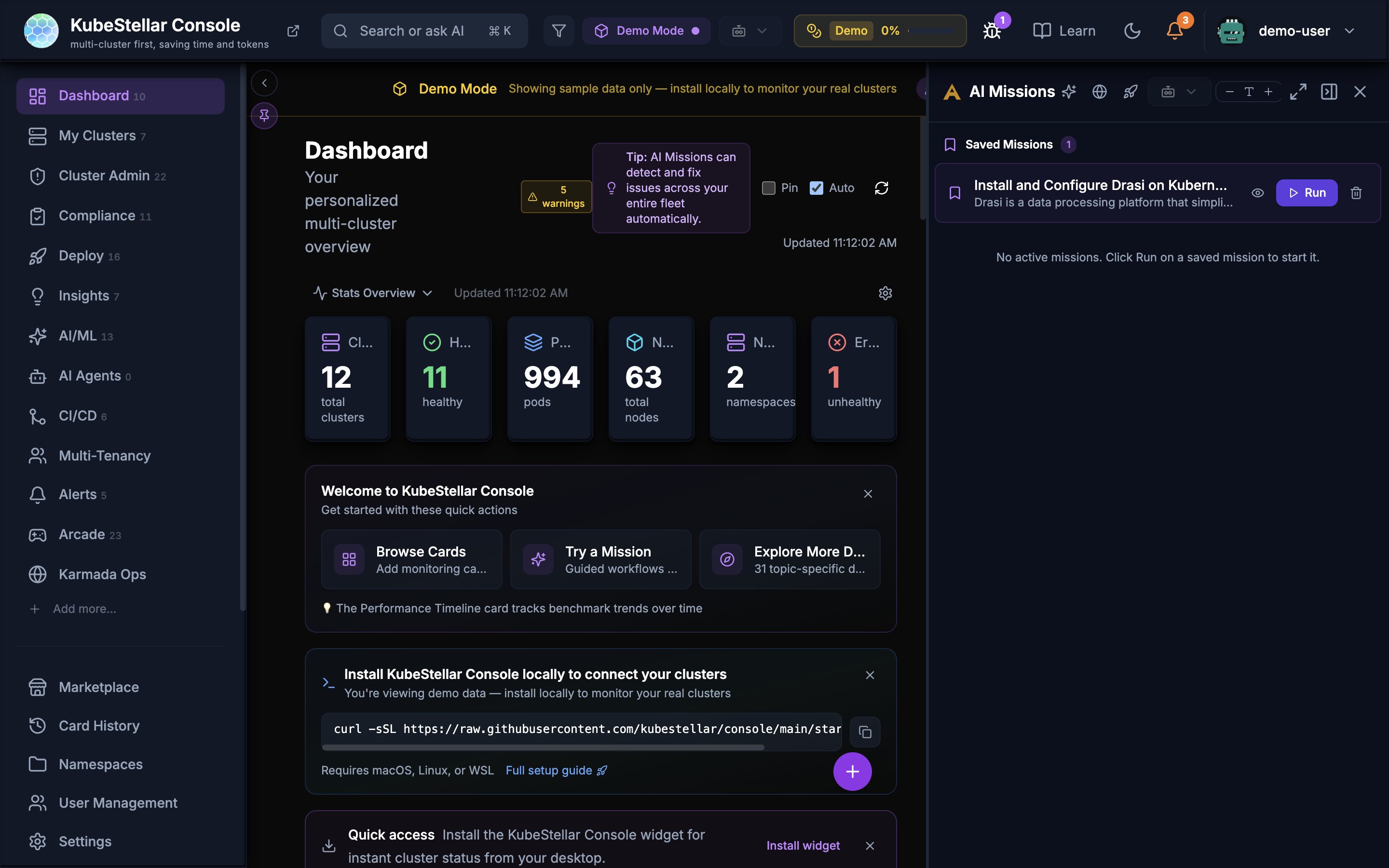
The AI Missions side panel with saved missions and mission execution controls.
Security Hardening (April 3-6)
Several security improvements were shipped across ~80 merged PRs:
- XSS sanitization: Eliminated all
dangerouslySetInnerHTMLusage in favor of DOMPurify-based safe rendering - Path traversal protection: API endpoints now validate and reject directory traversal sequences (
../) - CORS hardening: Stricter origin validation on the Go backend
- MCP query validation: All MCP endpoint query parameters are validated before being passed to cluster operations, preventing injection attacks
- WebSocket logout enforcement: Active WebSocket connections are now properly closed on logout, preventing stale authenticated sessions
- SSE recovery: SSE connections now auto-reconnect with exponential backoff after disconnection
Global Filter Wiring (April 3-6)
Multiple cards have been wired to the global cluster filter so they properly respond to cluster selection changes:
- Stats Overview: Stats bar now reflects selected clusters
- Predictive Health: Predictions filter to selected clusters
- All 14 cards with missing
isRefreshingstate have been wired to show accurate loading indicators
Performance Optimizations (April 3-6)
- AlertsContext optimization: Condition evaluation now runs in constant time instead of linear, eliminating jank on dashboards with many alert rules
- Bundle splitting: Large vendor chunks (React, D3, Recharts) are split into separate cacheable files, reducing re-download on app updates
- Lazy loading: Dashboard card components are lazy-loaded, reducing initial JavaScript payload
- Unmount guards: Cards with async data fetching (UpgradeStatus, PodHealthTrend) now cancel in-flight requests on unmount, preventing stale state updates
i18n Extraction (April 3-6)
278 hardcoded UI strings were extracted to i18n translation keys using react-i18next, preparing the console for future localization support.
Lint Cleanup (April 3-6)
Lint problems were reduced from 960 to 513 (47% reduction) across the codebase, improving code quality and developer experience.
Light Mode Improvements (April 3-6)
- Fixed theme toggle reliability between dark and light modes
- Improved contrast ratios in light mode for all flagged components
- Removed debug logging that was polluting the browser console during theme switches
Accessibility (April 3-6)
- Added missing ARIA labels to all interactive elements across the console
- Improved keyboard navigation in mission browser and card grids
Dashboard Tips (April 3-6)
All 28 dashboards now display rotating tips in the Getting Started banner. Tips cycle through contextual suggestions relevant to each dashboard without repeating.
Bug Fixes (April 3-6)
Key bug fixes across this period:
- Fixed Mission Control dialog UX bugs (11 issues in PR)
- Fixed marketplace install flow and added mission history pagination
- Fixed WebSocket race condition in kubectlProxy causing Safari errors
- Fixed cache clearing, session state, and key corruption issues
- Fixed Kube Chess castling-while-in-check rule violation
- Fixed blank card empty state and persist collapse/expand state across sessions
- Fixed node confirmation, etcd parsing, DNS scope, and RBAC performance issues
- Fixed duplicate notifications and filter analytics tracking
- Fixed dev startup scripts to handle stale port processes
Custom Card Data Fetching (useCardFetch)
Tier 2 custom cards can now fetch data from external APIs using the new useCardFetch(url, options) hook. The hook proxies requests through the Go backend at /api/card-proxy with comprehensive SSRF protection:
- URL validation: http/https, max 2048 characters
- Private IP blocking: DNS resolution blocks RFC 1918, loopback, and link-local addresses
- Response limits: 5 MB max response body, 15-second timeout
- Concurrency: Max 5 concurrent fetches per card
fetch/XMLHttpRequestremain blocked in the sandbox —useCardFetchis the permitted way for card code to access external data
Landing Page Performance
Public landing pages (/from-holmesgpt, /from-lens, /from-headlamp, /welcome, etc.) now load via a lightweight shell that skips the full authentication and provider stack. This reduces initial JavaScript from ~1.8 MB to ~200 KB and eliminates the “Loading” spinner that previously appeared on console.kubestellar.io where the Go backend is unavailable.
Visit Streak and Rotating Tips
Subtle engagement features added to the dashboard:
- Visit streak badge: A flame emoji and day count in the navbar tracks consecutive daily visits (appears when streak >= 2 days)
- Rotating tips: The Getting Started banner shows a “Did you know?” line that cycles through 18 tips without repeating
Security Improvements
- JWT HS256 enforcement: All JWT parsing now uses a centralized
middleware.ParseJWT()function that restricts token algorithms to HS256, preventing algorithm confusion attacks. This was a prerequisite for the CNCF TAG-Security self-assessment. - JWT URL leakage fix: Token data is no longer exposed in URLs or query parameters.
- Stale build detection: A “ tag and visibility/interval checks automatically reload the page when a newer build is deployed, preventing stale JavaScript chunk errors after deploys.
CNCF Incubation Readiness
New governance and security documents were added to the console repository:
- ROADMAP.md — Near-term, mid-term, and long-term plans with non-goals
- ARCHITECTURE.md — System diagram, component descriptions, data flows, and security architecture
- SUPPORT.md — Version support policy and platform compatibility matrix
- COMMUNITY.md — Communication channels and meeting schedule
- SELF-ASSESSMENT.md — TAG-Security self-assessment covering actors, actions, and threat model
- Updated OWNERS and SECURITY_CONTACTS
Mission Explorer UX
The Mission Explorer file browser received several UX improvements:
- File-type icons: Orange for YAML, green for Markdown, blue for JSON
- Resizable sidebar: Drag the edge to resize between 180—500px
- Source and PR links: Click to view or edit files directly on GitHub
- CNCF project icons: Files are annotated with CNCF project icons based on API group detection
- Refresh: Re-fetches file contents instead of just toggling expand/collapse
CI Quality Infrastructure
A comprehensive quality assurance infrastructure was introduced:
- Post-build safety checks: Detect Vite define corruption, MSW leaks, and bundle size regressions before deploy
- Post-merge Playwright verification: Runs Playwright tests against production after merge to catch deployment regressions
- Coverage suite: Sharded test coverage running on push to main, with auto-issue creation when coverage drops >5%
- AI Quality Assurance documentation: Describes the full CI pipeline from PR gate through coverage suite
Improved Modal Safety
Form modals throughout the console have been hardened against accidental data loss:
- Backdrop click protection: Form modals (StatsConfig, APIKeySettings, WidgetExport, NamespaceQuotas, CardChat) no longer close when clicking outside, preventing accidental data loss
- Escape key handling: Custom dropdowns (AlertBadge, ClusterSelect, FloatingDashboardActions) properly close with the Escape key
- Error notifications: Five critical operations (sign-in, OPA policy toggle, policy deletion, role updates, user deletion) now show toast notifications on failure instead of silent console errors
Semantic Color System
Error and status colors have been standardized across the entire console:
| Color | Meaning |
|---|---|
| Red | Errors, failures, critical issues |
| Yellow | Warnings, pending states |
| Orange | Warning-level alerts, medium severity |
| Green | Healthy, success, running |
| Blue | Active, in-progress, informational |
| Violet/Purple | AI/ML features and insights |
Crossplane Managed Resources Card
A new community-contributed card displays Crossplane managed resources:
- Shows managed resource count, provider health, and composite resource status
- Displays resource table with name, kind, provider, synced/ready status, and age
- Integrates with the Crossplane operator running in connected clusters
Cloud Native Buildpacks Card
A new community-contributed card monitors Cloud Native Buildpacks:
- Displays build counts, success rates, and active builders
- Shows recent builds with status, duration, and builder information
- Tracks buildpack versions and update availability
Add Cluster Dialog
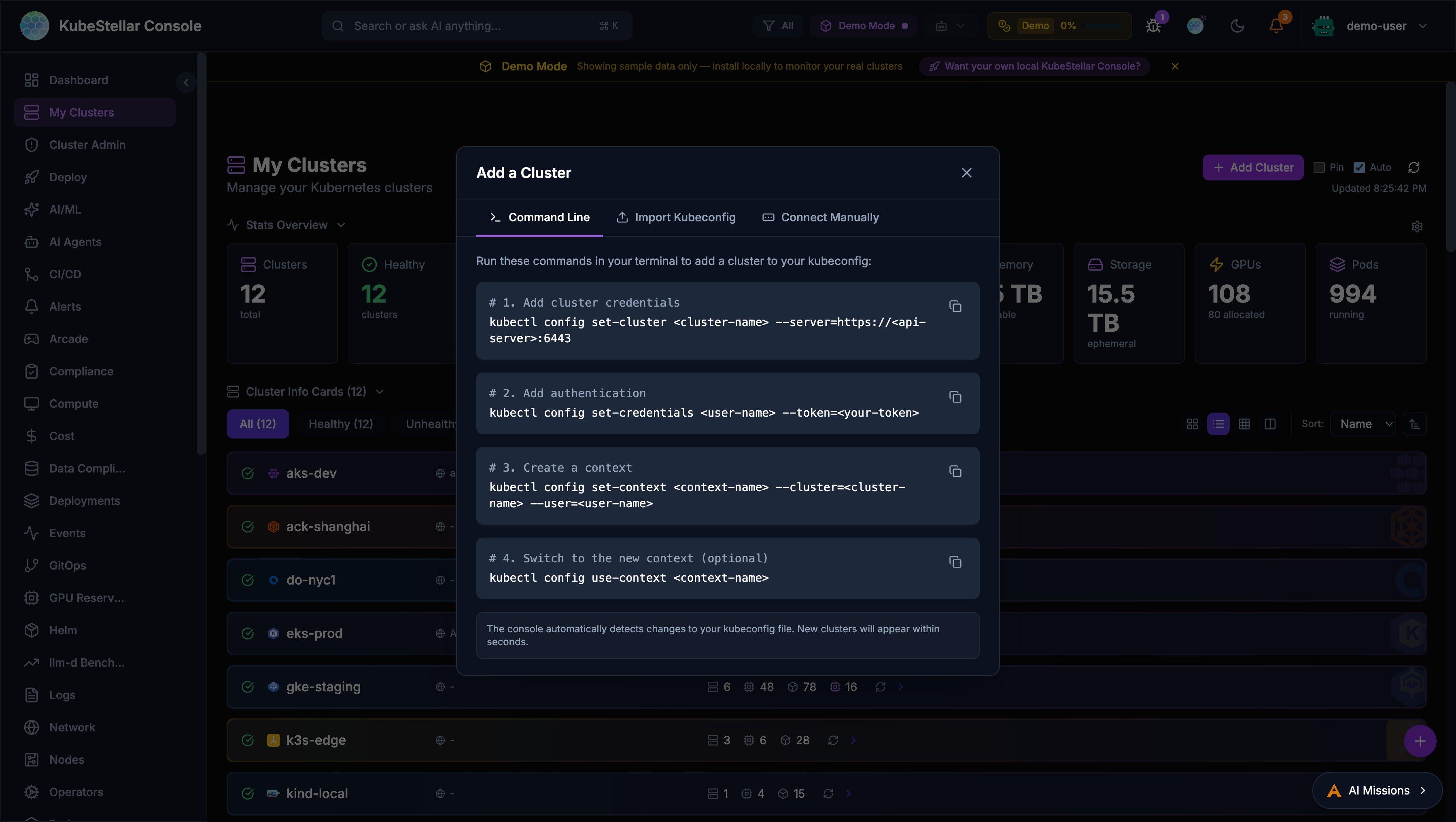
The console now provides a multi-method dialog for adding clusters, accessible from the Add Cluster button on the My Clusters page.
Command Line
Step-by-step kubectl commands with copy buttons:
kubectl config set-cluster— Add cluster credentialskubectl config set-credentials— Add authenticationkubectl config set-context— Create a contextkubectl config use-context— Switch to the new context
The console automatically detects kubeconfig changes and displays new clusters within seconds.
Import Kubeconfig
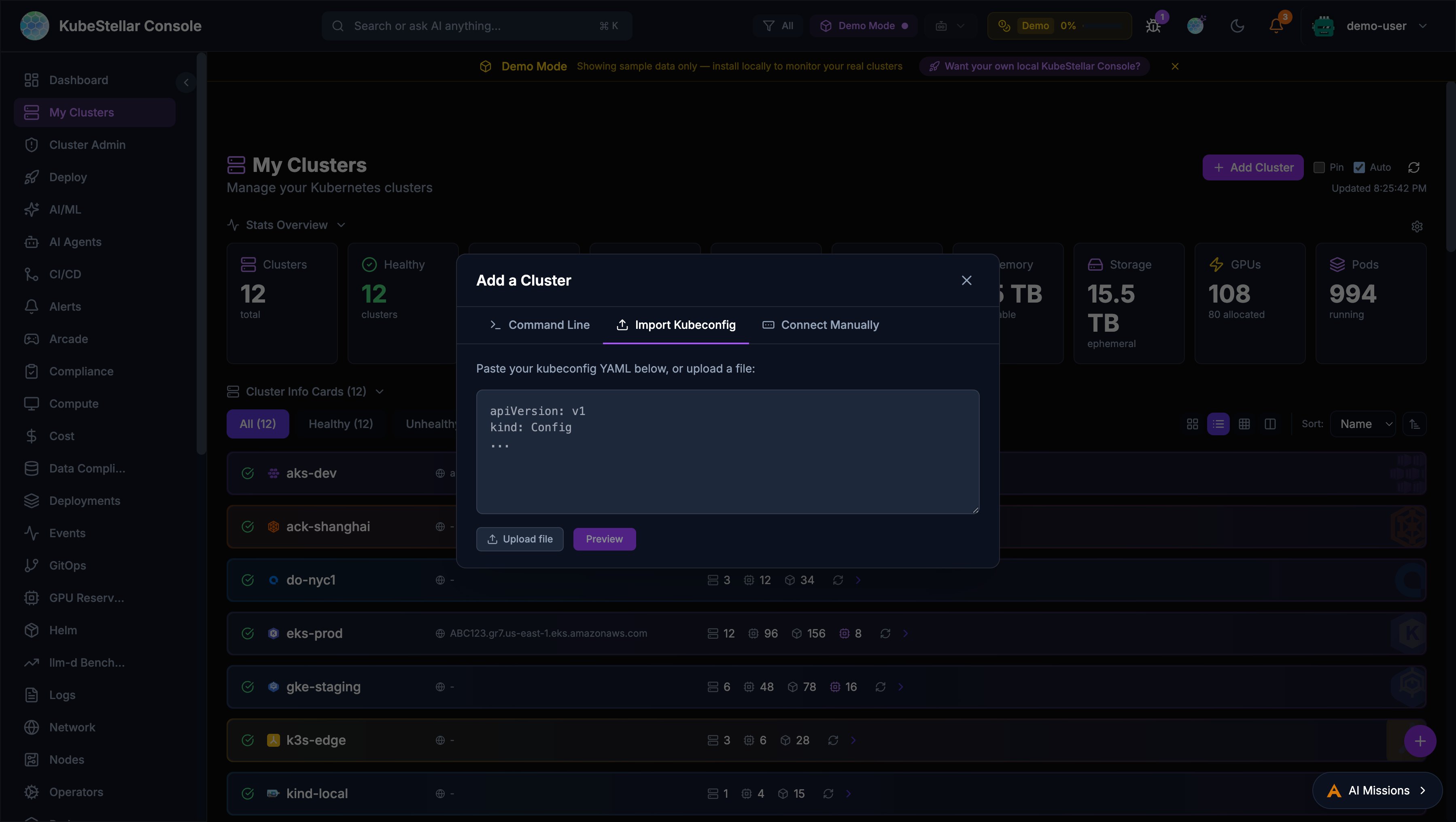
Paste or upload a kubeconfig file to import clusters:
- Preview which contexts are new vs. already existing —click merge into your active kubeconfig
- Automatic backup of your current kubeconfig (
~/.kube/config.bak-<timestamp>) - Requires kc-agent to be connected
Connect Manually
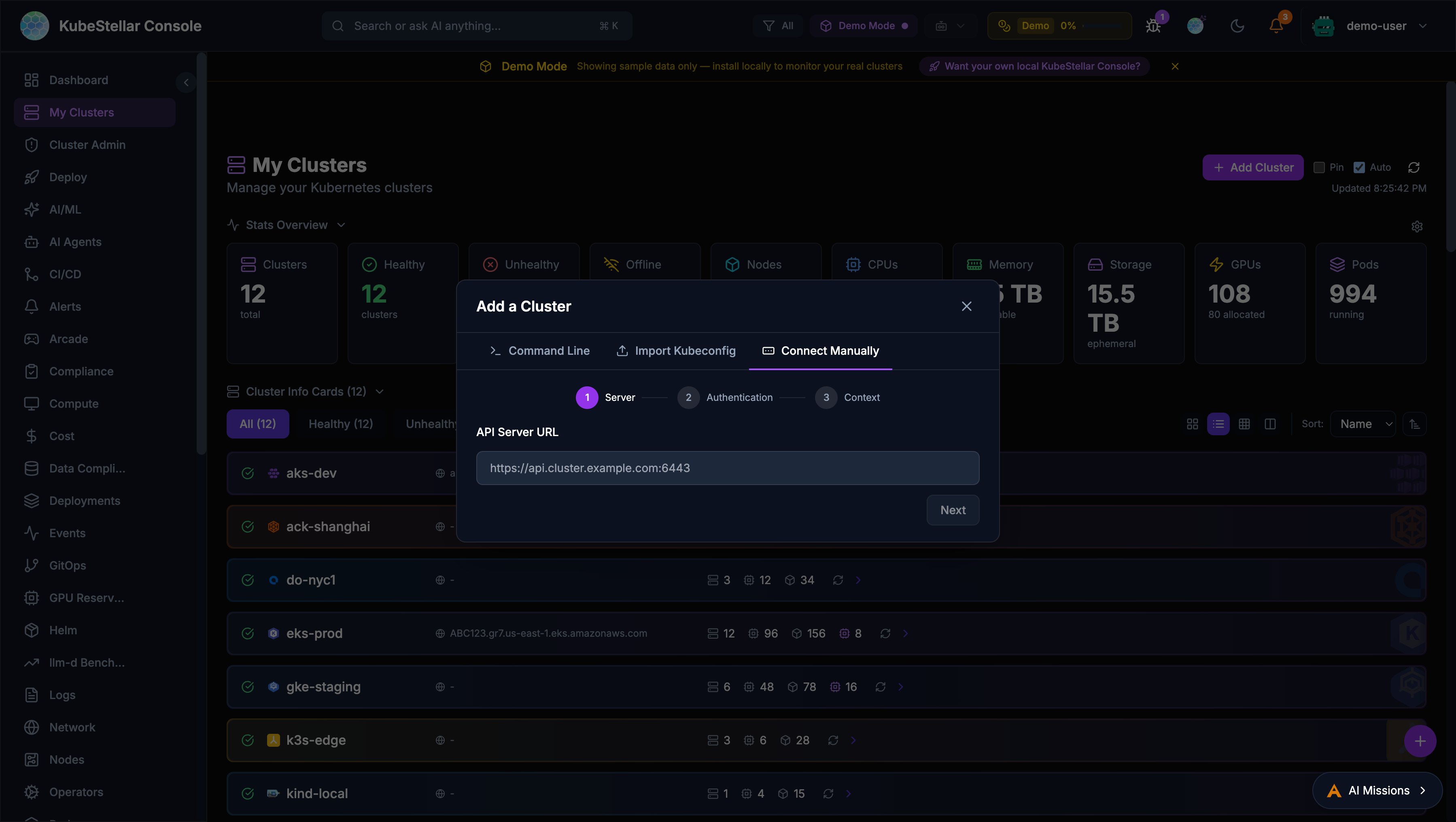
A 3-step wizard for manual cluster connection:
- Server URL: Enter the Kubernetes API server address
- Authentication: Choose between bearer token or client certificate
- Context settings: Name and configure the context
A Test Connection button verifies the cluster is reachable before adding it.
GPU Node Health Monitor
A new Proactive GPU Node Health Monitor card provides comprehensive health checking for GPU nodes across all connected clusters.
Health Check Tiers
The monitor runs checks at four configurable tiers:
| Tier | Name | What It Checks |
|---|---|---|
| Tier 1 | Critical | Node ready, cordoned status, stuck pods, NVIDIA operator pods, GPU reset/XID events |
| Tier 2 | Standard | + Capacity vs allocatable mismatch, pending GPU pods, pressure conditions |
| Tier 3 | Full | + Zero utilization, MIG drift, RDMA pods, failed jobs, evicted pods |
| Tier 4 | Deep | + nvidia-smi (ECC errors, temperature), dmesg GPU kernel errors, NVLink status |
CronJob Management
Install and manage GPU health check CronJobs directly from the card:
- Configure target namespace and cron schedule
- Install/uninstall per cluster
- Results stored in ConfigMaps with version stamps
- RBAC-aware: authorized users see install/uninstall buttons
Alert Integration
GPU health issues integrate with the alert system:
gpu_health_cronjobcondition type- Browser notifications with deep-link to affected nodes
- AI Diagnose button for automated troubleshooting
Accessibility (WCAG 2.1 AA)
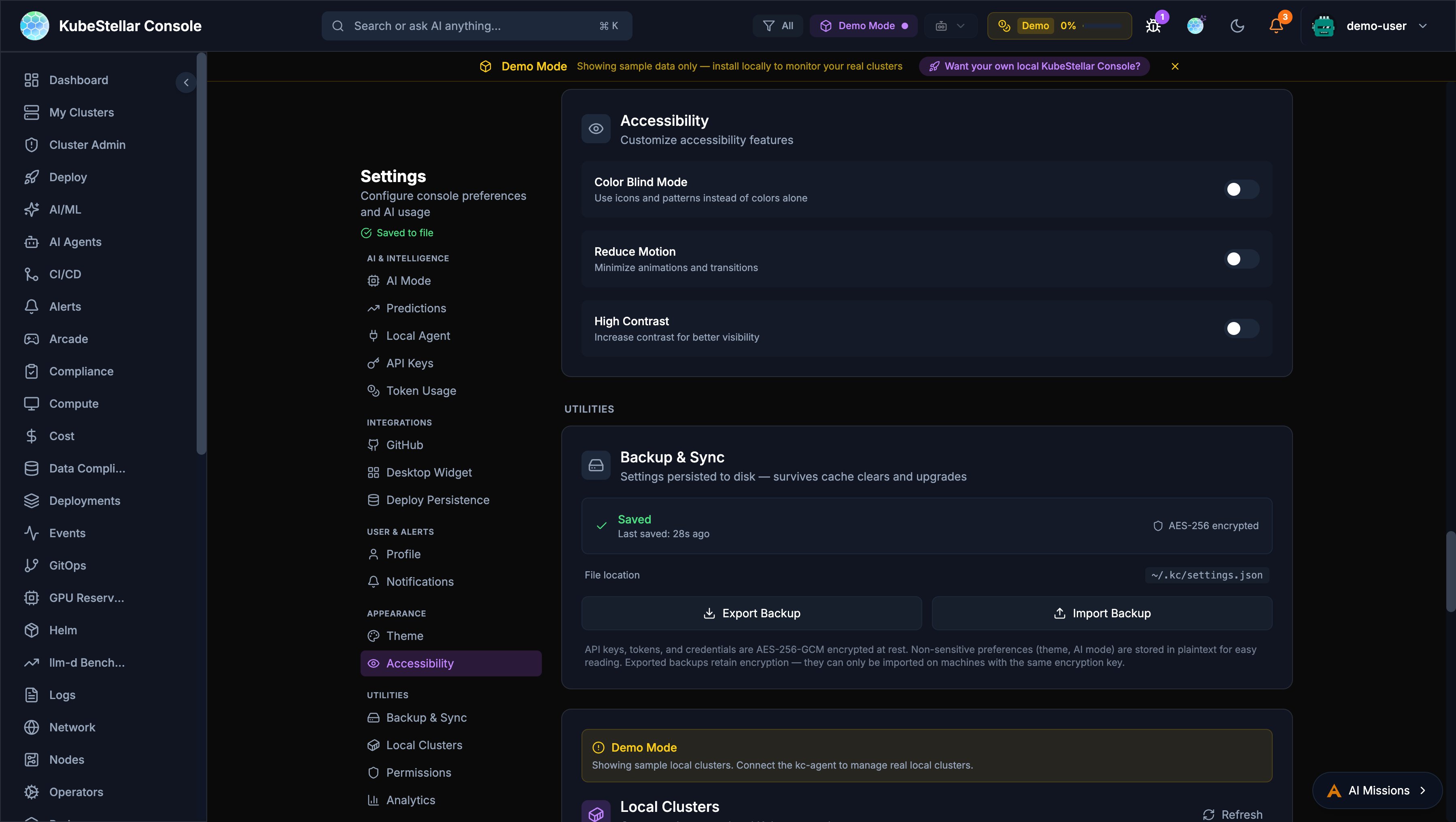
The console now meets WCAG 2.1 AA accessibility standards with three phases of improvements.
Keyboard Navigation
- Tab: Navigate between dashboard cards with visible focus rings
- Enter/Space: Open expanded card view
- Arrow keys: Navigate the card grid
- Escape: Close modals with automatic focus restoration
- Skip-to-content: Press Tab on page load to skip navigation
Screen Reader Support
- ARIA live regions announce dynamic content changes (demo/live badges, failure indicators, refresh status)
- Accessible names on cluster status badges, run dots, and chart containers
- Semantic ARIA landmarks for page regions
- Card menus use
role="menu"androle="menuitem"
Visual Accessibility
Configure in Settings > Appearance > Accessibility:
- Color blind mode
- Reduce motion
- High contrast mode
GA4 Product Telemetry
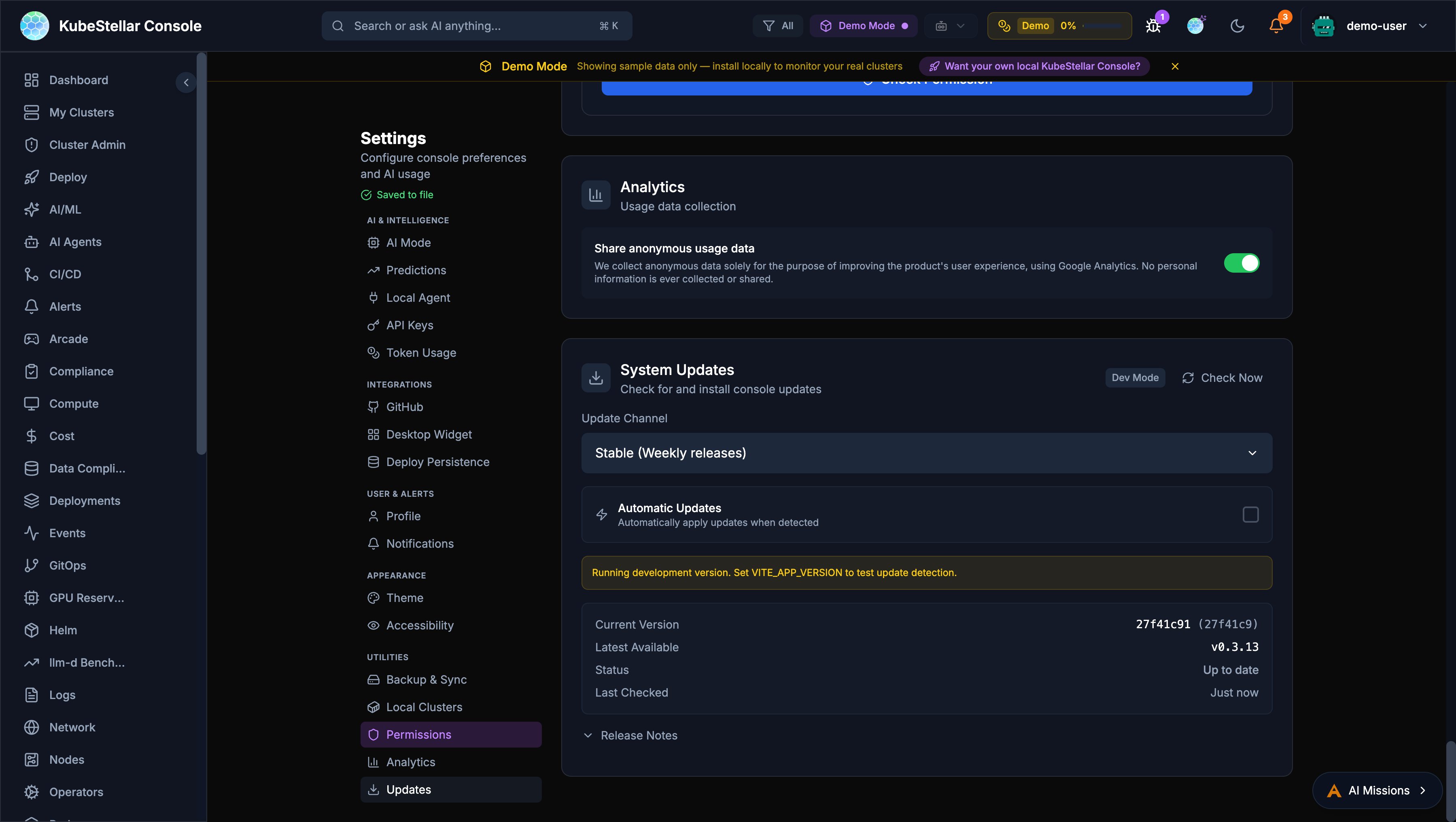
Anonymous Google Analytics 4 telemetry helps improve the product experience.
What Is Collected
- Page views and navigation patterns
- Card interactions (add, remove, drag, expand, configure)
- AI mission lifecycle events
- Auth events and tour progress
- All events prefixed with
ksc_— no PII is collected
Opting Out
Navigate to Settings > Analytics and toggle the analytics switch off.
Admin Configuration
Set the GA4 measurement ID via environment variable:
VITE_GA_MEASUREMENT_ID=G-XXXXXXXXXXAI Coding Agent Providers
The console now supports 17+ AI coding agent providers with a mixed-mode architecture.
Supported Providers
| Category | Providers |
|---|---|
| CLI Agents | Claude Code, Codex, Gemini CLI, Antigravity, Bob |
| IDE Agents | GitHub Copilot, Cursor, VS Code, Windsurf, JetBrains, Zed |
| API Agents | Claude Desktop, Open WebUI, Raycast |
| Frameworks | Cline, Continue |
Mixed-Mode Architecture
API agents (thinking) and CLI agents (execution) can work together:
- API agent reasons about the task
- CLI agent executes tools and commands
- API agent analyzes results
Provider capabilities are defined by a bitmask: Chat (1), ToolExec (2), or both (3).
Contribute Dialog
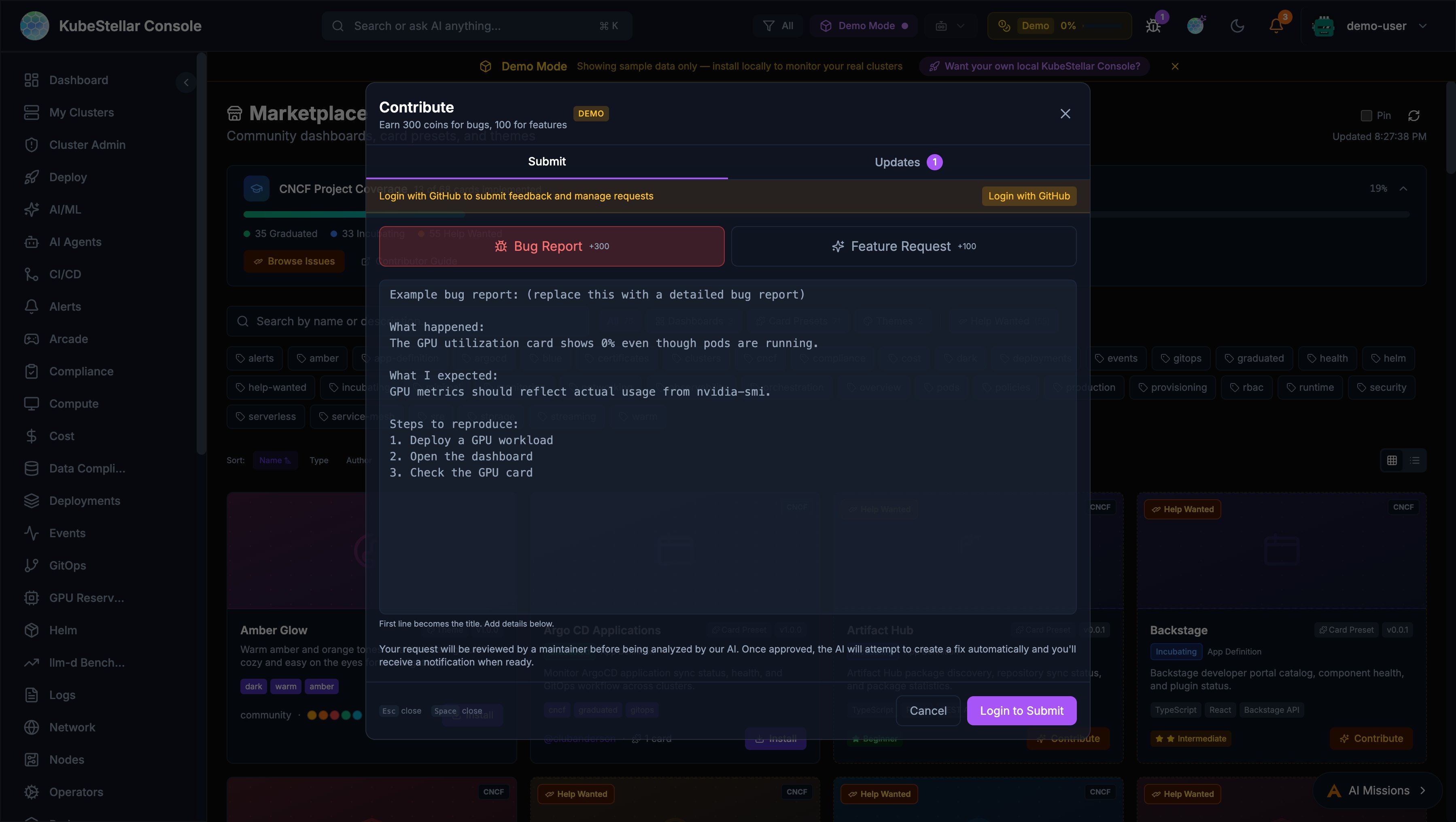
The feedback system has been redesigned as a unified Contribute dialog.
Entry Points
- Navbar bug icon: Opens the Contribute dialog
- Per-card bug button: Every card toolbar now has a bug report icon that pre-fills context
- Profile dropdown: “Contribute” menu item
Submit Tab
- Bug Report (+300 coins) and Feature Request (+100 coins)
- First line auto-extracts as title
- Enlarged textarea with example prompts
- Submissions open GitHub issues for tracking
Updates Tab
Merged view of your requests, notifications, and GitHub contributions in a single scrollable list.
GitHub Activity Rewards
Earn coins from GitHub activity across kubestellar and llm-d organizations:
| Activity | Coins |
|---|---|
| Bug issue opened | 300 |
| Feature issue opened | 100 |
| Other issue opened | 50 |
| PR opened | 200 |
| PR merged | 500 |
Contributor Ladder
An 8-tier progression system rewards sustained community contributions:
| Tier | Level | Coin Threshold |
|---|---|---|
| 1 | Observer | 0 |
| 2 | Participant | 100 |
| 3 | Contributor | 500 |
| 4 | Active Contributor | 1,500 |
| 5 | Reviewer | 5,000 |
| 6 | Maintainer | 15,000 |
| 7 | Lead | 50,000 |
| 8 | Legend | 150,000 |
Your level badge appears in the profile dropdown with a progress bar showing advancement toward the next tier.
Marketplace Author Profiles
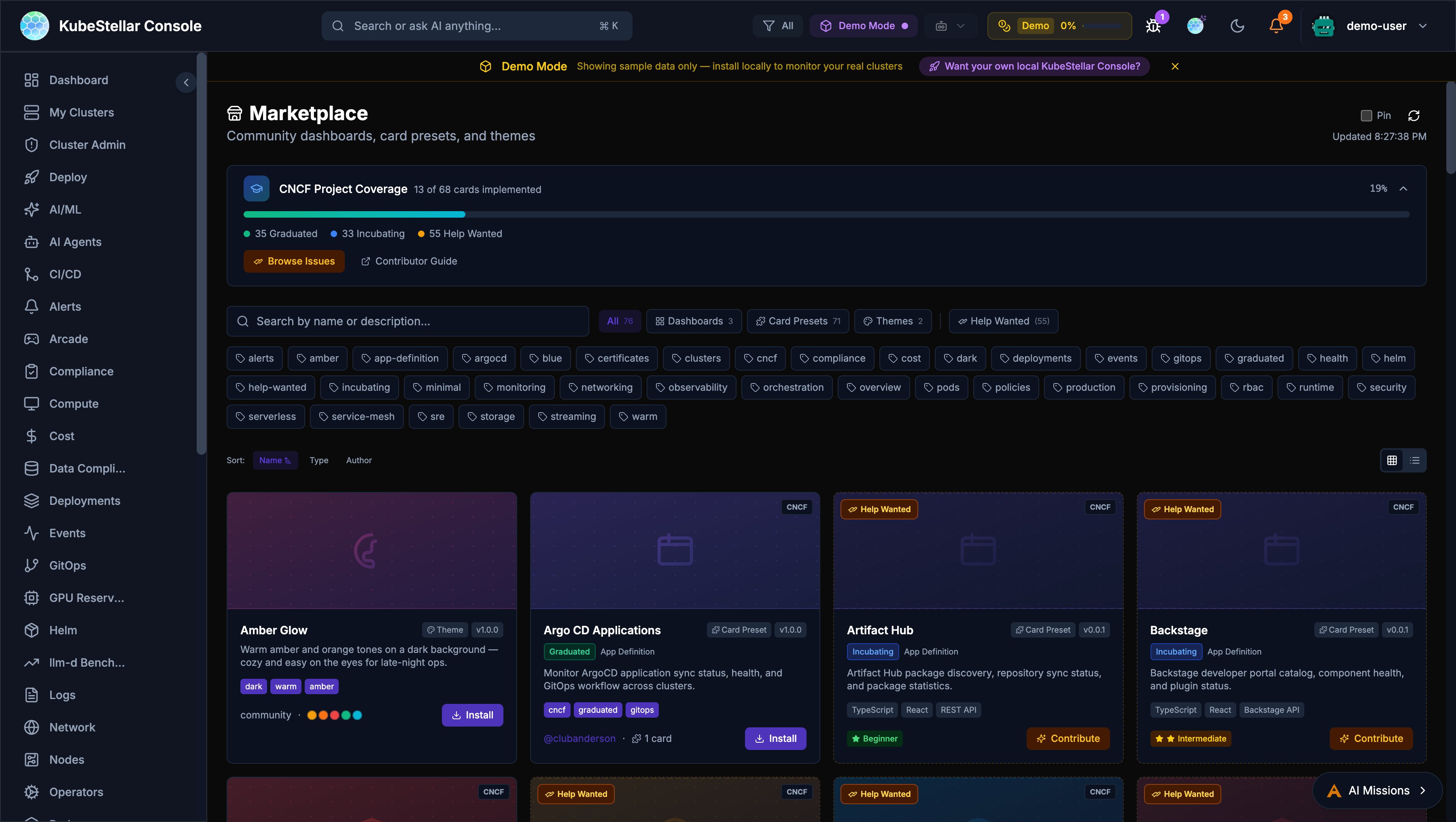
Marketplace items now display author attribution:
- GitHub handle: Linked
@handlewith profile URL - Hover cards: Show GitHub avatar, coin count (100 coins per merged PR), and per-repo PR breakdown
- Grid view: Full hover card on author name
- List view: Compact clickable link
Flatcar Container Linux Card
A new Flatcar Container Linux Status card in the Provisioning category:
- Node count running Flatcar Container Linux
- OS version distribution across nodes
- Update status — whether all Flatcar nodes are up to date
- Health indicator based on update currency
- Demo mode with realistic mock data; live mode from Kubernetes Node info
Real-Time Cluster Creation Progress
Creating or deleting clusters now shows phased progress with real-time WebSocket updates:
- Progress states:
validating→creating/deleting→done/failed - Inline progress banner with spinner and progress bar
- Docker pre-flight check: Catches missing Docker daemon before kind/k3d creation fails
- Auto-refreshes cluster list on completion
- Auto-dismiss on success
KeepAlive Route Caching
Dashboard navigation is ~18% faster with KeepAlive route caching:
- Previously visited dashboards render instantly without re-mounting or re-fetching
- LRU cache preserves up to 8 route component instances
- No configuration needed — transparent performance improvement
Mission Explorer / Browser (New in March 2026)
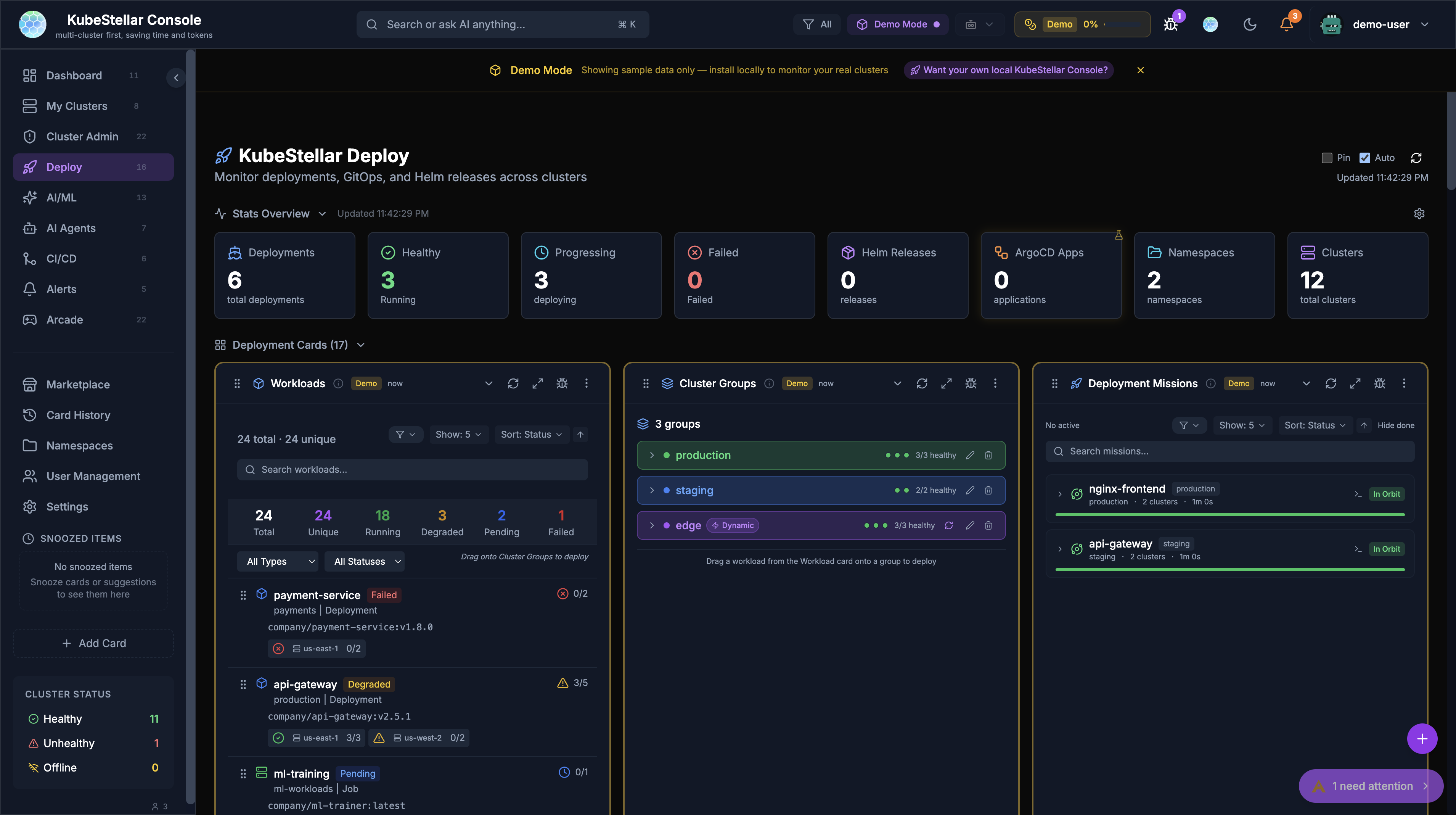
The Deploy page now includes a full-featured Mission Browser for discovering, sharing, and importing deployment missions across your multi-cluster environment.
Mission Discovery
The Mission Browser provides a searchable, filterable catalog of deployment missions:
- Installer Tab: Pre-built installer missions for common infrastructure (Helm charts, operators, CNCF projects)
- Solution Tab: End-to-end solution missions that combine multiple components
- Progressive Loading: Missions load incrementally with shimmer skeleton placeholders for smooth UX
- Deep-Links: Every mission has a shareable URL that preserves query parameters through OAuth login flows
Mission Sharing and Import
- Share Missions: Generate shareable links to specific missions with embedded configuration
- Smart Import Browser: Browse and import missions from the community with AI-powered recommendations
- Security Scanning: Imported missions are automatically scanned for security issues before deployment
- Saved Missions Panel: Quick access to previously saved missions from the sidebar
Mission Detail View
Clicking a mission opens a detail view with:
- Full description and prerequisites
- Step-by-step installation instructions
- Configuration options with sensible defaults
- Target cluster selection with compatibility checks
- Shimmer loading skeleton during data fetch for polished UX
Declarative GitOps Restart (Argo CD Integration)
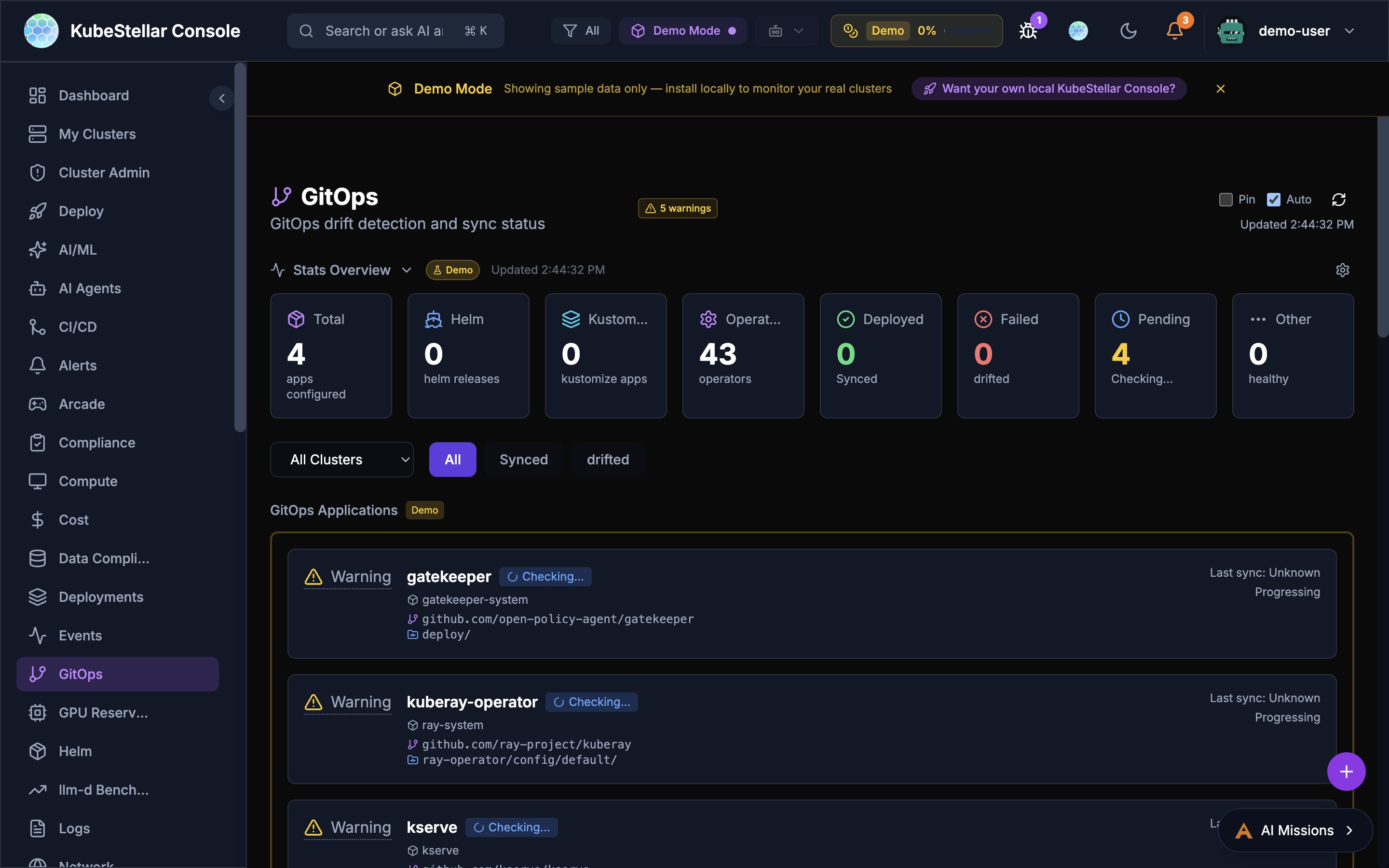
The GitOps dashboard now includes enhanced Argo CD integration with declarative restart capabilities.
Sync Now Button
The Argo CD card now includes a Sync Now button that triggers an immediate sync of ArgoCD applications:
—click sync for individual applications
- Bulk sync for all applications in a cluster
- Real-time sync status updates via SSE streaming
GitOps Restart Tab
A new GitOps Restart tab in the Argo CD drilldown view provides:
- Declarative restart of ArgoCD-managed applications
- Rolling restart with configurable strategy (RollingUpdate, Recreate)
- Restart history with timestamps and initiator tracking
- Integration with the alert system for restart failures
Developer Setup Dialog
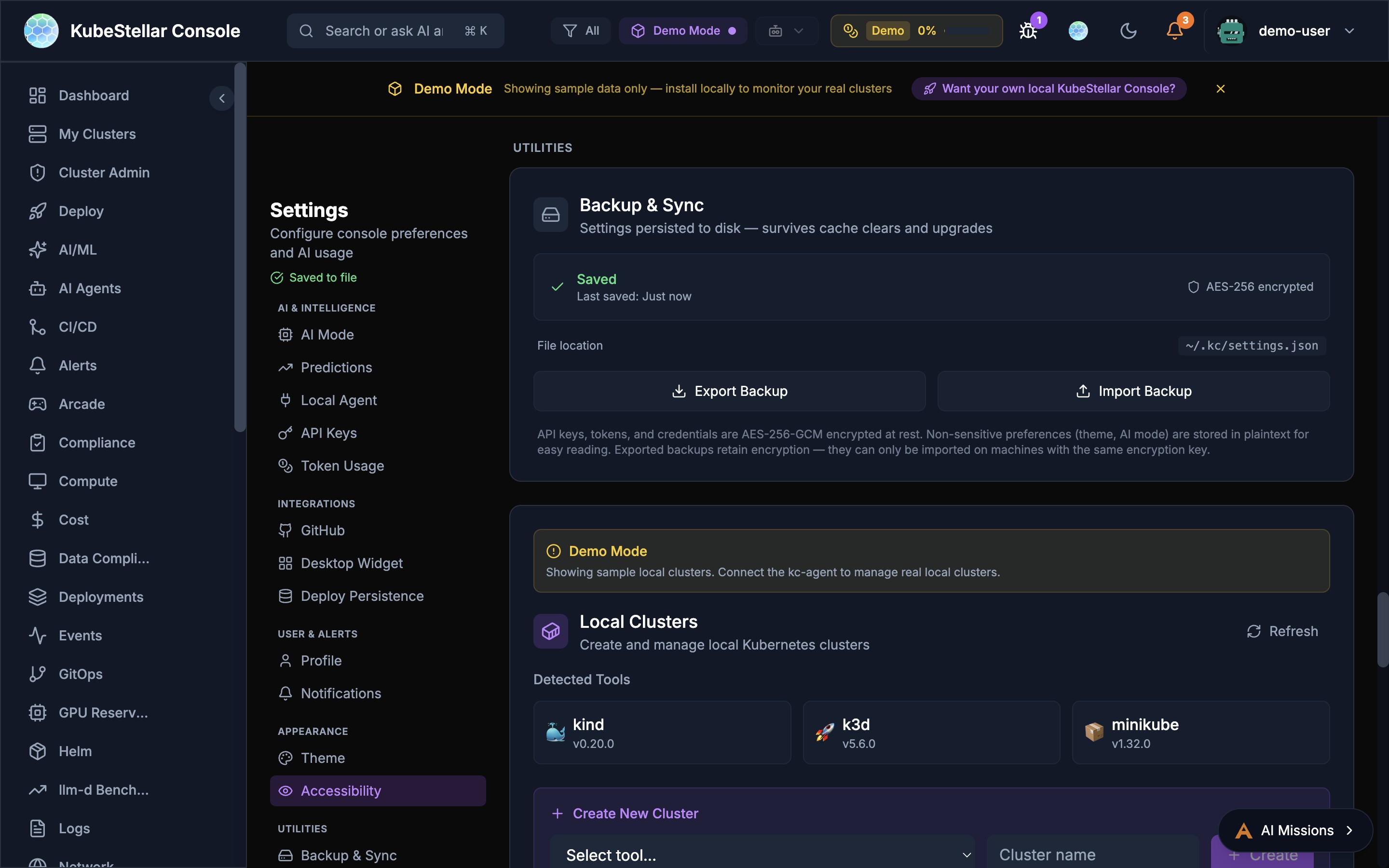
A new Developer Setup dialog helps contributors run the console from source with full OAuth integration.
Environment Prerequisites
The Developer channel in Settings > Updates now shows a comprehensive environment checklist:
- kc-agent: Connection status to the local Kubernetes agent
- Coding agent: Whether a coding agent (Claude Code, Cursor, etc.) is detected
- OAuth: GitHub OAuth configuration status (Detected/Configured/Not Set)
- GitHub token: Token status for API access
- Install mode: Source (dev) vs binary vs Helm detection
- Git status: Uncommitted changes warning
Source Update Workflow
For developers running from source:
- Pull & Build:-click command to pull latest code and rebuild
- Restart: Restart all processes (frontend, backend, kc-agent)
- Automatic Updates: Toggle to automatically apply updates when detected
- Version tracking: Shows current commit, latest on main, and commit diff
Contributor Leaderboard
The Updates tab in the Settings page now includes a Contributor Leaderboard that ranks community members by their contributions.
Ranking Criteria
Contributors are ranked by a composite score including:
- Pull requests merged
- Issues opened and resolved
- Code review activity
- Documentation contributions
Display
- Top contributors shown with GitHub avatars and contribution counts
- Per-repository breakdown of activity
- Historical trend showing contribution velocity
AI Agent Improvements
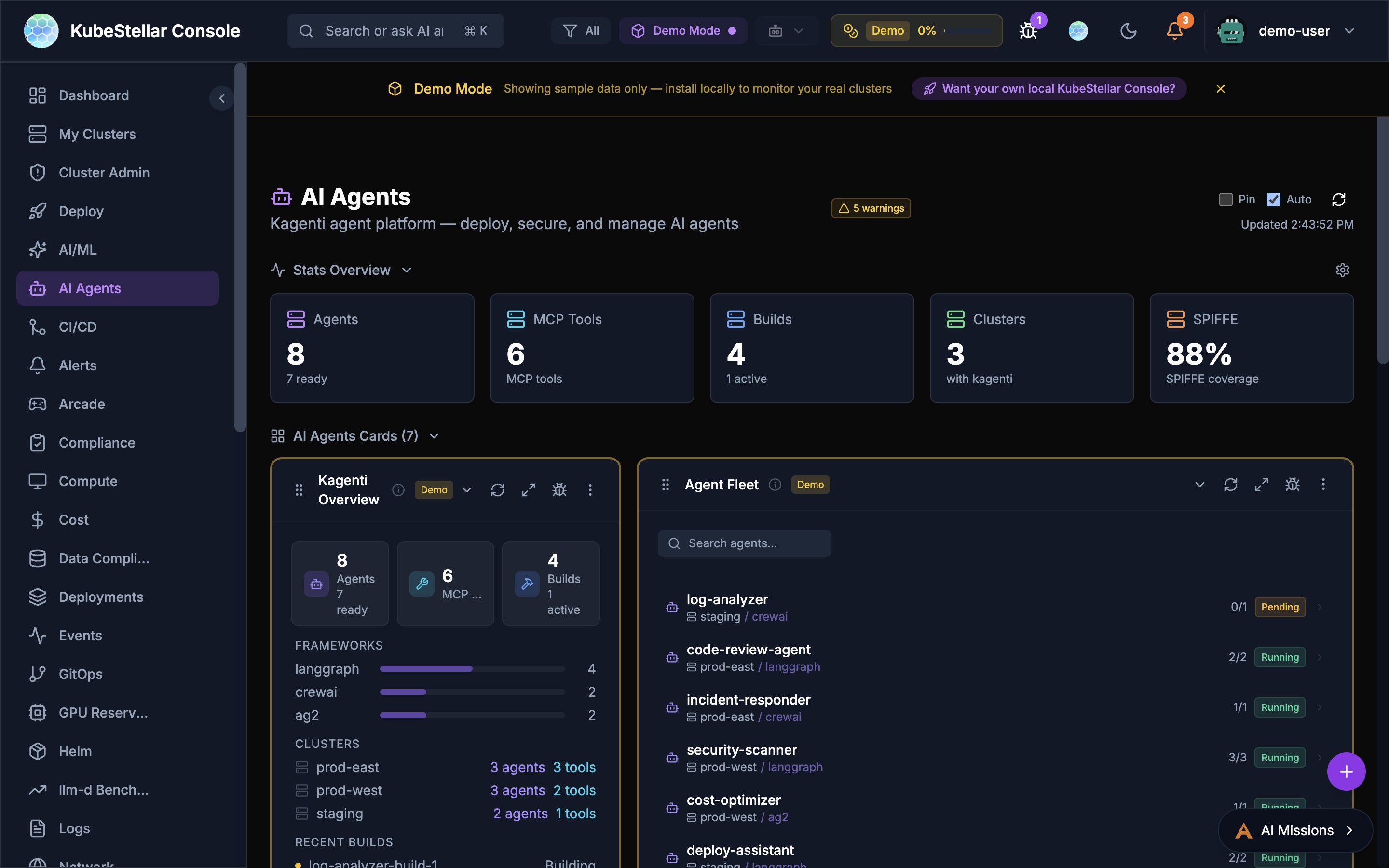
The AI Agents dashboard has received significant usability improvements.
Agent On/Off Toggle
- New toggle switch to enable/disable individual AI agents
- Agent state persists across sessions with agent memory
- Visual “Live” indicator shows when an agent is actively processing
None Option
- A new “None” option allows disabling all AI agents while keeping the dashboard visible
- Useful for monitoring agent status without active AI assistance
- The header AI indicator shows the current agent state (AI On/Off/None)
Agent Fleet Enhancements
The Agent Fleet card now shows:
- Framework information (LangGraph, CrewAI, AG2) per agent
- Build status with recent build history
- MCP Tool Registry with searchable tool listing
- Agent Discovery with skill tags and cost analysis capabilities
New Monitoring Cards
Several new monitoring cards have been added to the card catalog.
CRI-O Runtime Card
Monitors CRI-O container runtime across clusters:
- Container count and runtime version
- Image pull statistics and cache hit rates
- Runtime health status per node
Contour Ingress Card
Monitors Contour/Envoy ingress controllers:
- HTTP proxy count and status
- Request throughput and latency metrics
- TLS certificate expiry tracking
CoreDNS Card
Monitors CoreDNS instances across clusters:
- Query rate and cache hit percentage
- Error rate and SERVFAIL tracking
- Per-zone query distribution
Thanos Card
Monitors Thanos components for long-term Prometheus storage:
- Store gateway status and block count
- Query frontend cache hit rates
- Compactor progress and retention status
OPA Policy Improvements
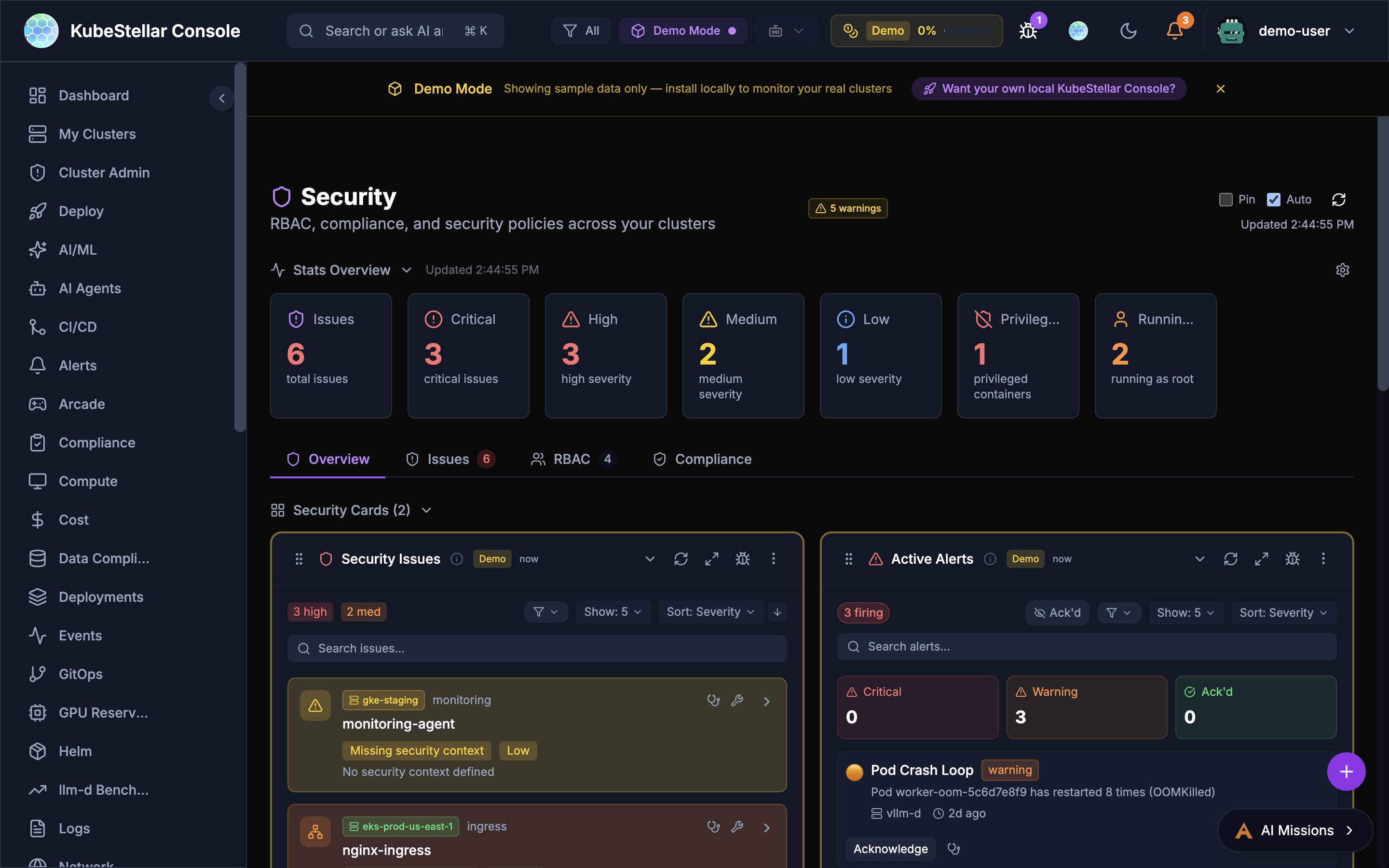
The OPA (Open Policy Agent) integration has been significantly enhanced.
AI-Driven Create Policy Modal
- New Create Policy modal with AI-assisted policy generation
- Describe your policy intent in natural language
- AI generates Rego policy code with proper constraint templates
- Preview and test policies before deployment
Parallel Cluster Checks
- OPA policy checks now run in parallel across all connected clusters
- Dramatically reduced check times for environments with many clusters
- Progress indicator shows check completion per cluster
Two-Phase Loading
- Phase 1: Load policy metadata (fast, cached)
- Phase 2: Load violation data (background, per-cluster)
- Cards show policy structure immediately, then populate violation counts
Alert Deduplication
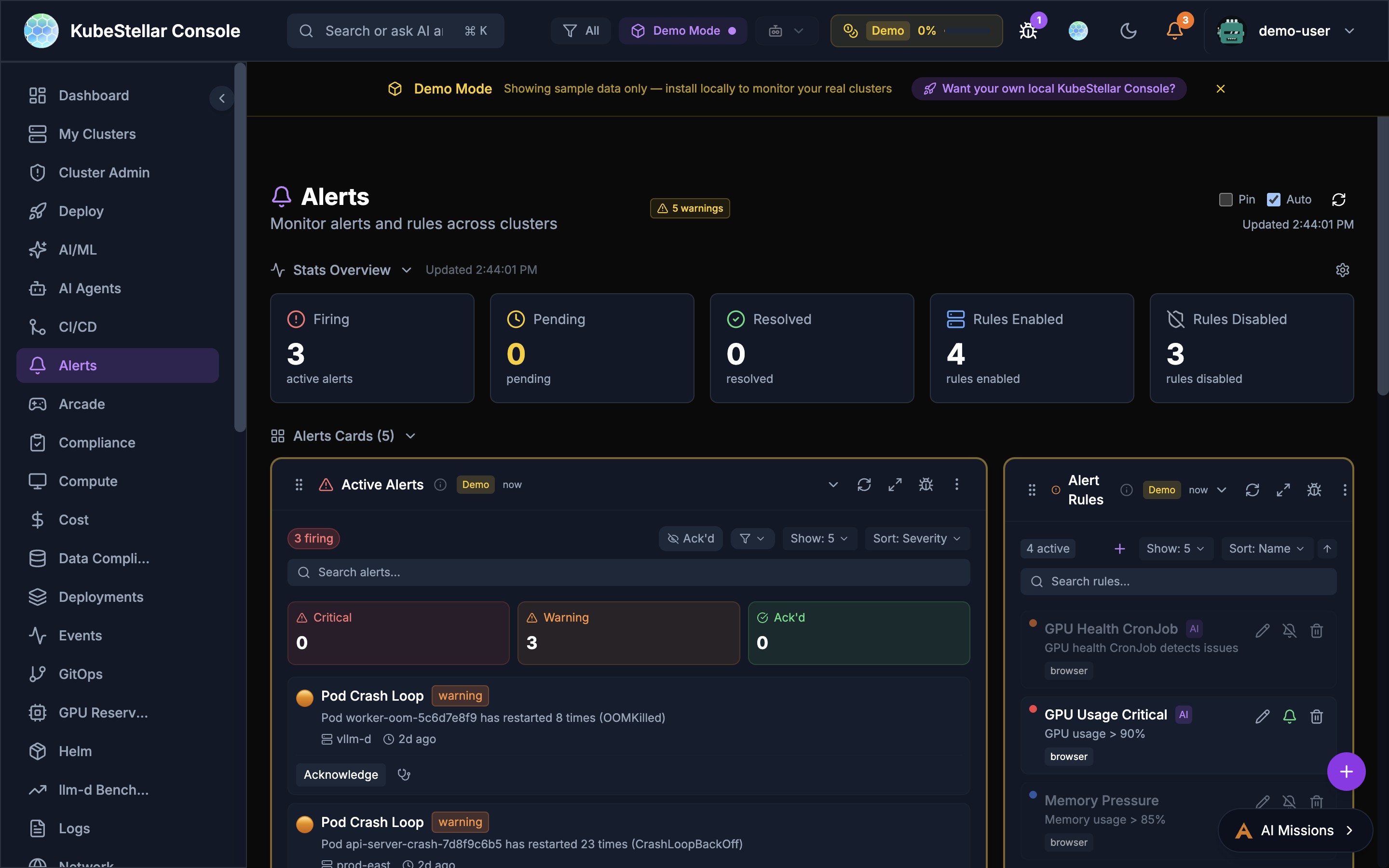
The alert system now includes type-aware deduplication to prevent duplicate alerts from cluttering the dashboard.
How It Works
- Alerts are deduplicated based on a composite key of: alert type, source cluster, affected resource, and severity
- When duplicate alerts arrive, the system increments a count rather than showing separate entries
- The most recent occurrence timestamp is preserved
- Deduplication works across both real-time SSE streams and REST polling
Benefits
- Cleaner alert view during cluster-wide events (e.g., node failures that trigger many pod alerts)
- Accurate alert counts without inflation from duplicate sources
- Faster alert page rendering with fewer DOM elements
macOS Native Notifications
Console notifications now integrate with macOS native notifications:
- Alerts and critical events trigger native macOS notification banners
- Clicking a notification opens the console and navigates to the relevant page
- Notification grouping by severity level
- Configurable in Settings > Notifications
Marketplace Theme Persistence
Marketplace themes now survive localStorage clears:
- Theme selections are backed up to the server-side user profile
- On localStorage clear (e.g., browser cache wipe), themes are restored from the server
- No more losing custom theme selections after clearing browser data
OAuth Status Improvements
The OAuth status indicator in the developer panel has been improved:
- No more false “not configured” flash during startup
- OAuth status shows accurate state immediately: Detecting -> Configured/Not Set
- Deep-link query parameters are preserved through the OAuth login flow
- Returning from GitHub OAuth redirects to the original deep-linked page
Performance Improvements
Vendor Splitting and Compression
- JavaScript bundles are now split by vendor to optimize caching
- Gzip and Brotli compression reduce transfer sizes
- Vendor chunks (React, D3, etc.) are cached separately from application code
- Cache headers ensure vendor chunks survive application updates
Dashboard Import Suggestions
- Lazy Knowledge Base matching for import suggestions
- Suggestions load progressively as the KB is indexed
- Reduced initial page load by deferring suggestion computation
GA4 Analytics Enhancements
Campaign Tracking
- UTM parameter support for tracking traffic sources
- Campaign-aware event tagging for marketing attribution
- Referrer tracking for community link sharing
Engagement Time Fix
- Corrected engagement time calculation for accurate session duration reporting
- Page visibility API integration ensures background tabs don’t inflate metrics
Shimmer Loading Skeleton
Mission detail views and other data-heavy pages now use shimmer loading skeletons instead of spinners:
- Anatomically correct placeholders that match the final layout
- Smooth shimmer animation for perceived performance
- Progressive content reveal as data arrives
- Applied to mission details, cluster cards, and agent fleet views
Accessibility Improvements
Additional accessibility improvements in this release:
ARIA Labels
- Comprehensive ARIA labels on all interactive elements
- Screen reader announcements for dynamic state changes
- Improved focus management in modals and dropdowns
Touch Targets
- All interactive elements now meet the 44px minimum touch target size
- Improved tap accuracy on mobile and tablet devices
- Consistent button sizing across the sidebar and toolbar
Keyboard Navigation
- Full keyboard navigation support for the mission browser
- Arrow key navigation in card grids
- Escape key handling in all modal and dropdown contexts
Direct Issue Route (New in March 2026)
Navigate to /issue in your running console to immediately open the feedback modal. This route can be shared as a direct link for bug reports and feature requests (e.g., http://localhost:8080/issue).
- Requires GitHub OAuth to be configured
- The route redirects to the dashboard and opens the Contribute dialog automatically
- Referenced in CONTRIBUTING.md for quick issue filing
Resizable Sidebar (New in March 2026)
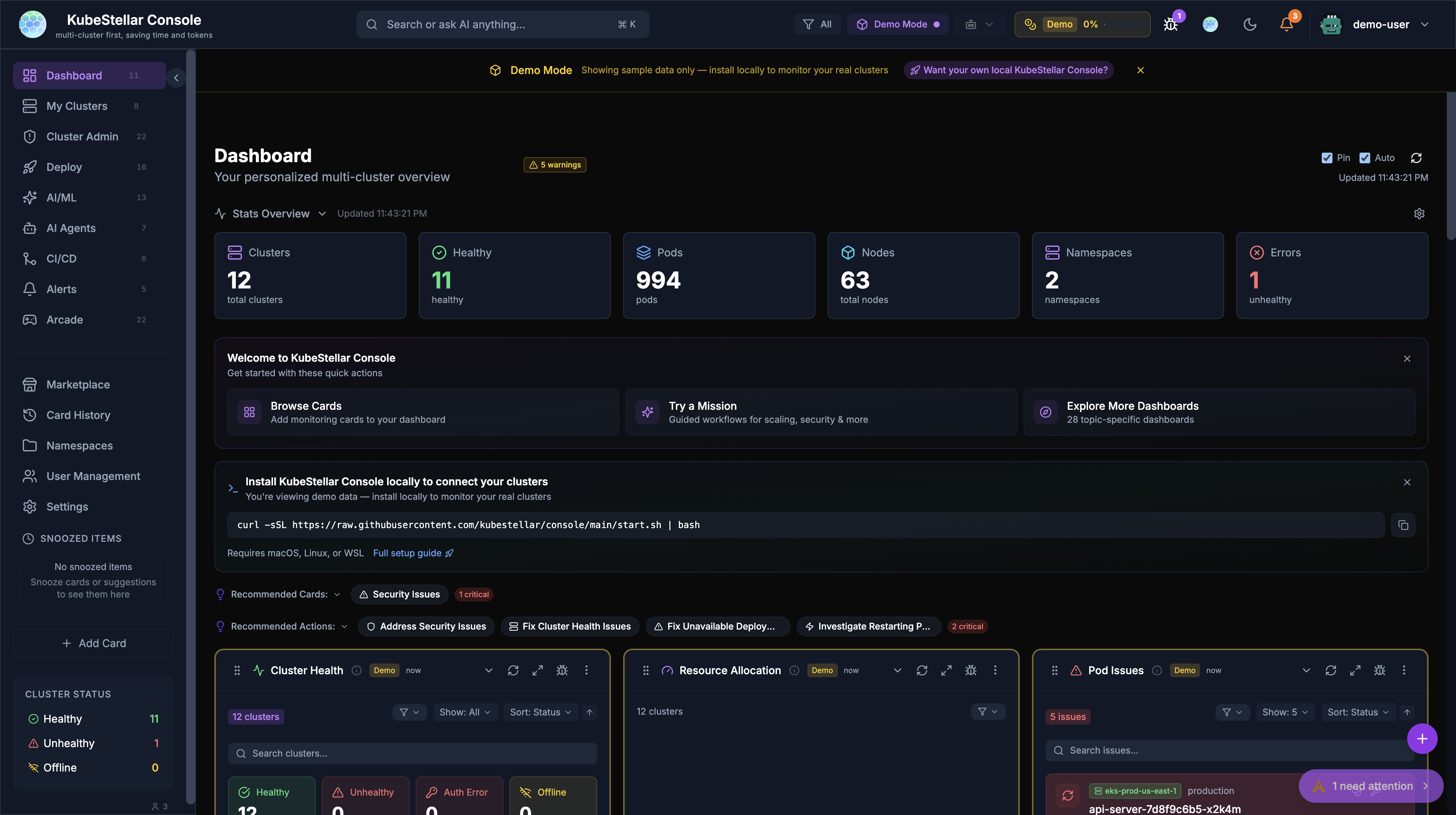
The sidebar is now resizable by dragging its edge:
- Drag to adjust sidebar width to your preference
- Width persists across sessions
- Aligned item counts for cleaner visual hierarchy
- Labels that don’t fit show full text on hover via tooltip
- Cluster status section shows healthy/unhealthy/offline counts at a glance
Getting Started Banner (New in March 2026)
The dashboard now features a consolidated Getting Started banner that guides new users through setup:
- Context-aware CTAs that progress based on what you’ve already done
- Install locally via
curlcommand, connect clusters, or explore demo mode - The banner auto-hides setup is complete
- Replaces the previous scattered mission CTAs for a cleaner experience
WSL Support (New in March 2026)
WSL (Windows Subsystem for Linux) is now supported across all installation methods:
- Installation CTAs include WSL instructions alongside macOS and Linux
start.shandstartup-oauth.shwork inside WSL environments- Documented in the Getting Started banner and deploy page
Recommendation Panel Improvements (New in March 2026)
Recommendation panels (Recommended Cards, Recommended Actions) have been streamlined:
- Panels auto-collapse by default to reduce visual noise
- Collapse/expand state persists across sessions
- Neutralized panel colors for a less distracting appearance
- SmartCardSuggestions feature removed in favor of the simplified panels
Mission Control Modal (New in April 2026)
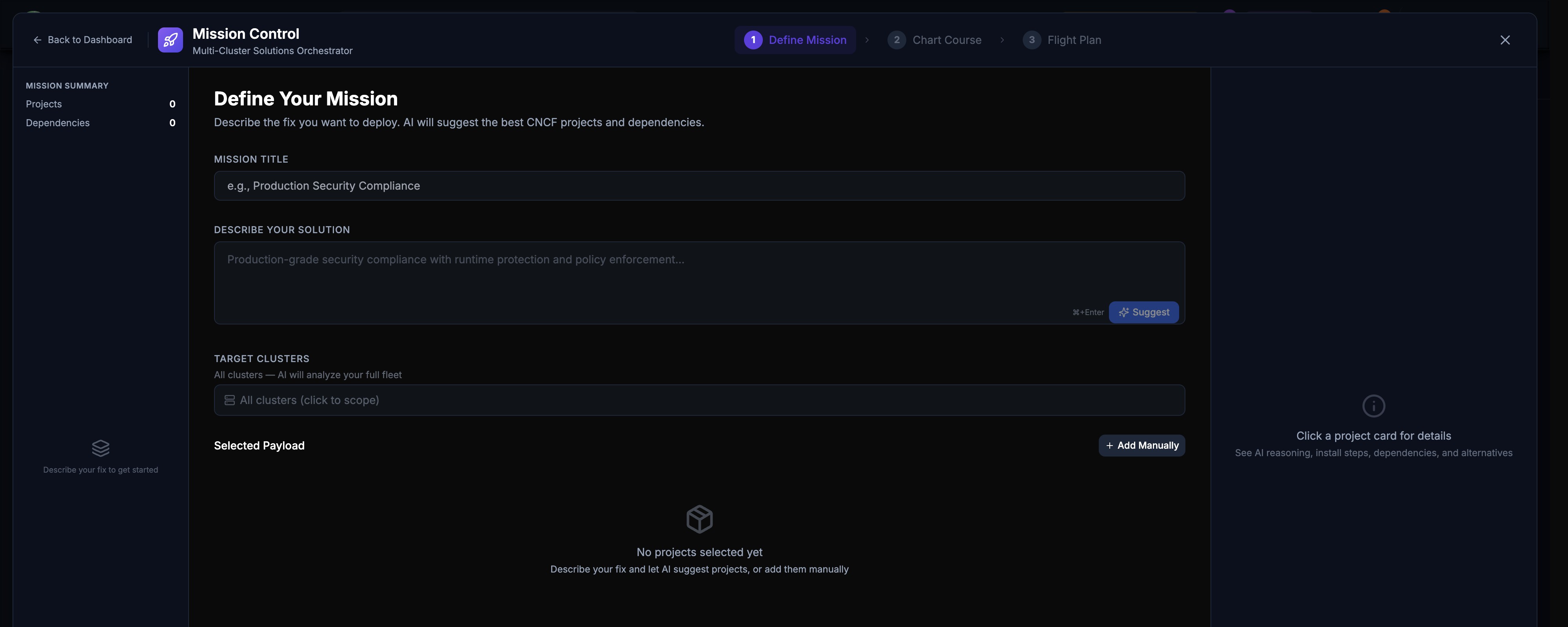
Mission Control has been redesigned as a proper full-screen modal with a 3-step wizard: Define Mission, Chart Course, and Flight Plan.
Define Mission
The first step collects your mission requirements:
- Mission Title: Name your mission (e.g., “Production Security Compliance”)
- Describe Your Solution: Free-text description of what you want to deploy or fix
- AI Suggest: Click the Suggest button to have AI auto-fill solution details based on your title
Cluster Selector (Phase 1)
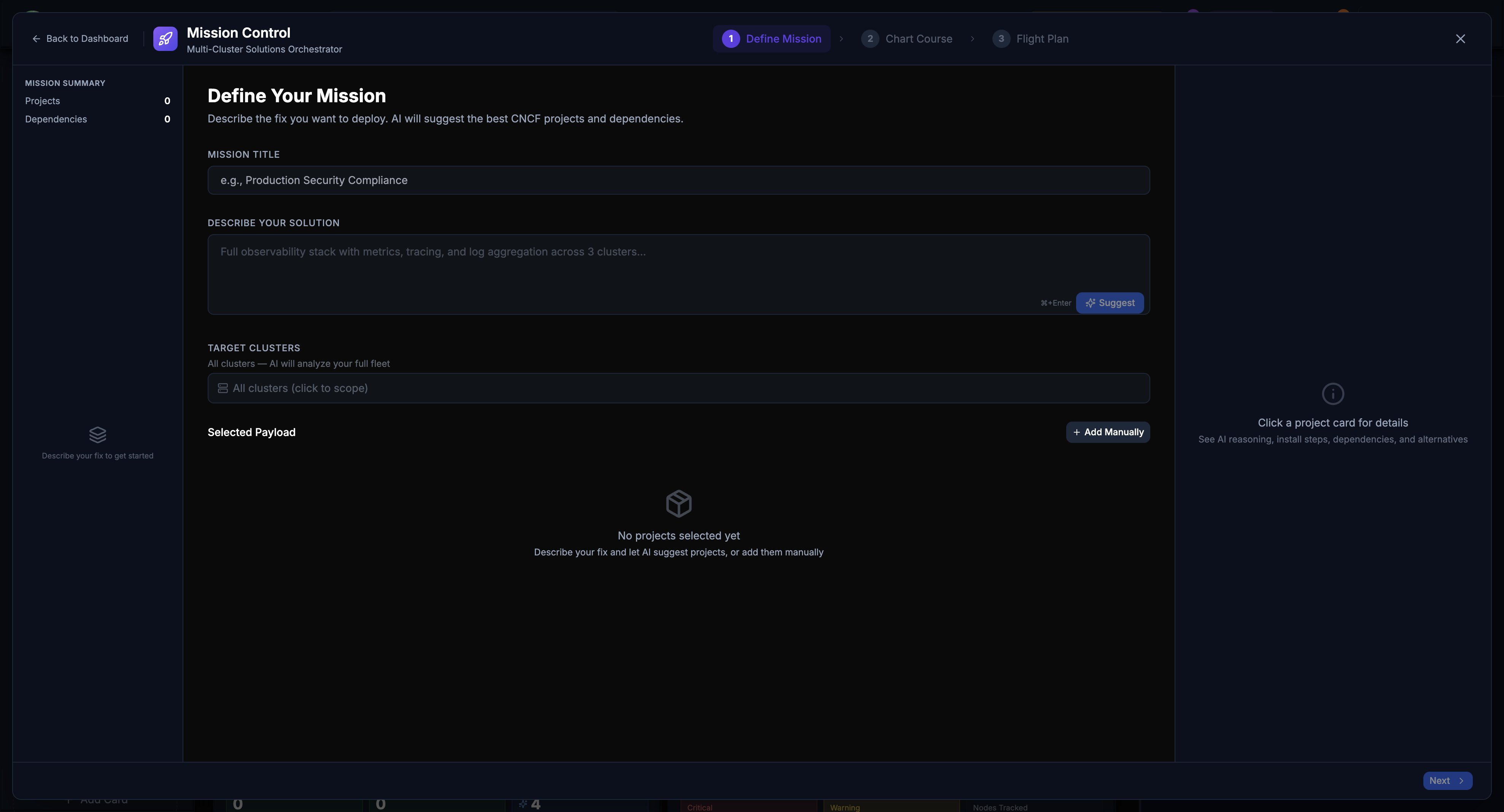
The Target Clusters section lets you scope missions to specific clusters:
- All clusters (default) — AI analyzes your full fleet
- Click to scope — Select individual clusters to target
- AI will analyze the scoped clusters, reducing token usage and focusing results
Selected Payload
- Add Manually — Add CNCF projects, Helm charts, or custom resources as payload
- Click a project card — View AI reasoning, install steps, dependencies, and alternatives
- Projects and dependencies counter in the Mission Summary sidebar
Mission Editing Before Execution
Missions can now be edited before they start executing. Review and modify the mission title, solution description, target clusters, and payload before committing to execution.
Draft Bug Reports
The Contribute dialog now includes a Drafts tab alongside Submit and Updates, allowing you to save bug reports and feature requests as drafts before submitting them.
AI Missions Navbar Button (New in April 2026)
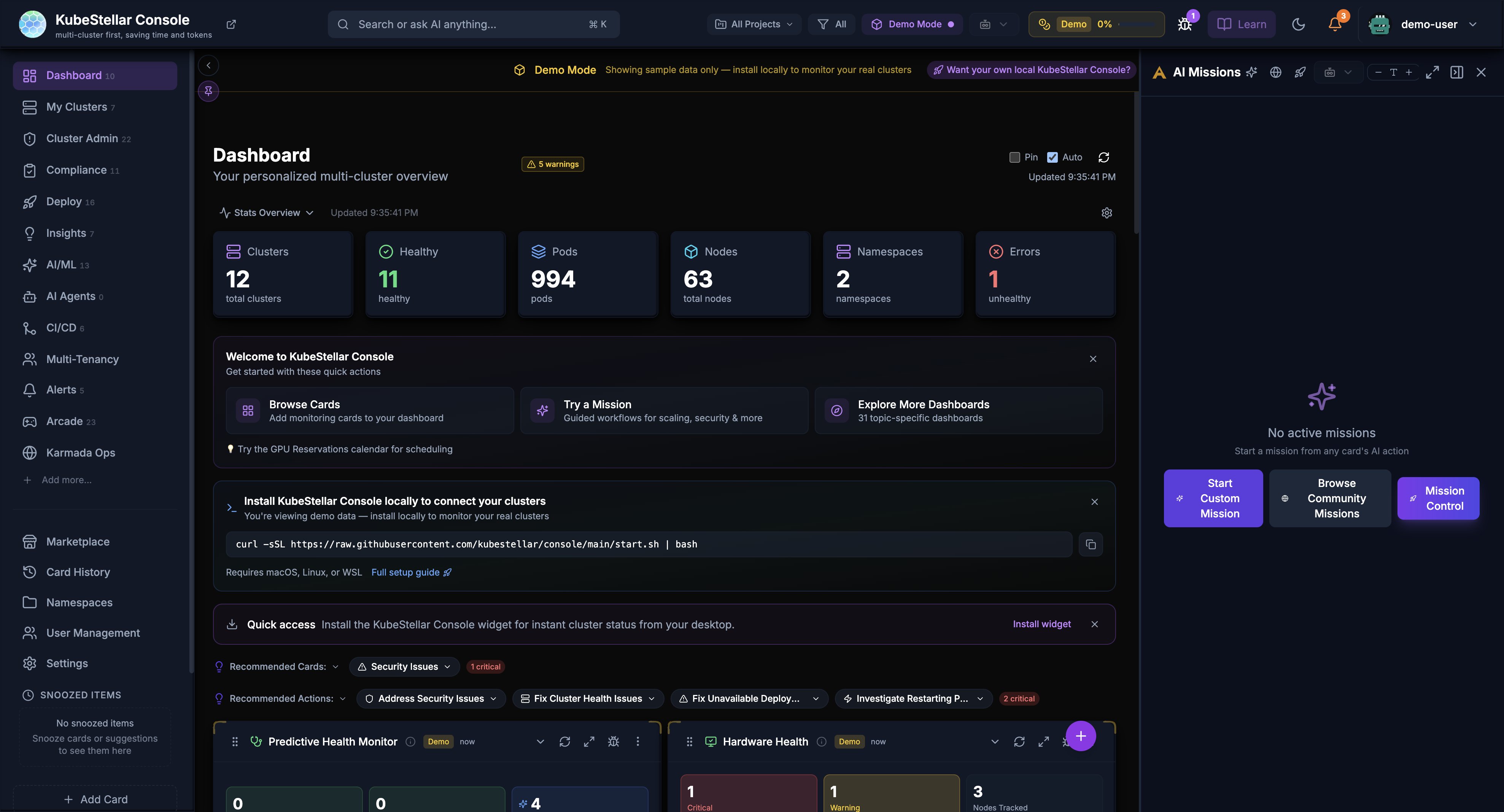
The AI Missions button has been promoted to the top navigation bar for faster access:
- Purple sparkle icon with “AI Missions” label, always visible in the header —click access to Start Custom Mission, Browse Community Missions, or Mission Control
- Replaces the previous bottom-right floating button as the primary entry point
- The floating button remains as a secondary access point on the dashboard
Mission Explorer Enhancements (New in April 2026)
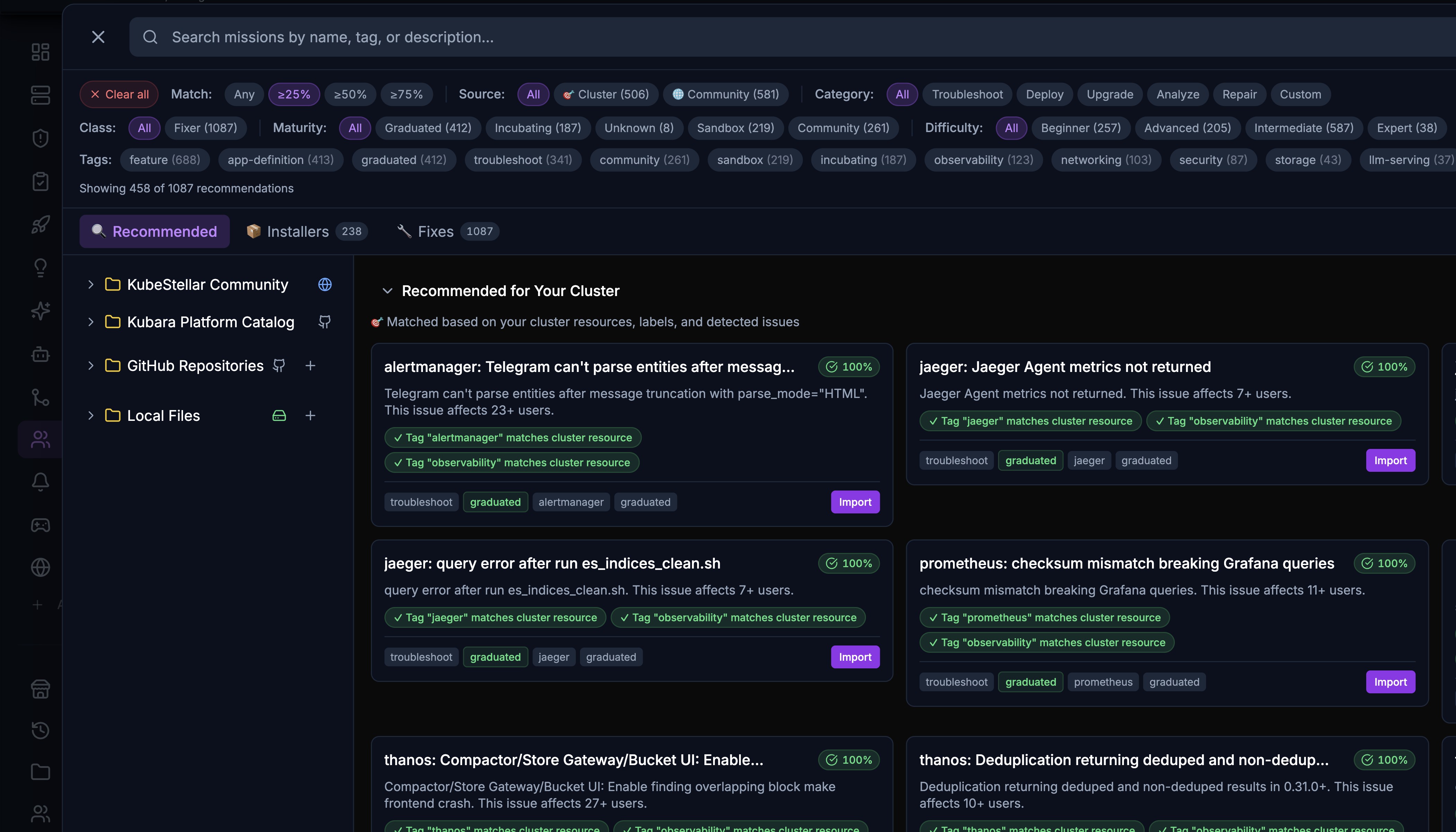
The Mission Explorer (formerly Mission Browser) has received significant UX improvements.
Kubara Platform Catalog
Kubara Platform Catalog is now a built-in mission source alongside KubeStellar Community and GitHub Repositories. It provides curated platform missions for common infrastructure patterns.
Resizable Sidebar
The Mission Explorer sidebar is now resizable, matching the main navigation sidebar behavior. Drag the edge to adjust the source panel width.
File Icons and Source Links
- Missions display file-type icons (YAML, Markdown) for quick visual identification
- Source and PR links connect each mission back to its origin repository
- CNCF project detection highlights missions related to CNCF graduated and incubating projects
YAML and Markdown Runbook Support
Missions now support YAML and Markdown runbooks with automatic CNCF project detection:
- YAML missions define structured deployment steps
- Markdown runbooks provide narrative deployment guides
- CNCF project references are automatically detected and linked
GitHub Repository Browsing Fixes
Repository browsing has been improved with fixes for navigation, file listing, and content rendering when browsing missions directly from GitHub repositories.
Filtering and Discovery
- Class filter: All, Fixer (troubleshooting missions)
- Tags filter: feature, app-deploy, graduated, incubating, sandbox, and more
- Source filter: Cluster, Community, custom
- Category filter: All, Troubleshoot, Ingress, Sandbox, Repair, Custom
- Difficulty filter: Beginner, Advanced, Intermediate, Expert
- Match mode: Any or All tags
- Showing count of matching recommendations (e.g., “Showing 458 of 1087 recommendations”)
Multi-Project Selection (New in April 2026)
The All Projects dropdown in the navbar now supports multi-project selection:
- Filter the entire dashboard by or more CNCF projects
- When projects are selected, cards and data relevant to those projects are displayed
- Quick “All” filter toggle to show everything
- Project selection persists across page navigation
Karmada Ops Dedicated Page (New in April 2026)
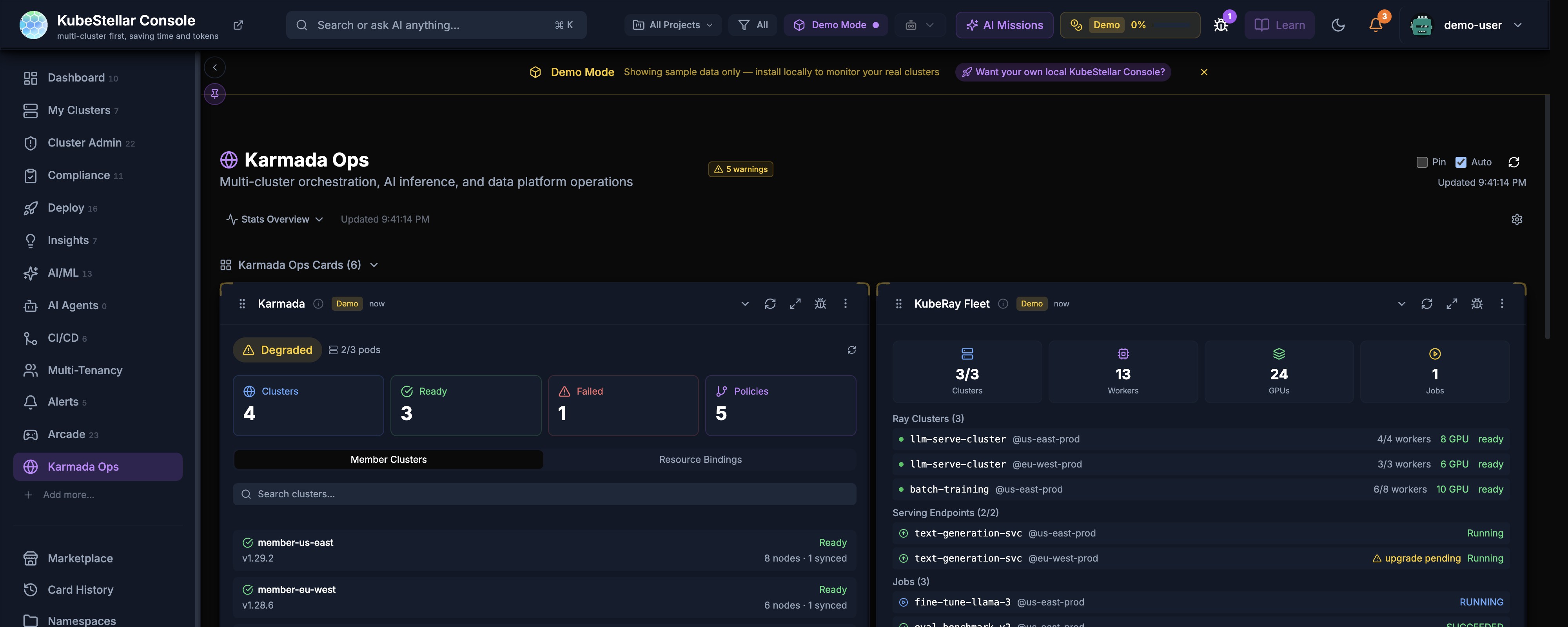
Karmada Ops now has its own dedicated page in the sidebar navigation, separate from the Multi-Tenancy dashboard.
Karmada Fleet Overview
- Karmada card: Cluster count, ready/failed status, member clusters with search, resource bindings
- KubeRay Fleet card: Ray clusters, workers, GPUs, jobs with per-cluster breakdown
- Activity Trail: Recent operations timeline
- Serving Endpoints: Service status across regions with upgrade pending indicators
Member Cluster Details
Each member cluster shows:
- Version and sync status
- Node and pod counts
- GPU allocation per cluster
- Ready/pending state indicators
Security Hardening (New in April 2026)
JWT HS256-Only Enforcement
JWT token validation now strictly enforces HS256 algorithm, preventing algorithm confusion attacks. Tokens signed with other algorithms are rejected.
JWT URL Leakage Prevention
JWT tokens are no longer included in URLs or query parameters. All token transmission uses HTTP-only cookies or Authorization headers, preventing token exposure in server logs and browser history.
WebSocket Authentication Hardening
WebSocket connections now require authentication on every connection and reconnection:
- Initial connection validates the JWT before upgrading to WebSocket
- Reconnection after disconnection re-validates credentials
- Expired tokens during an active WebSocket session trigger a graceful disconnect with re-authentication prompt
CNCF Incubation Readiness
The project has been prepared for CNCF incubation with:
- Governance documentation: GOVERNANCE.md, SECURITY.md, and OWNERS files
- Security self-assessment: Comprehensive security self-assessment following TAG-Security guidelines, including architecture diagrams
- Roadmap: Public roadmap document for transparency
- TAG-Security submission: Self-assessment submitted to CNCF TOC (cncf/toc#2106)
Custom Card External Data (New in April 2026)
useCardFetch Hook
A new useCardFetch React hook enables custom cards to fetch data from external APIs:
- Declarative data fetching with automatic loading, error, and refresh states
- Built-in caching and deduplication to prevent redundant requests
- Compatible with the card lifecycle (pause fetching when card is collapsed, resume on expand)
Card Proxy with SSRF Protection
Custom cards that need to fetch external data go through a server-side proxy that includes SSRF (Server-Side Request Forgery) protection:
- Allowlist-based URL validation
- Private IP range blocking (10.x, 172.16-31.x, 192.168.x, localhost)
- Rate limiting per card per user
- Request timeout enforcement
CI and Quality Improvements (New in April 2026)
Post-Build Safety Checks
Five automated safety checks run after every build to catch regressions:
- Bundle size check — Fails if the production bundle exceeds the size threshold
- TypeScript strict mode — Verifies no
anytypes leaked into the build - Import cycle detection — Catches circular import dependencies
- Dead code detection — Identifies unreachable exports
- Console.log audit — Flags stray console.log statements in production code
Post-Merge Playwright Verification
After PRs merge to main, an automated Playwright test suite runs to verify end-to-end functionality:
- Smoke tests for critical user flows (login, dashboard load, card interactions)
- Screenshot comparison for visual regression detection
- Results posted as GitHub check status on the merge commit
AI Quality Assurance
Five ratcheted AI antipattern checks prevent common code quality issues:
- Magic numbers — All numeric literals must be named constants
- Array safety — All array operations must guard against undefined
- Unsafe type assertions — Two-value form required for type assertions
- Hardcoded strings — User-facing strings must use constants or i18n
- Missing error handling — Async operations must have try/catch or .catch()
The ratchet mechanism ensures the count of violations never increases — new code must not introduce new violations, while existing violations are tracked and reduced over time.
UX Improvements (New in April 2026)
Visit Streak and Rotating Tips
The dashboard now tracks your visit streak and displays rotating tips:
- Visit streak counter: Shows consecutive days you have used the console
- Rotating tips: Context-aware tips that cycle through useful features and shortcuts
- Tips are personalized based on which features you have and have not used
Hover Tooltips for Technical Abbreviations
Technical abbreviations throughout the console now show explanatory tooltips on hover:
- Abbreviations like OPA, RBAC, CRD, CSI, CNI, SPIFFE show their full names
- First-time users can learn Kubernetes terminology without leaving the console
- Tooltips are unobtrusive and appear on hover
Card Shadows in Light Mode
Card shadow rendering has been fixed in light mode themes:
- Cards now display proper depth shadows in all light themes
- Shadow intensity scales with the theme’s brightness level
- Consistent shadow appearance across KubeStellar, Nord, and Tokyo Night light variants
Touch Target Accessibility
All interactive elements now meet WCAG 2.1 AA touch target requirements:
- Minimum 44x44px touch targets for all buttons, links, and interactive elements
- Improved tap accuracy on mobile and tablet devices
- Sidebar icons, card action buttons, and toolbar items all meet the standard
Landing Pages Lightweight Shell
Landing pages (login,) now use a lightweight shell that loads faster:
- Reduced JavaScript bundle for unauthenticated pages
- Faster time-to-interactive for first-time visitors
- Core dashboard code is not loaded until after authentication
Solution Missions Renamed to Fixer
“Solution missions” in the Mission Explorer have been renamed to Fixer missions for clarity:
- The “Solution” class filter is now “Fixer”
- Fixer missions focus on troubleshooting and remediation
- Naming aligns with the mission categories: Installer, Fixer, Custom
Adopter Ecosystem (New in April 2026)
Three new projects have been added as adopters of KubeStellar Console:
KitOps
KitOps provides ModelKits for packaging and sharing AI/ML models. The console includes a KitOps card for monitoring ModelKit deployments across clusters.
Easegress
Easegress is a cloud-native traffic orchestration system. The console provides monitoring cards for Easegress traffic routing, pipeline status, and filter chain health.
Cadence
Cadence is Uber’s workflow orchestration engine. The console includes cards for monitoring Cadence workflow domains, task lists, and worker health across clusters
Cross-Cluster Dependency Edges in Flight Plan (New in April 2026)
The Flight Plan blueprint view now renders visible dependency edges between clusters, showing how workloads and configurations flow across your multi-cluster environment:
- Directed edges: Arrows show the direction of dependency between source and target clusters
- Color-coded lines: Edge colors indicate dependency type (deployment, config sync, data replication)
- Hover details: Hovering an edge reveals the specific resources that create the dependency
- Auto-layout: The graph automatically arranges clusters to minimize edge crossings
- Drag-and-drop project nodes: Users can drag project nodes in the blueprint to reposition them, with edges updating in real time
Related PRs
- Add cross-cluster dependency edges to Flight Plan (#5384)
- Add drag-and-drop for blueprint project nodes (#5547)
Kubara Catalog with AI Reasoning Demo (New in April 2026)
A new Kubara Catalog provides a tree-view browser for exploring Kubernetes resources with integrated AI reasoning:
- Tree-view navigation: Browse resources hierarchically by API group, version, and kind
- File preview: Select any resource to see its full YAML/JSON definition inline
- AI reasoning demo: Watch the AI agent’s step-by-step reasoning as it analyzes resources, providing educational insight into how AI-driven operations work
- Search and filter: Quickly locate resources across the catalog with full-text search
Related PRs
- Add Kubara catalog with tree-view browsing and file preview (#5387)
Helm Chart OCI Registry (New in April 2026)
The KubeStellar Console Helm chart is now published to an OCI-compliant container registry, enabling standard Helm install workflows:
# Add the OCI registry
helm install ks-console oci://ghcr.io/kubestellar/console/helm/ks-console

# Or pull and inspect the chart
helm pull oci://ghcr.io/kubestellar/console/helm/ks-console --version 0.3.17- OCI distribution: Chart is hosted alongside container images for simplified supply chain
- Versioned releases: Each console release automatically publishes a matching Helm chart version
- Install documentation: The installation guide has been updated with OCI registry instructions
Related PRs
- Publish Helm chart to OCI registry with install docs (#5527)
Improved Modal and Dialog Behavior (New in April 2026)
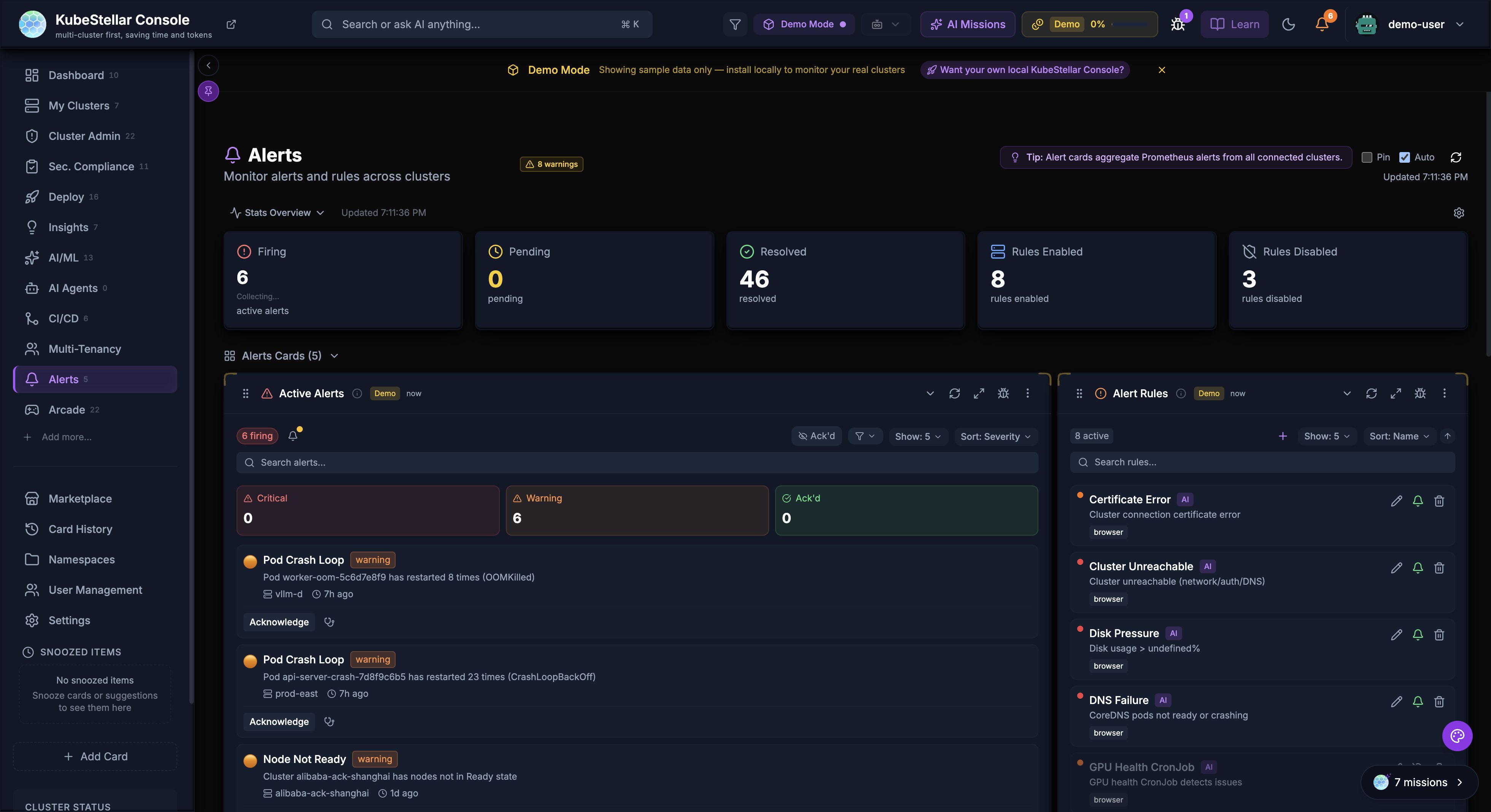
Escape Key Scoping
The Escape key now closes the topmost modal or dialog, rather than dismissing all open layers at. This prevents accidentally closing a parent dialog when dismissing a nested confirmation.
Two-Click Delete Confirmation
Browser confirm() dialogs have been replaced with in-app two-click delete flows throughout the console:
- First click reveals an inline “Confirm Delete” button with a brief countdown
- Second click executes the deletion
- Eliminates inconsistent browser-native styling across platforms
- Provides a safer, more predictable deletion experience
Related PRs
- Scope Escape key to topmost modal (#5540)
- Replace browser confirm dialogs with two-click delete (#5595)
Skeleton Loading and Keyboard Navigation (New in April 2026)
Skeleton Loading States
Cards and data tables now display content-aware skeleton placeholders during loading instead of generic spinners:
- Skeletons match the shape and layout of the content they replace
- Reduces perceived load time and layout shift
- Applied to dashboard cards, table rows, and detail panels
Keyboard Navigation Improvements
- Arrow key navigation: Navigate between dashboard cards with arrow keys
- Enter to expand: Press Enter on a focused card to expand its detail view
- Tab order: Improved tab order across all dashboard elements for screen reader compatibility
Related PRs
- Add skeleton loading states for dashboard cards (#5437)
- Improve keyboard navigation across dashboard (#5492)
Updated Roadmap (New in April 2026)
The public roadmap has been updated to reflect current priorities and completed milestones:
- Near-term items updated with April 2026 deliverables
- New mid-term goals for multi-tenancy and RBAC improvements
- Long-term vision items refined based on community feedback
Related PRs
- Update roadmap with April 2026 priorities (#5603)
RBAC Endpoint Restrictions (New in April 2026)
Seven API endpoints have been restricted to the admin role, tightening access control for sensitive operations:
| Endpoint | Description |
|---|---|
POST /api/cluster-sync | Trigger cluster synchronization |
POST /api/webhooks | Manage webhook configurations |
DELETE /api/sessions | Terminate user sessions |
POST /api/settings/system | Modify system-wide settings |
POST /api/backup | Trigger configuration backup |
POST /api/restore | Restore from backup |
DELETE /api/cache | Clear server-side cache |
Non-admin users attempting these operations receive a 403 Forbidden response with a descriptive error message.
Related PRs
- Restrict 7 sensitive endpoints to admin role (#5472)
Server-Side GPU Capacity Validation (New in April 2026)
GPU capacity requests are now validated on the server before being forwarded to clusters:
- Range checks: Requested GPU counts must be within the cluster’s available capacity
- Type validation: GPU model identifiers are validated against known hardware types
- Quota enforcement: Namespace GPU quotas are checked before allocation
- Prevents over-provisioning and invalid GPU requests from reaching the Kubernetes API
Related PRs
- Add server-side GPU capacity validation (#5432)
Body Size Limits on API Endpoints (New in April 2026)
Webhook and cluster sync endpoints now enforce request body size limits to prevent denial-of-service through oversized payloads:
- Webhook endpoints: Maximum 1 MB request body
- Cluster sync endpoints: Maximum 5 MB request body
- Oversized requests receive a
413 Payload Too Largeresponse - Limits are configurable via environment variables (
MAX_WEBHOOK_BODY_BYTES,MAX_CLUSTER_SYNC_BODY_BYTES)
Related PRs
- Add body size limits on webhook and cluster sync endpoints (#5610)
OpenSSF Silver, SLSA Provenance, and Cosign Signing (New in April 2026)
The console has achieved OpenSSF Best Practices Silver badge status and now ships with verifiable supply chain artifacts:
OpenSSF Silver Badge
- All Silver-level criteria met, including security review, vulnerability disclosure process, and test coverage thresholds
- Badge displayed in the repository README and on the documentation site
SLSA Provenance
- Build provenance is generated for every release using SLSA Level 3 workflows
- Provenance attestations are published alongside release artifacts
- Consumers can verify that release binaries were built from the expected source commit
Cosign Signing
- All container images are signed with Sigstore Cosign
- Helm charts include cosign signatures for verification before installation
- Verification commands are documented in the installation guide:
# Verify container image signature
cosign verify ghcr.io/kubestellar/console:v0.3.17

# Verify Helm chart signature
cosign verify-blob --signature ks-console-0.3.17.tgz.sig ks-console-0.3.17.tgz
Related PRs
- Achieve OpenSSF Silver badge (#5543)
- Add SLSA provenance to release workflow (#5548)
- Add cosign signing for container images (#5588)
- Add cosign signing for Helm charts (#5594)
- Document supply chain verification in installation guide (#5598)
ACCM Metrics Dashboard (New in April 2026)
The Analytics page now includes an ACCM (AI Codebase Maturity Model) section that visualizes real project data to support the ACCM white paper research.
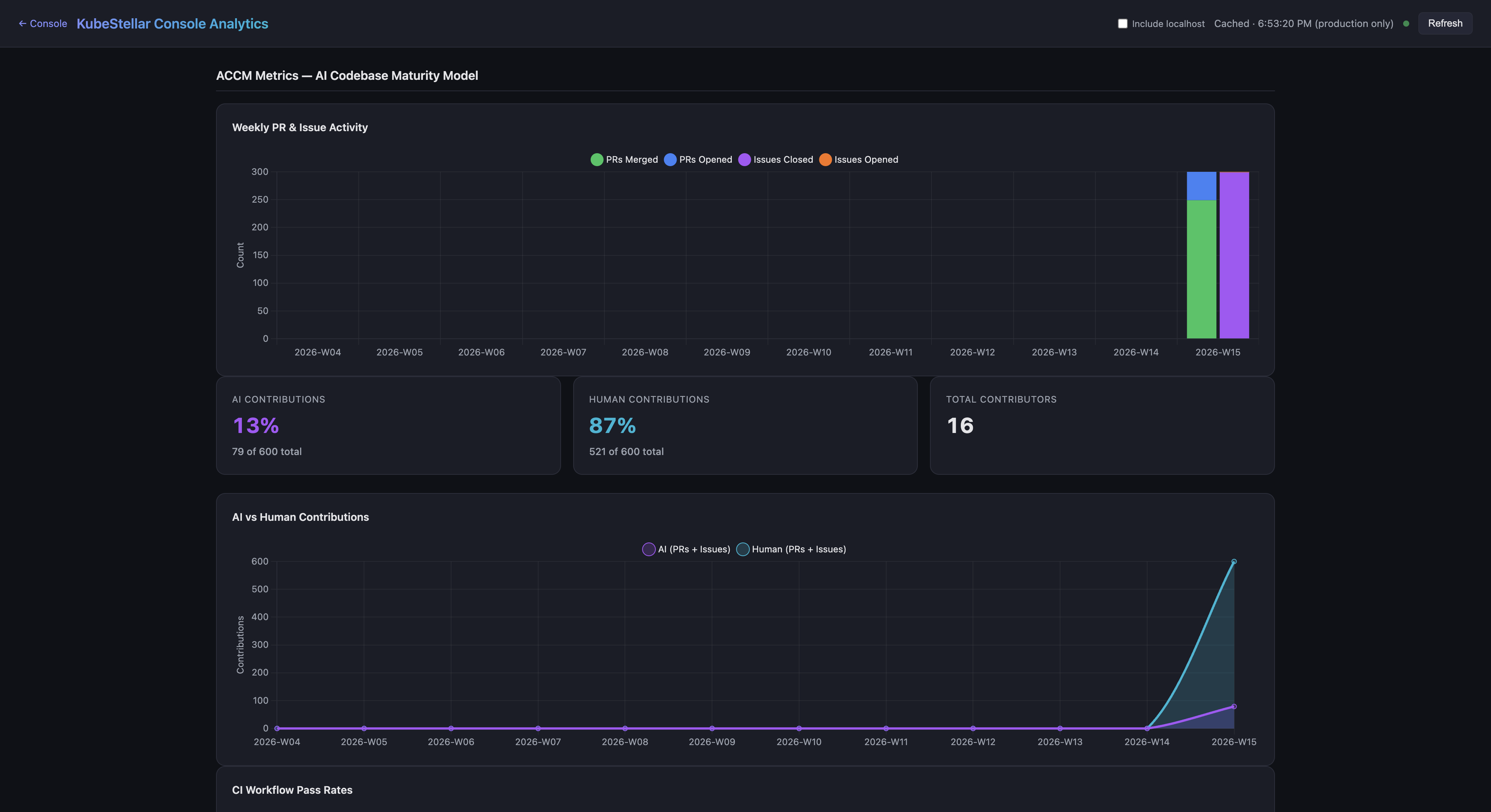
Four new charts track AI-assisted development maturity:
- Weekly PR & Issue Activity — Stacked bar chart showing PRs merged/opened and issues closed/opened per week, corresponding to ACCM Level 2-3 (Instructed to Measured)
- AI vs Human Contributions — Stacked area chart with KPI cards showing the percentage breakdown of AI-generated vs human contributions (Level 5: Self-Sustaining)
- CI Workflow Pass Rates — Line chart tracking CI success rates over time (Level 3: Measured)
- Contributor Growth — Bar + line chart showing new vs total contributors (Level 4: Managed)
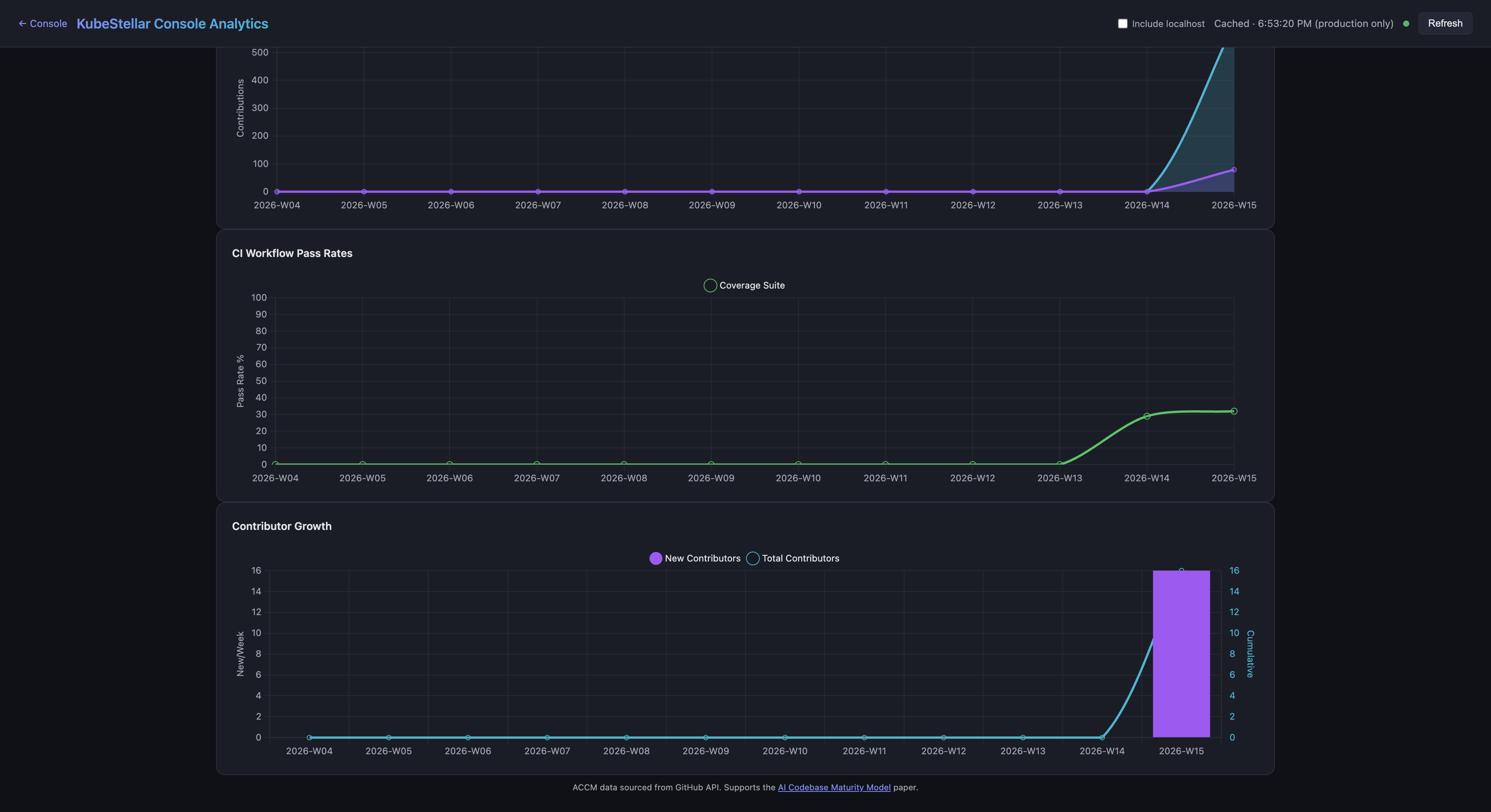
All ACCM data is sourced from the GitHub API with a rolling historical window.
NPS Backend and Analytics Integration (New in April 2026)
The NPS survey system (documented above) now includes a self-hosted backend that operates independently of GA4:
- Netlify Function at
/api/nps:- POST — Submit a score (0-10) with optional feedback text, stored in Netlify Blobs
- GET — Returns aggregate NPS score, promoter/passive/detractor breakdown, monthly trend, and recent responses
- No PII collected — Rolling window of 1,000 responses
- Dual submission — The
useNPSSurveyhook sends to the NPS backend first, then to GA4 analytics as a secondary channel - Analytics dashboard — NPS aggregate scores and trends are displayed in the analytics page
Daily Issues and PRs Chart (New in April 2026)
A new IssueActivityChart card on the Analytics page shows daily GitHub activity:
- Grouped bar chart — Issues opened (blue) vs closed (green) per day
- PRs merged line overlay — Orange line showing merged PR count
- Configurable lookback — 30, 60, 90, or 180 days with summary statistics
- Dark-theme-compatible styling using ECharts
- 1-hour cache — Data fetched via the existing GitHub proxy endpoint
Coin Breakdown and Bonus Points (New in April 2026)
The rewards panel now shows a detailed breakdown of how coins are earned:
- GitHub points (green) — Earned from PRs and issues across kubestellar and llm-d organizations, shown on the public leaderboard
- Console coins (purple) — Earned from in-app activity (missions, games, sharing), stored in browser localStorage
- Bonus points (pink) — Awarded via
[bonus]issues on kubestellar/console, fetched from a new Netlify Function at/api/rewards/bonus - Total (yellow) — Combined GitHub + Console + Bonus
The breakdown explains why the console total may be higher than the public leaderboard, which tracks GitHub contributions.
Remove Cluster Endpoint (New in April 2026)
A new POST /kubeconfig/remove endpoint allows cleanup of stale clusters from the dashboard:
- Removes the specified context from kubeconfig
- Cleans up orphaned cluster and user entries if no other context references them
- Prevents removing the currently active context
- Clears cached clients for the removed context
- Writes the updated kubeconfig back to disk
This addresses the issue of deleted environments (e.g., WSL) leaving permanently “offline” cluster entries in the dashboard.
UX Cohesion Overhaul (New in April 2026)
A comprehensive UX consistency pass unified visual patterns across the console:
- Unified overlay system — All modals, drawers, and dialogs use the same backdrop component with consistent blur and opacity
- Z-index scale — A standardized z-index token scale prevents stacking context conflicts between overlays, sidebars, and tooltips
- Form components — Standardized input, select, textarea, and checkbox components with consistent sizing, focus rings, and error states
- Design tokens — Centralized color, spacing, and typography tokens replace scattered inline values
Security Hardening (April 9, 2026)
Several security improvements were shipped:
- XSS prevention — Block
javascript:and other dangerous URI schemes in markdown link rendering.http:,https:,mailto:,#, and/prefixes are allowed. Unsafe links render as plain text. - CSP headers tightened — Replaced wildcard
img-src https:with explicit domain allowlist (github.com,*.githubusercontent.com,api.dicebear.com). Addedobject-src 'none',base-uri 'self',form-action 'self',frame-src 'none',worker-src 'self' blob:,manifest-src 'self'. - Preflight fail-closed — Mission preflight checks now block execution on exceptions instead of silently passing (was fail-open).
- WebSocket fix — The
onerrorhandler no longer nullifiesonclose, preventing missions from getting stuck in a permanent “running” state.
Mobile Crash Resolution (April 9, 2026)
Two React render loop crashes on mobile viewports (React error #185: Maximum update depth exceeded) were identified and fixed:
- Tour effect loop —
useTour.tsxhadisActivein auseEffectdependency array while also callingsetIsActive(false)in the effect body, creating an infinite loop on mobile - Sidebar function reference loop —
closeMobileSidebarin auseEffectdependency array was recreated on every render (not wrapped inuseCallback), causing an infinite loop
A GA4 mobile traffic monitor workflow now runs daily to detect when mobile session percentage drops below 5% for 3+ consecutive days and automatically creates a GitHub issue.
A post-merge mobile viewport smoke test CI workflow validates that the dashboard renders without crashes on mobile-sized viewports after every merge.
Affiliate Clicks API (New in April 2026)
A new /api/affiliate/clicks Netlify Function queries GA4 for intern affiliate link click counts:
- Maps intern UTM terms (
intern-01throughintern-10) to GitHub user IDs - Returns click counts and unique users for each intern
- 15-minute cache with CORS restricted to
kubestellar.ioorigins - Used by the docs site leaderboard to populate the Social column
Slack Notification Routing (New in April 2026)
Alert Slack notifications are now routed through the backend API at /api/notifications/send instead of direct browser-to-webhook requests, which were blocked by CORS.
Pagination Infinite Loop Fix (April 9, 2026)
Fixed a React error #185 crash caused by useEffect hooks that had currentPage in both the condition and dependency array. When totalPages drops to 0 (all API data fails), the effect would loop infinitely. Fixed in cardHooks.ts and two other locations.
Updated Screenshots (April 9, 2026)
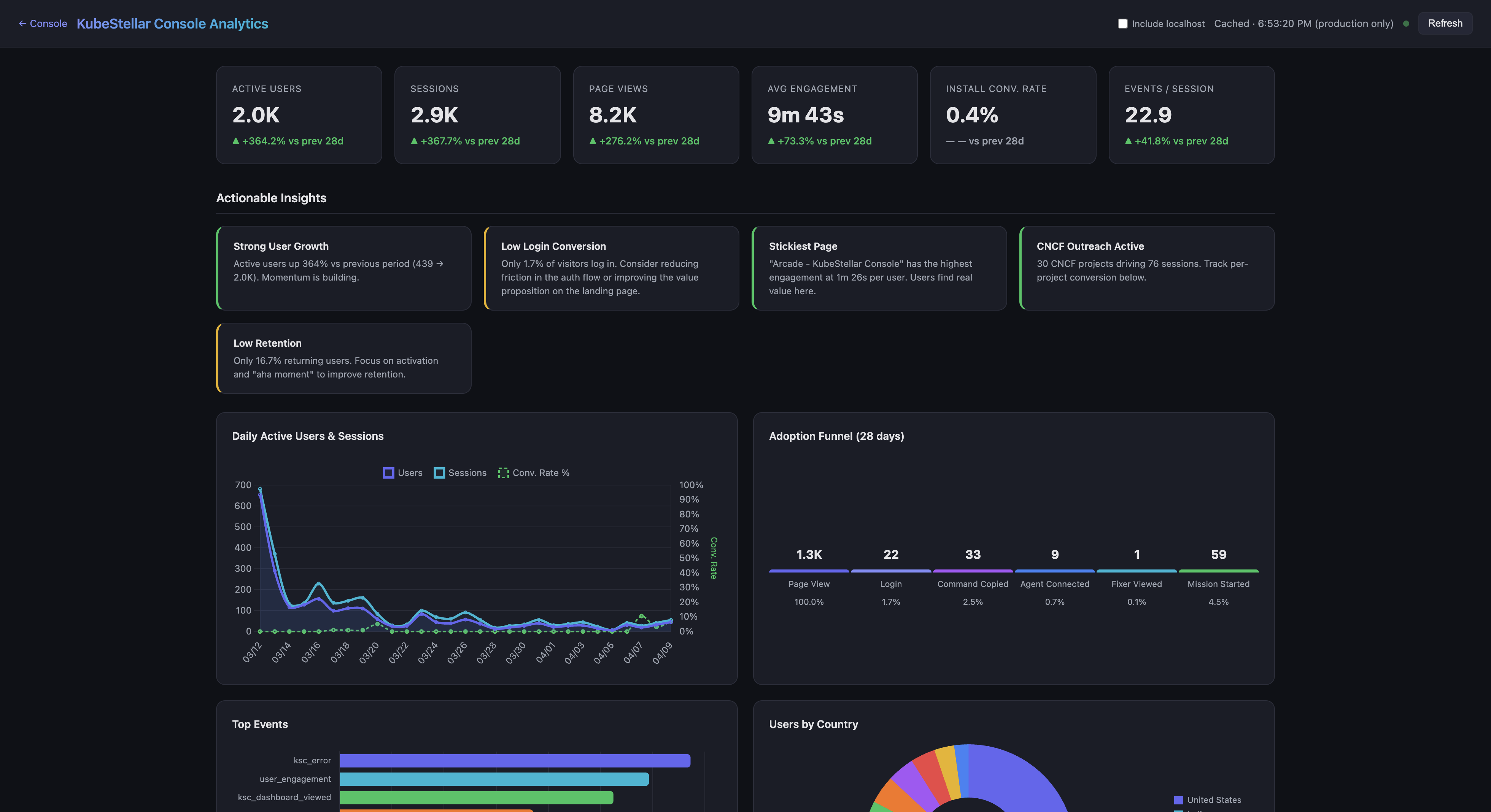
The analytics dashboard with KPI cards, actionable insights, daily active users chart, adoption funnel, and top events breakdown.
The new ACCM Metrics section showing Weekly PR & Issue Activity, AI vs Human Contributions (13% AI, 87% Human), and contribution KPI cards.
Updated Screenshots (April 8, 2026)
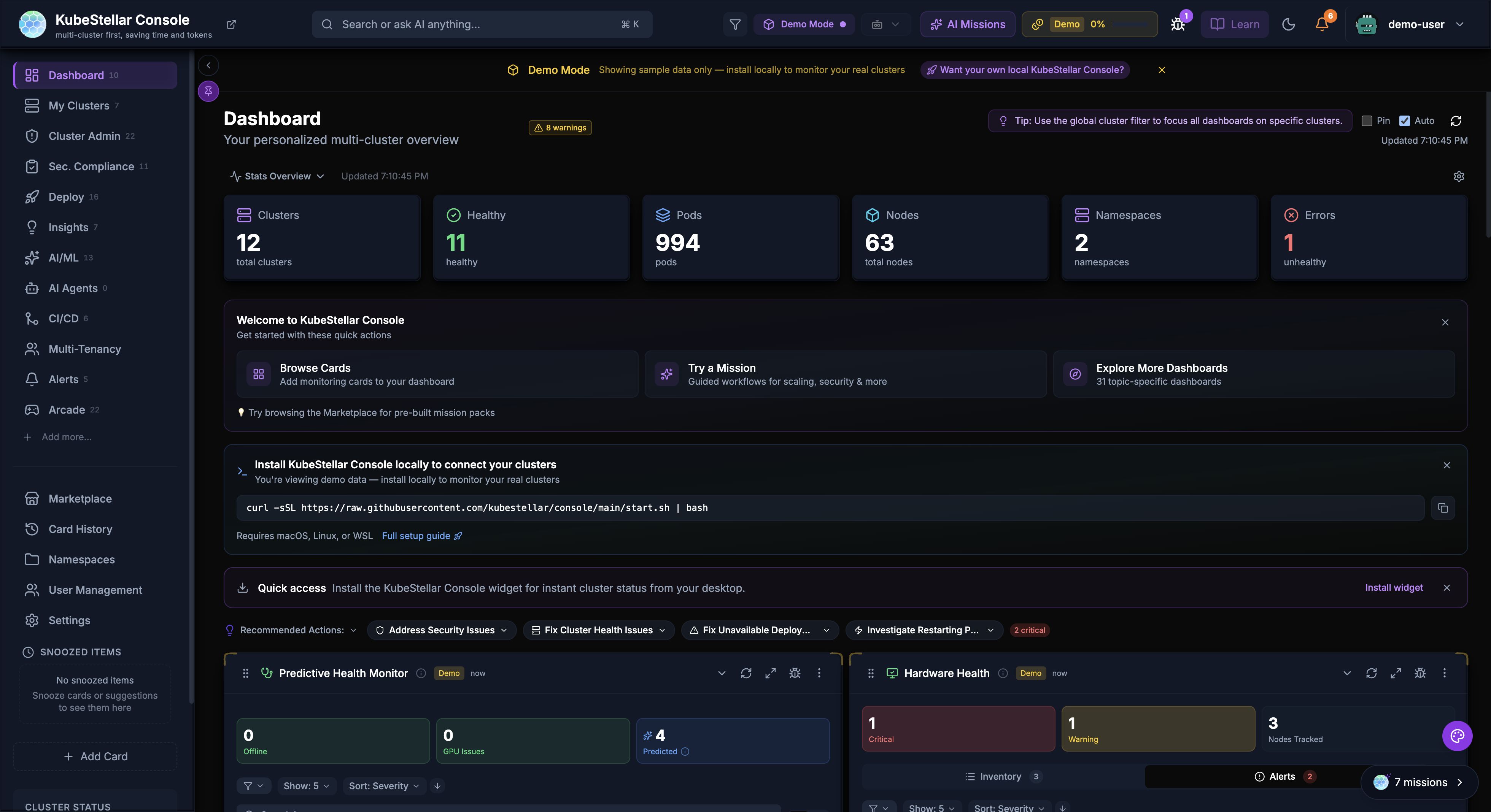
The main dashboard showing the updated card grid with skeleton loading states and keyboard-navigable cards.
The Flight Plan blueprint with cross-cluster dependency edges and draggable project nodes.
The Kubara Catalog tree-view browser with AI reasoning panel.
The Alerts dashboard with two-click delete confirmation and scoped Escape key behavior.
3D Globe Visualization Refresh (New in March 2026)
The 3D globe on the login page has been polished:
- Updated cluster labels: “Console” replaces “KubeStellar”, “AI Cortex” replaces “KubeFlex Core”
- More professional rendering with improved materials and lighting
- Smoother animations and label placement
Design System Standardization (New in March 2026)
A comprehensive design system overhaul improves visual consistency:
- Color palette consolidated: Indigo merged into blue, pink merged into purple — fewer colors, more consistent
- Semantic design tokens: All hardcoded gray/emerald/rose values replaced with theme-aware tokens
- StatusBadge component: 200+ inline badge spans migrated to a shared component for consistent status display
- Button component: 88+ inline button elements migrated to a shared component
- Modal backdrop blur: Standardized 24px blur across all overlays
Helm Chart Security Defaults (New in March 2026)
The Helm chart now includes production-grade security defaults out of the box:
- NetworkPolicy: Restricts ingress/egress traffic
- PodDisruptionBudget: Ensures availability during node maintenance
- securityContext: Non-root user, read-only filesystem, dropped capabilities
- Dockerfile hardened: Non-root user, healthcheck endpoint,
.dockerignorefor smaller images
Lima Card (New in March 2026)
A new monitoring card for Lima — Linux virtual machine manager:
- Monitors Lima VM instances
- Shows VM status, resource usage, and health
- Available in the card catalog under the Compute category
CI/CD Dashboard Layout (New in March 2026)
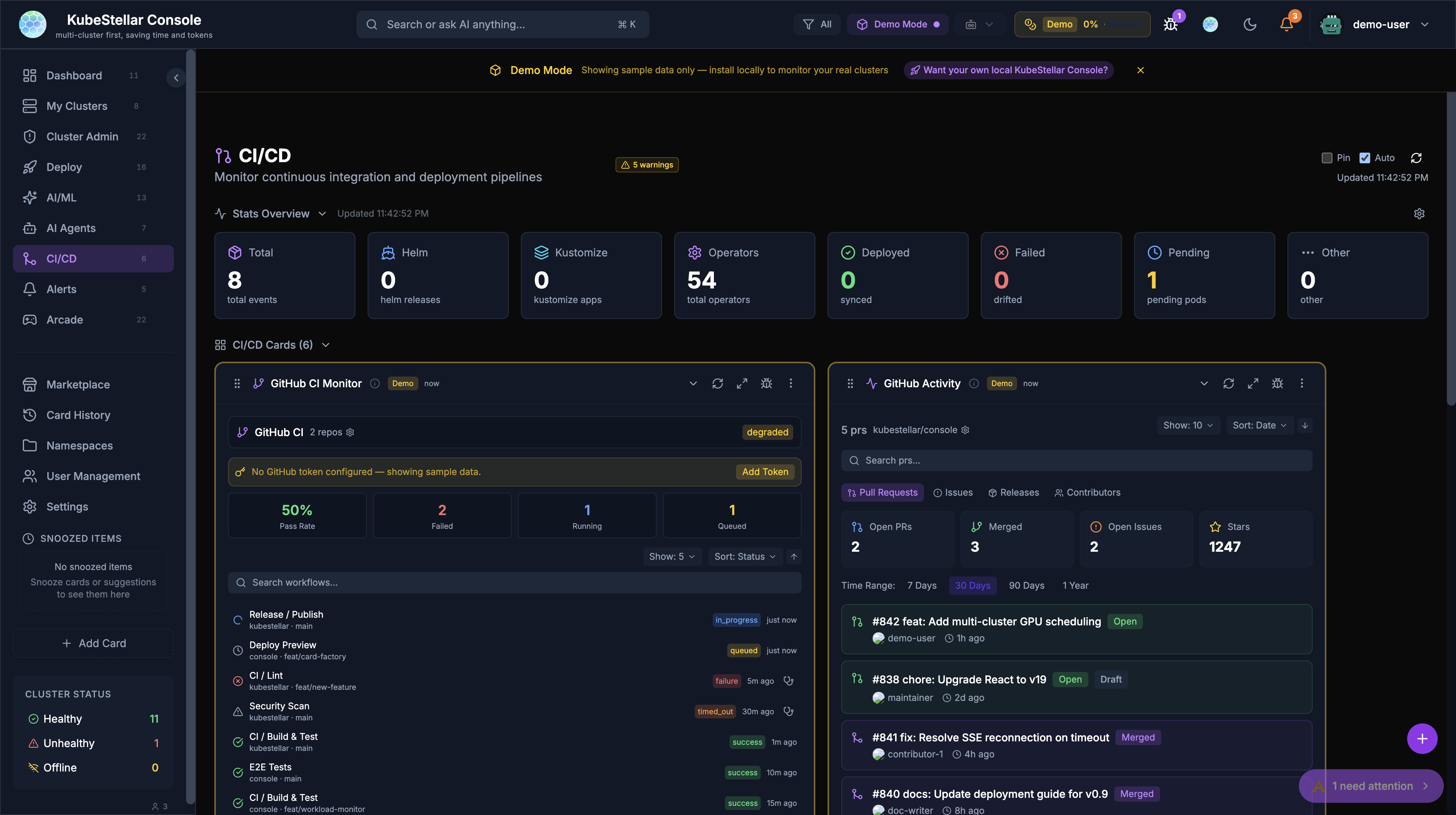
The CI/CD dashboard has been reorganized:
- GitHub-related cards (GitHub CI Monitor, GitHub Activity) moved to the top for better visibility
- Improved card ordering for the most common CI/CD workflows
Cluster Admin Dashboard (New in March 2026)
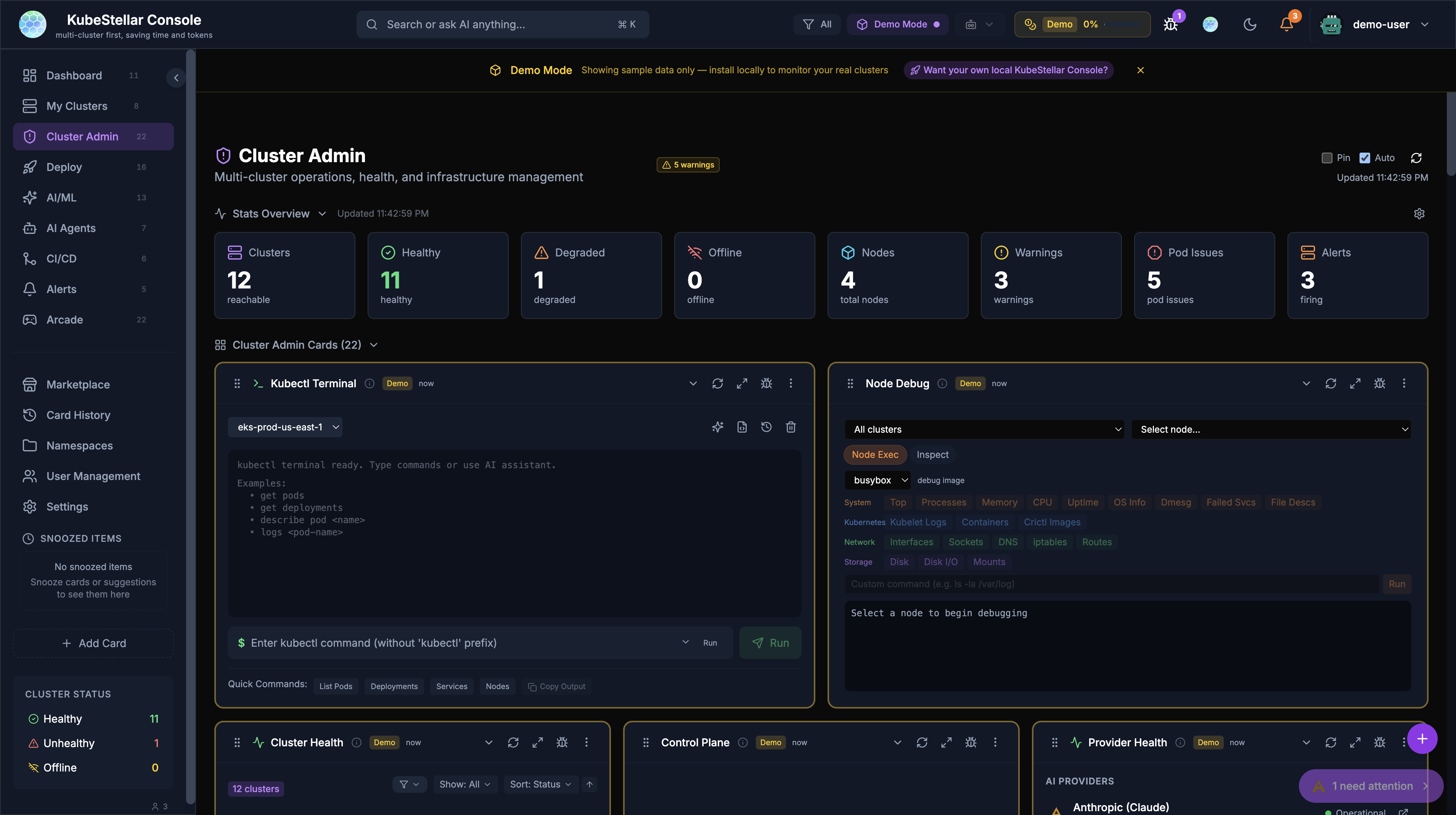
The Cluster Admin dashboard has been reordered for better workflow:
- Most important operational cards prioritized at the top
- Kubectl Terminal and Node Debug prominently placed
- Cluster Health and Control Plane cards in the second row
AI/ML Dashboard Updates (New in March 2026)
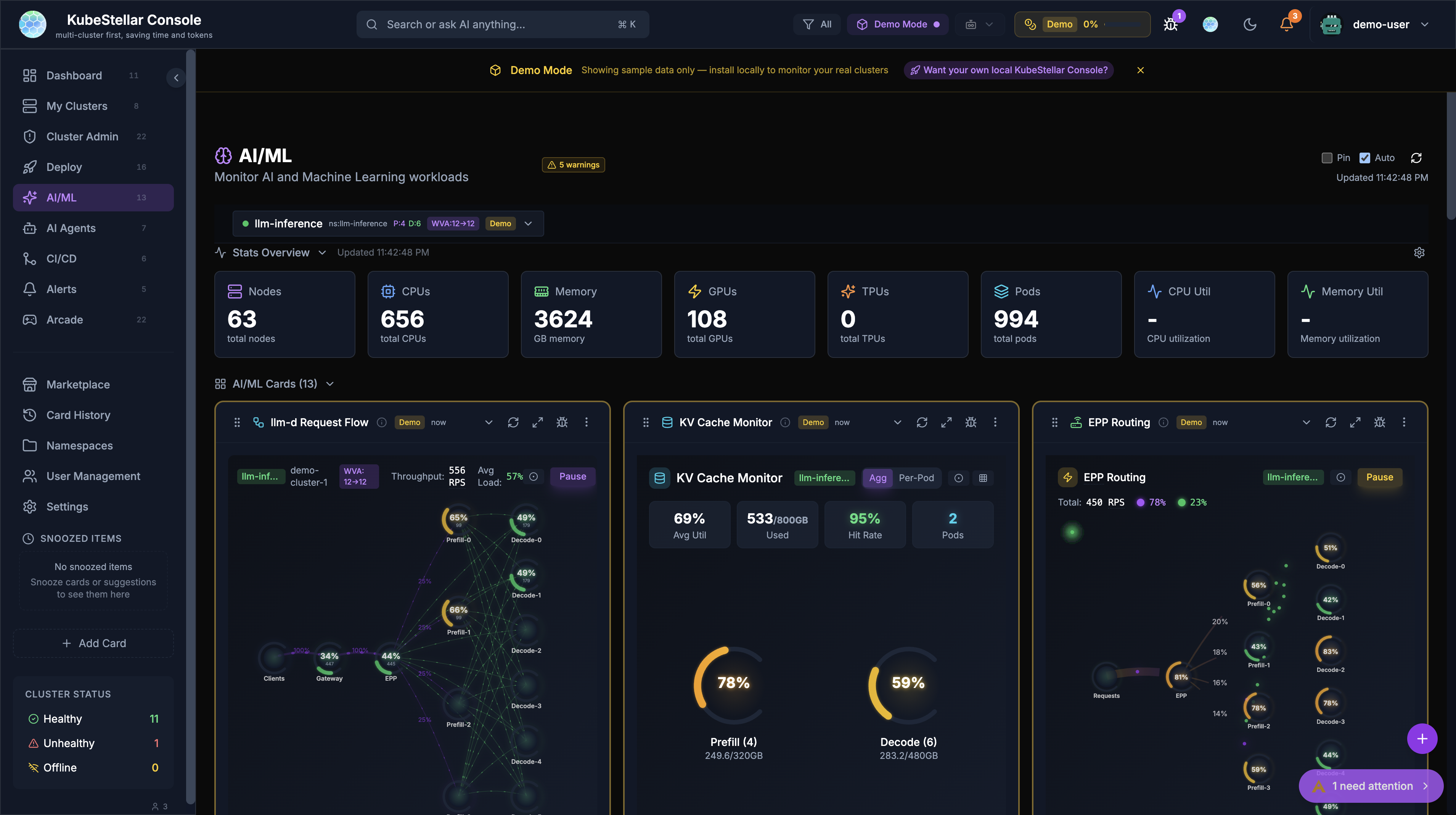
The AI/ML dashboard now properly shows demo data badges on all cards when running in demo mode, ensuring users can distinguish between real and sample data across all 13 AI/ML monitoring cards.
Helm Self-Upgrade (New in March 2026)
The console can now upgrade itself when deployed via Helm — no manual helm upgrade required.
How it works
- Backend discovers its own Deployment via
app.kubernetes.io/name=kubestellar-consolelabels - Uses
SelfSubjectAccessReviewto verify the ServiceAccount can patch Deployments - When triggered from Settings, applies a JSON patch to update the container image tag
- Kubernetes rolls the new pod; the console shows a progress UI with restart polling
Configuration
- Opt-in via
selfUpgrade.enabled=truein Helm values (enabled by default for new Helm installs) - JWT-authenticated API endpoint prevents unauthorized upgrades
- Progress bar and restart detection in the Settings page
Related PRs
- Helm self-upgrade via Deployment image patch (#2318)
- Restart polling and progress UI (#2413)
- JWT auth for self-upgrade API calls (#2334)
- Enable selfUpgrade by default for Helm installs (#2330)
Pod Exec Terminal (New in March 2026)
Interactive shell sessions directly from the console — no need to switch to kubectl exec.
Features
- Full interactive terminal powered by xterm.js
- Accessible as an “Exec” tab in pod drill-down views
- Container picker for multi-container pods
- Auto-reconnect on connection drops
- JWT-authenticated WebSocket connection
How to use
- Navigate to a pod (via Workloads dashboard or search)
- Click the Exec tab
- Select a container (if the pod has multiple)
- Start typing commands in the terminal
Related PRs
- Add pod exec terminal (#2213)
- Fix exec WebSocket blocked by middleware (#2250)
- Fix container name extraction (#2247)
- Add JWT authentication to /ws/exec endpoint (#2416)
Helm Write Operations (New in March 2026)
Full Helm release management — not just read-only monitoring:
| Operation | Where | Safety |
|---|---|---|
| Rollback | Revision history row → Rollback button | Confirmation dialog |
| Uninstall | Release overview → Danger Zone | Confirmation dialog + release name verification |
| Upgrade | Release overview → Upgrade button | Version selection + dry-run preview |
Completes Helm release management feature parity with Lens.
Related PRs
- Add Helm write operations: rollback, uninstall, upgrade (#2214)
CRD Browser (New in March 2026)
The CRD Browser is now wired to real backend data:
- Lists all CRDs across all connected clusters via the Kubernetes dynamic client
- Shows group, scope, versions, and status conditions (Established/NotEstablished/Terminating)
- Local cache with 5-minute expiry and auto-refresh every 2 minutes
- Falls back to demo data when no clusters are connected
Related PRs
- Wire CRD browser to real backend API (#2210)
White-Label System (New in March 2026)
The console can now be deployed as a branded dashboard for any CNCF or open-source project.
How it works
Set CONSOLE_PROJECT=crossplane (or any project name) and the console shows generic Kubernetes cards — no KubeStellar branding or features.
Two independent systems
- Project system —
CONSOLE_PROJECTenv var controls which cards, dashboards, and routes are active - Theme system — Custom colors and branding per project
Landing page
The /white-label page explains the system with:
- Deployment tabs (binary, Helm, Docker)
- Branding env var reference table
- Feature overview and visibility matrix
- Analytics tracking for engagement
Related PRs
- White-label project system for CNCF adoption (#2520)
- Add /white-label landing page (#2536)
CNCF Ecosystem Cards (New in March 2026)
Five new cards for monitoring popular CNCF projects across your fleet:
KubeVela Application Delivery
- Shows controller health, OAM application delivery status, workflow progress
- Component and trait counts across clusters
- Category: App Definition
KEDA Autoscaler Status
- Detects KEDA operator pods via label-filtered query
- Shows operator health, scaled object stats with replica progress bars
- Trigger details (consumer groups, Prometheus queries, etc.)
- Category: Orchestration
Strimzi Kafka Status
- Detects Kafka broker and operator pods via label matching
- Displays cluster health, broker readiness, topic status
- Consumer group lag monitoring
- Category: Streaming & Messaging
OpenFeature Status
- Detects flagd/OpenFeature operator pods
- Shows provider health (flagd, LaunchDarkly, Split, etc.)
- Feature flag stats and evaluation counts
- Category: App Definition
Compliance Trestle (OSCAL)
- Integrates OSCAL-based compliance assessment from the CNCF Sandbox project
- Shows overall compliance score and per-profile breakdowns (NIST 800-53, FedRAMP)
- Per-cluster compliance status
- AI mission prompts for installation and troubleshooting
- Category: Compliance
Related PRs
- Add KubeVela application delivery status card (#2427)
- Add KEDA autoscaler status card (#2420)
- Add Strimzi Kafka status card (#2419)
- Add OpenFeature status card (#2418)
- Add Compliance Trestle (OSCAL) card (#2553)
Recommended Policies Card (New in March 2026)
AI-powered fleet-wide compliance gap analysis on the compliance dashboard:
- Analyzes policy gaps across the entire fleet
- Identifies which recommended security policies are missing from which clusters —click “Deploy All” button triggers an AI mission that deploys missing policies across every eligible cluster
- Individual “Deploy” buttons per recommendation for granular control
- Fleet coverage gauge showing overall policy adoption
Related PRs
- Recommended Policies card — AI-powered fleet-wide compliance gap analysis (#2163)
Compliance Dashboard Streaming (New in March 2026)
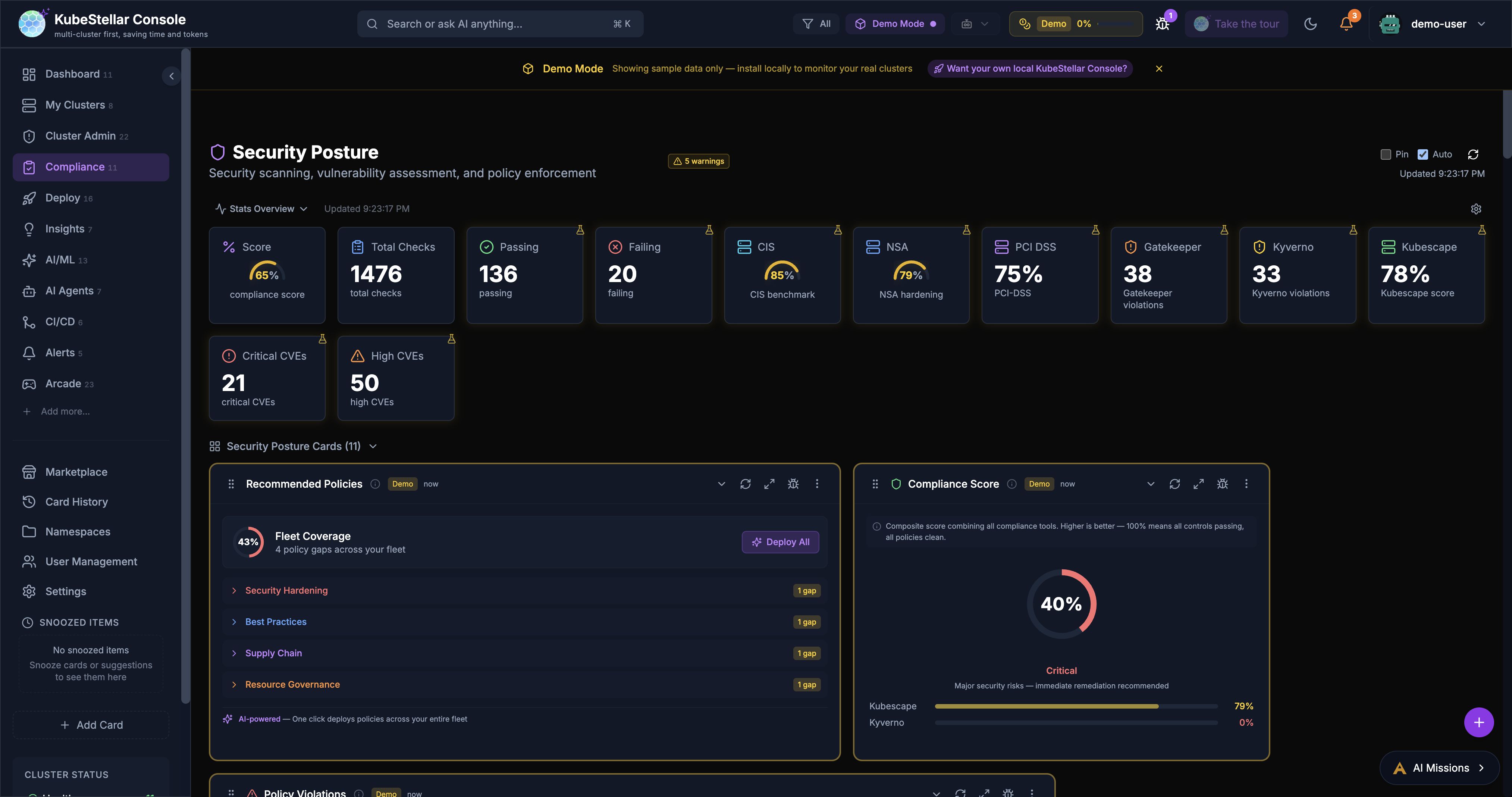
The compliance dashboard now loads data progressively:
- Progressive streaming — Cards appear as data arrives from each cluster, rather than waiting for all clusters to respond
- Progress rings — Visual indicators show data loading progress per card
- Framework descriptions — Each compliance card now includes context about the framework it monitors
- Cluster badges — Always visible on compliance cards showing which clusters participate
Related PRs
- Add progressive streaming to all compliance dashboard cards (#2578)
- Add progress ring to remaining compliance cards (#2585)
- Progressive streaming for compliance hooks (#2167)
- Add framework descriptions and context (#2166)
Stat Block Visualization Modes (New in March 2026)
Stats blocks now support 9 display modes instead of just numbers:
| Mode | Visual | Best for |
|---|---|---|
| numeric | Big number (default) | Everything |
| sparkline | Mini area chart + number | Trends over time |
| gauge | Semicircular arc | Percentages, scores |
| ring | Circular progress | Utilization, completion |
| mini-bar | Horizontal progress bar | Any bounded value |
| trend | Number + ▲/▼ arrow + % change | Issue counts, alerts |
| stacked-bar | Segmented horizontal bar | Breakdowns |
| heatmap | Background color intensity | Severity (errors, issues) |
| horseshoe | 270° arc gauge | Percentages, scores |
How to switch modes
Hover over any stat block → click the gear icon → select a mode from the dropdown.
Smart defaults
- Clusters unhealthy/unreachable → heatmap (glows red as count increases)
- Workload healthy % → horseshoe gauge
- Resource utilization → ring progress
Related PRs
- Add configurable visualization modes for stat blocks (#2561)
- Add trend, stacked-bar, heatmap, and horseshoe stat block modes (#2566)
Undo/Redo for All Dashboards (New in March 2026)
Every dashboard now supports undo and redo:
- Snapshot-based history (max 30 levels)
- Tracks all card mutations: add, remove, configure, resize, reorder, reset
- Keyboard shortcuts:
Ctrl+Z(undo),Ctrl+Shift+Z(redo) - Also accessible via the FAB (floating action button) menu
- Reset button now always works correctly (compares current layout to defaults)
Related PRs
- Fix Reset button + add undo/redo for all dashboards (#2252)
- Wire undo/redo into main dashboard + collapse update prereqs (#2261)
Mission Improvements (New in March 2026)
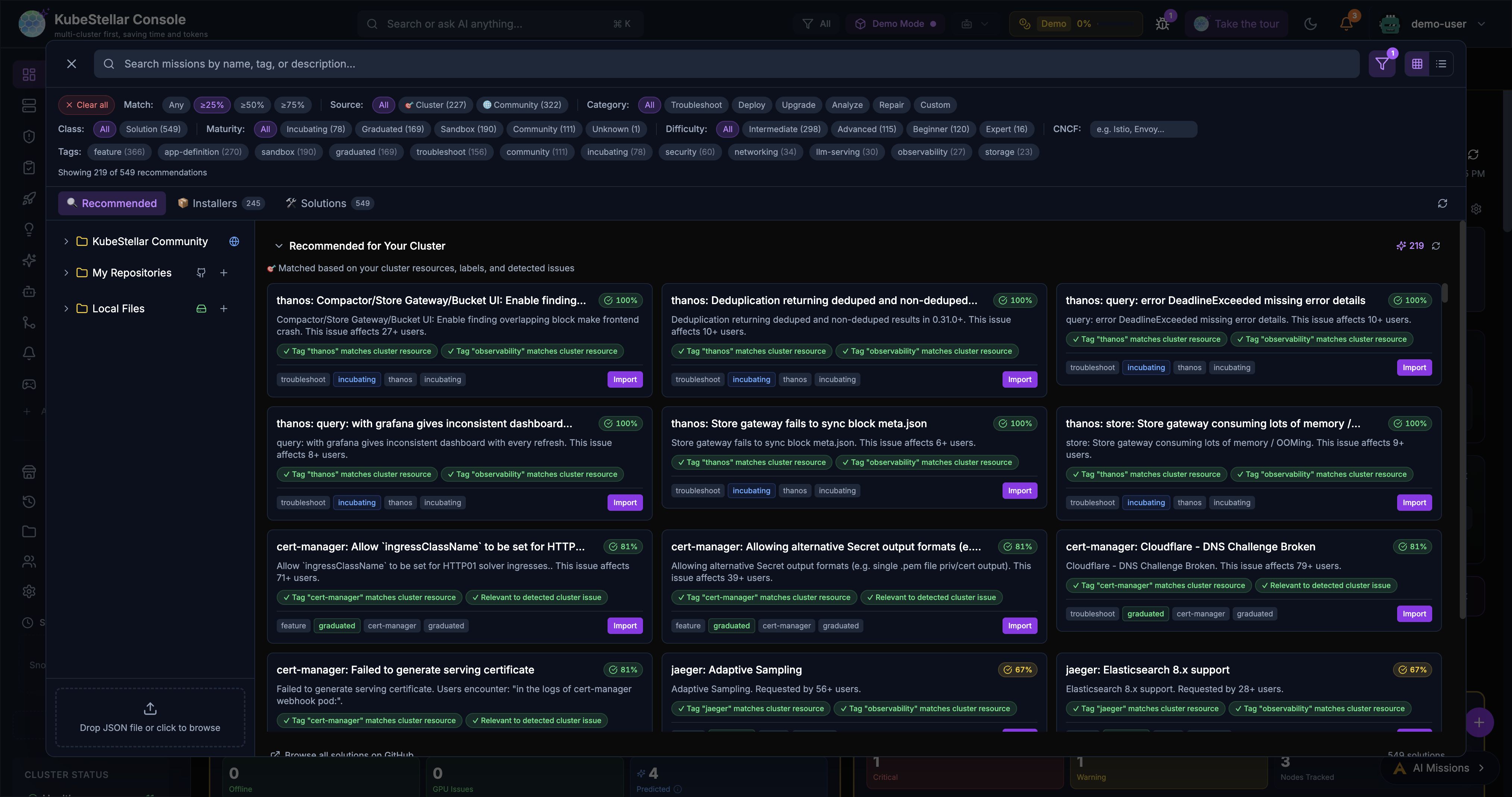
Several improvements to the AI Missions system:
- YAML export — Share Mission dialog now includes a YAML export option for mission configurations
- Inline title rename — Rename missions directly from the chat header without opening a separate dialog
- Virtualized browser — Mission browser uses virtualization for large mission lists (better performance with 100+ missions)
- AI actions in Trivy modal — Vulnerability modal now includes AI mission actions for remediation
- Back button — All mission conversation states now have a back button for navigation
- 429 quota handling — Graceful handling when AI provider rate limits are hit, with message size validation
- Stuck mission fix — Missions no longer get stuck in Running/Processing state indefinitely
Related PRs
- Add YAML export option to Share Mission dialog (#2363)
- Add inline mission title rename from chat header (#2628)
- Virtualize MissionBrowser for large mission lists (#2507)
- Add AI Mission actions to Trivy vulnerability modal (#2181)
- Add back button to all mission conversation states (#2304)
- Fix AI Mission 429 quota errors and add message size validation (#2495)
- Fix AI missions remaining in Running/Processing state indefinitely (#2498)
From-Lens Migration Page (New in March 2026)
A dedicated landing page at /from-lens for users migrating from Lens:
- Step-by-step installation (binary, Helm, Docker)
- Cluster deployment option with Helm ingress template
- Feature comparison positioning Console as a complement, not competitor
- Analytics tracking for tab switches and command copies
Related PRs
- Wire live backends for topology/ArgoCD cards and add Lens migration page (#2206)
- Fix /from-lens: split commands, remove false claims (#2262)
- Add cluster deployment option to from-lens page (#2321)
From-Headlamp Landing Page (New in March 2026)
A landing page at /from-headlamp for users coming from the Headlamp Kubernetes dashboard:
- Collegial tone — Headlamp is a fellow CNCF Sandbox project
- Positions Console as a complement, not a competitor
- Teal accent color and respectful messaging with link to headlamp.dev
- Same installation structure as the from-lens page
Related PRs
- Add /from-headlamp landing page (#2475)
In-Cluster Agent Banner (New in March 2026)
When the console is running in-cluster (Helm) without a kc-agent connection:
- Blue “Agent Not Detected” banner appears
- Clicking opens a modal with two paths:
- Install the kc-agent — brew install or build from source
- Already have an agent? — Configure CORS with
KC_ALLOWED_ORIGINS
- Collapsible “Why is CORS needed?” section
- Auto-dismisses when agent connects
Related PRs
- In-cluster agent banner with setup dialog (#2310)
Auto Demo Mode for Helm (New in March 2026)
When deployed via Helm with no OAuth and no kc-agent, the console auto-enables demo mode:
- Same instant-dashboard experience as console.kubestellar.io
- Eliminates login page friction for the
helm install → port-forward → open browserflow - When OAuth IS configured, the login page still appears as normal
Related PRs
- Auto-enable demo mode for Helm installs (#2292)
New User Cluster Prompt (New in March 2026)
New users are now prompted to create or connect a cluster:
- Appears on first visit when no clusters are detected
- Guides users through the setup process
- Reduces time-to-value for new installations
Related PRs
- Prompt new users to create/connect a cluster (#2315)
DiskPressure & MemoryPressure Alerts (New in March 2026)
New built-in alert evaluators for node resource pressure:
- DiskPressure — Fires when nodes report disk pressure condition (critical severity, enabled by default)
- MemoryPressure — Fires when nodes report memory pressure condition
- PIDPressure — Fires when nodes report PID pressure condition
- Backend detects conditions from cluster health data and reports affected node names
- Browser notifications with deep links to affected nodes
- Auto-resolves when conditions clear
Related PRs
- Add DiskPressure/MemoryPressure node condition alerts (#2317)
Analytics Dashboard (New in March 2026)
A comprehensive analytics dashboard for understanding console usage:
- Mission analytics — Track AI mission creation, completion, and engagement
- Card analytics — Per-card error breakdown with sparkline trends
- Feature analytics — Usage tracking across features
- Retention analytics — User return rates and session depth
- Error tracking — GA4-tracked runtime errors with sparkline trends
- Bot filtering — Automated/bot traffic is filtered out of analytics
- Umami dual tracking — Running alongside GA4 for validation
Related PRs
- Add mission, card, feature, retention & error analytics sections (#2173)
- Add sparkline trends to analytics error tracking (#2178)
- Add per-card error breakdown (#2179)
- Filter localhost dev traffic (#2195)
GA4 Error Monitor (New in March 2026)
Automated error monitoring that creates GitHub issues from production error spikes:
- Monitors GA4 error events (card_render, uncaught_render, chunk_load)
- Automatically creates GitHub issues when error counts spike
- Reduces manual monitoring overhead
Related PRs
- Add GA4 error monitor — auto-creates issues from production error spikes (#2570)
Install Conversion Funnel (New in March 2026)
Track the full user journey from page view to agent connection:
- Unified
ksc_install_command_copiedanalytics event across all copy buttons - 6-step funnel: Page View → Login → Command Copied → Agent Connected → Dashboard → Retention
- Daily install conversion rate chart on the analytics dashboard
- Replaced bounce rate KPI with install conversion rate
Related PRs
- Add install conversion funnel (#2590)
- Add daily install conversion rate line (#2592)
Settings Improvements (New in March 2026)
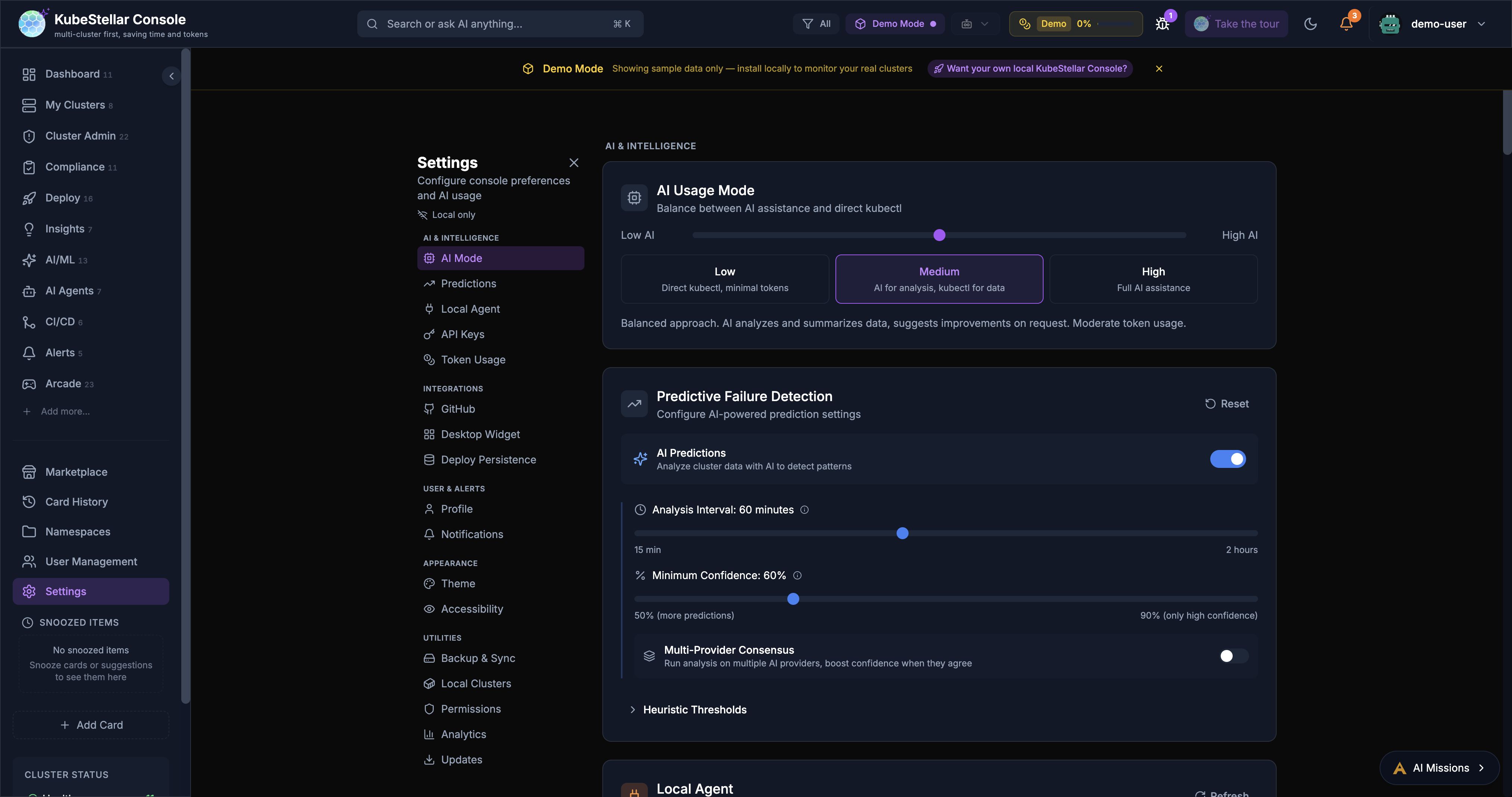
- Close/back button — Settings page now has a close button to return to the previous page
- Feedback GitHub token — New settings section for configuring the FEEDBACK_GITHUB_TOKEN
- Sidebar scroll fix — Sidebar no longer scrolls back to top on navigation click
Related PRs
- Add close/back button to Settings page (#2625)
- Add feedback GitHub token settings support (#2414)
- Add FEEDBACK_GITHUB_TOKEN status display to Settings (#2511)
Security Hardening Sprint (March 2026)
A comprehensive security hardening effort covering the full stack:
Authentication & Authorization
- JWT auth on WebSocket exec — Pod exec terminal now requires JWT authentication
- JWT auth for SSE — Server-sent events use fetch-based delivery instead of EventSource for secure JWT delivery
- HttpOnly cookies — JWT auth plumbing for HTTP-only cookie delivery
- Server-side token revocation — JTI-based blocklist for revoking tokens
- Rate limiting — Auth and API endpoints now have rate limits
- OAuth scope reduction — requests
user:emailscope (removedread:user) - TTL expiry for OAuth state — Prevents stale/replayed OAuth state values
Input Validation & Sanitization
- Helm/kubectl param validation — Input validation for command parameters
- Path/ref sanitization — Sanitize path and ref params in mission handlers
- Repo allowlist — Validate repo params against an allowlist in nightly E2E handler
- XSS fix — RSS parser switched from
innerHTMLtoDOMParser
Infrastructure Security
- Security response headers — Added to Go backend (CSP, HSTS, X-Frame-Options, etc.)
- CodeQL analysis — Automated security scanning workflow
- Dependabot — Enabled for Go, npm, and GitHub Actions dependencies
- Pin CI tools to SHA — Reusable workflows pinned to commit SHA
- Sandbox hardening — Dynamic card sandbox blocks global access and prototype pollution
Data Protection
- PAT moved to backend — GitHub PAT stored in backend-only storage via API proxy
- Webhook secret required — Origin validation bypass fixed
- SQLite data loss prevention — Prevents data loss during Helm upgrades
- Ownership verification — Feedback issue handlers verify resource ownership
Related PRs
- Add JWT auth to /ws/exec (#2416), self-upgrade API (#2334), SSE (#2449)
- Add security response headers (#2428)
- Add rate limiting (#2448)
- Server-side token revocation (#2451)
- CodeQL analysis (#2454)
- Enable Dependabot (#2421)
- Fix XSS in RSS parser (#2422)
- Harden dynamic card sandbox (#2473)
- HttpOnly cookie for JWT auth (#2474)
- Require webhook secret (#2453)
- Sanitize path and ref params (#2430)
- Add input validation for helm/kubectl params (#2424)
- Pin reusable workflows to SHA (#2426)
- Fix critical script injection in copilot-recovery workflow (#2415)
- Move GitHub PAT to backend-only storage (#2460)
- Remove read:user OAuth scope (#2521)
- Add TTL expiry to OAuth state store (#2557)
- Add ownership verification to feedback handlers (#2556)
- Prevent SQLite data loss during Helm upgrades (#2535)
- Fix undici vulnerability (#2550)
Generic Custom Resources API (New in March 2026)
New backend endpoint for querying any custom resource across clusters:
GET /api/custom-resourceswith group, version, resource parameters- Enables the CRD browser to display actual CR instances
- Used by ecosystem cards (KubeVela, KEDA, Strimzi, OpenFeature) for data fetching
Related PRs
- Add generic custom resources API endpoint (#2455)
Lazy-loaded Event Drill-Down (New in March 2026)
The Events drill-down view is now lazy-loaded for better initial bundle size:
- Reduces the main bundle by deferring event-related code
- Improves initial page load performance
- Transparent to users — loads on first navigation to events
Related PRs
- Lazy-load EventsDrillDown for better initial bundle size (#2619)
Console Documentation Issue Reporting (New in March 2026)
Users can now report documentation issues directly from the console:
- New option in the feedback/help menu
- Creates a GitHub issue on the docs repository with relevant context
- Streamlines the feedback loop between users and documentation maintainers
Related PRs
- Add console documentation issue reporting option (#2529)
SEO & Discovery (New in March 2026)
Improved discoverability of the console:
- 29 landing pages — for each dashboard route, optimized for Google indexing
- Full internal link graph — All landing pages cross-link for crawler discovery
- Artifact Hub listing — Helm chart published to Artifact Hub for discovery
- Helm chart validation CI — Automated validation of chart metadata
Related PRs
- SEO: Add landing pages for all 29 dashboard routes (#2202)
- SEO: Add full internal link graph (#2203)
- Add Artifact Hub metadata (#2201)
- Add Helm chart validation CI (#2204)
Trestle Card Streaming (New in March 2026)
The Trestle/OSCAL compliance card uses progressive streaming with parallel cluster checks:
- Race CRD/deployment checks in parallel for instant Trestle detection
- Stream data progressively from each cluster as it arrives
- Significantly faster time-to-first-data on the compliance dashboard
Related PRs
- Stream Trestle card data progressively with parallel cluster checks (#2564)
- Race CRD/deployment checks in parallel for instant Trestle detection (#2565)